prisma
Improve Timezone Support for Existing MySQL Databases configured with a Non-UTC Timezone
Bug description
The OS and MySQL time both are set to KST(Korea Standard Time) which is UTC+9:00.
But when create or update records with new Date(), DATETIME string doesn't respect the database's timezone and always filled with UTC time.
For example, when the current time is 2020-06-20 13:00:00 in Korea, I expect the data should be stored like below
| id | created_at |
|---|---|
| 1 | 2020-06-20 13:00:00 |
However, what I get is UTC time which differs -9 hours.
| id | created_at |
|---|---|
| 1 | 2020-06-20 04:00:00 |
How to reproduce
-
Set the system and MySQL timezone to
Asia/SeoulorUTC+9:00 -
Create with
new Date()
await prisma.myTable.create({
  data: {
    createdAt: new Date()
  }
})
Expected behavior
I expect the DATETIME string to be synced with MySQL's timezone.
Prisma information
model MyTable {
  createdAt DateTime @map(name: "created_at")

  @@map(name: "my_table")
}
Environment & setup
- OS: Ubuntu
- Database: MySQL
8.0.20 - Prisma version:
2.0.1 - Node.js version:
13.14.0

We do automatic ISO conversions for JS Dates so you it will contains a UTC offset by default. If you want to provide a manual offset, you will need to provide a manual string by using something like https://date-fns.org/v2.8.1/docs/formatISO
A manually offsetted date will look like this: 2020-05-05T16:28:33.983+09:00
But I found a bug in our validator which I was triaging this so please follow: https://github.com/prisma/prisma-client-js/issues/741

(Internal note: I can reproduce this but I think this is a usage error which is unfortunately blocked by a bug prisma/prisma-client-js#741. So I am labeling as bug/1-repro-available for now)
@pantharshit00 Yes, currently I'm inserting data with manually adjusted time (+9:00). The problem of doing this is that I always have to subtract 9 hours again from a result of Prisma.
Try after prisma/prisma-client-js#741 is fixed. You can use a simple library like date-fns to get a correct offset.
https://date-fns.org/v2.8.1/docs/formatISO
So
import { formatISO } from 'date-fns'

const date = formatISO(new Date()) // date will have +09:00 if system uses that timezone
@jhaemin Can you please confirm if this issue is fixed for you in the latest version?

Ping @jhaemin about Divy's last followup. We want to move this issue forward, but need your help.

Okay, prisma/prisma-client-js#741 is not fixed yet so I cannot use the method @pantharshit00 suggested. Using the value of formatISO(new Date()) throws an error.
...
createdAt: '2020-09-03T00:38:06+09:00'
           ~~~~~~~~~~~~~~~~~~~~~~~~~~~
...
Argument createdAt: Got invalid value '2020-09-03T00:38:06+09:00' on prisma.createOneTip. Provided String, expected DateTime.
And unfortunately the error I issued is still happening. Prisma create or update with new Date() does not respect the system or Database timezone and always store the time string as UTC.
Here's the thing. Suppose the time in Korea is 2020-09-03 13:00.
MySQL timezone is set to Korean standard time(KST, +09:00). NOW() and CURRENT_TIMESTAMP both correctly display 2020-09-03 13:00 which means optional time fileds are automatically filled with KST time string in DB. But when I get the data with Prisma, it treats the time string as UTC and store the Date object inside the result. This mismatched time makes me always subtract 9 hours from the result.
My system timezone is also set to KST as well. date command shows Thu Sep 3 13:00:00 KST 2020 correctly.
Thanks @jhaemin for the update. I have candidated the other issue again so will discuss it soon for the next patch.
Thanks a lot for reporting 🙏
This issue is fixed in the latest dev version of @prisma/cli.
You can try it out with npm i -g @prisma/cli@dev.
In case it’s not fixed for you - please let us know and we’ll reopen this issue!

@timsuchanek
Right now, I've tested with @prisma/cli@dev and @prisma/client@dev.
Tested time is 10:55 PM (KST).

Here is the tested Prisma schema model.
model test {
  id       Int      @id @default(autoincrement())
  saved_at DateTime @default(now())
}
And I ran the codes below
await prisma.test.create({
  data: {}, // no `saved_at` input because it's optional
})
and
await prisma.test.create({
  data: {
    saved_at: new Date(), // pass `new Date()` explicitly
  },
})
And here is the result in mysql.
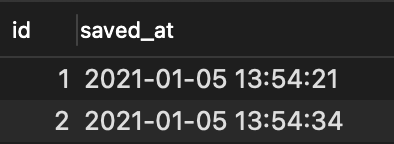
And when I create a row with MySQL's CURRENT_TIMESTAMP,

The datetime field which is set to CURRENT_TIMESTAMP is not correctly resolved to MySQL's CURRENT_TIME. The times created by Prisma is UTC, which is -9 hours from KST.
It's not fixed, and it should be reopened.

Sorry for cutting in, I'm also having trouble with this behavior. (JST)
If we could use timezone option of mariadb, would it be a solution?
https://github.com/mariadb-corporation/mariadb-connector-nodejs/blob/41d3926b1deed2fe10e601d13cd954a7f1654a66/lib/config/connection-options.js#L101
setupMysql method doesn't seem to support timezone option.
https://github.com/prisma/prisma/blob/aa17fbc65c403ecc7fb1bf887bc04a4917d53c86/src/packages/client/src/utils/setupMysql.ts
(I'm sorry if it's misplaced...)

setupMysqlmethod doesn't seem to supporttimezoneoption. https://github.com/prisma/prisma/blob/aa17fbc65c403ecc7fb1bf887bc04a4917d53c86/src/packages/client/src/utils/setupMysql.ts
This is only used for testing actually
setupMysqlmethod doesn't seem to supporttimezoneoption. https://github.com/prisma/prisma/blob/aa17fbc65c403ecc7fb1bf887bc04a4917d53c86/src/packages/client/src/utils/setupMysql.tsThis is only used for testing actually
Oh, was it wrong... sorry >< (so, mariadb is dev dependency)
I wish I could set the connection timezone somewhere. Is there any place where I could set it?
The problem is how JavaScript's Date is by default represented as UTC. When Prisma only uses DateTime<Tz> underneath, what happens here is the stringified date we get from the client is in UTC, if not explicitly specifying a timezone.
What we could do here is a new parameter for the client for the timezone. If set, the client stringifies the date with this timezone, and the database would then be correct.

Currently the Prisma Client will always convert time into UTC, regardless of where the server or database is located.
We think this actually a feature because then your database doesn't have timestamps that mix in timezones. May I ask why you'd like to see the time in Korean time instead?
Two guesses, but please let me know if there's another reason:
- It's easier to debug if the database time is in your local time
- You'd like to support multiple timezones in your database
For supporting multiple timezones, we recommend storing the UTC time in one column, and the "Olson timezone" in another column. In practice, this looks like this:
| ID | Time | Timezone |
|---|---|---|
| 1 | 2020-06-20 13:00:00 | Asia/Seoul |
| 2 | 2020-06-20 08:00:00 | America/Los_Angeles |
Would that work for you?

@matthewmueller
First of all, I have lots of previous data that were stored in Korean time before I started using Prisma. And yes, time should be stored in Korean time to read and debug much easily. Currently, I'm not considering multiple timezones in this issue.
What I want to say is that Prisma's default behaviour is different from what MySQL's CURRENT_TIMESTAMP does.
p.s.
I resolve this issue by adding 9 hours when storing, then use Prisma middleware that subtracts 9 hours from all the Date fields. It's not ideal but working.
@matthewmueller
I am in China (CST/GMT+8) and running into the same issue.
To be clear, MySQL store a timestamp, which also can be read as a [time string] + [time zone], take the example in your table, the time 2020-06-20 13:00:00 is not a string (if filed type is datetime), but a time with timezone.
You can read the value in different timezone. For example, set time_zone = '+09:00'; , then select the value, it may be 2020-06-20 13:00:00, then set time_zone = '+00:00'; and select the value, it should be 2020-06-20 04:00:00.
MySQL provide this feature, If you use mysql cli or Sequelize (with timezone option), or some GUI clients, they always handle this kind of value properly, but prisma does not, so it's really a bug, not a feature.

Since prisma always treat date value as UTC time, so set time_zone to +00:00 should match the actual datetime value.
This piece of code works:
prisma.$use(async (params, next) => {
    const timezoneSql = 'set time_zone = \'+00:00\'';
    if(params.args.query !== timezoneSql) {
        await prisma.$queryRaw(timezoneSql);
    }
    // Manipulate params here
    const result = next(params);
    // See results here
    return result;
});
To verify that I understand the problem correctly, you have a column in your database with the following:
| created_at |
|---|
| 2018-11-03 03:55:05.964875+00 |
| 2018-11-03 13:55:06.964875+10 |
| 2018-11-03 11:55:07.964875+08 |
And you're finding the data hard to interpret because Prisma writes values like: 2018-11-03 03:55:05.964875+00, but the rest of your data is in +10. Is this the main problem?
I double-checked with one of the engineers and this is working as intended. The internal query engine converts all data coming in and out to UTC. This is usually what you want, but I can see it being confusing if your DB is in a different timezone and you need to debug. There might be a way query the data in a specific timezone.
Unfortunately we don't have an easily solution for this as it requires getting the query engine to match the database's timezone. If you have multiple databases in multiple timezones, you have a problem.
@matthewmueller
Thanks for your reply, but it seems not very clear.
Mysql always shows datetime in one timezone(determined by session timezone config), so the table above is not actually correct, if you mean they are three different rows. If you mean the rows above are the same time value, yes, they are.
The problem is, if you pass a value to prisma (using Date instance), the value itself also contains a timezone info. For example: new Date('2018-11-03 11:55:07') is actually 2018-11-03T11:55:07+08 in my computer, same value can also be represented by 2018-11-03 03:55:05+0. both values are acceptable, because they represent the same time value.
But, if you save this value to database with prisma, when database's default timezone is +08, the time value becomes 2018-11-03 03:55:05+8, which is not a correct value. The reason is prisma treat the value as 0 zone value(2018-11-03 03:55:05+0), but mysql treat it as +8 zone value(2018-11-03 03:55:05+8).
So I given a workaround above: set mysql session timezone to 0 zone, to keep the same with prisma, then the saved value will be 2018-11-03 03:55:05+0 , or 2018-11-03 11:55:05+8 (same value).
The correct logic to process this value:
- write the value with timezone info
2018-11-03 03:55:05+0instead of2018-11-03 03:55:05, but it seems not supported by mysql. - provide a way to set default timezone, so prisma can convert
Dateinstance to a string with zone info, instead of UTC time. In other words, make prisma to respect mysql session timezone setting, instead of just coverting everything to UTC.
When you use mysql client or other GUI tools to modify a datetime value, they will always treat the value you input as localtime (same with mysql session time_zone), they will not treat the string you input as UTC time string.
In my opinion, prisma should do the same. If not, developers have poor way to handle it, because datetime field requires a Date instance , not a string, so convert the value ahead is not quite possible. Maybe the only way to handle is to do an offset calculating ahead, and pass in an Date instance with incorrect time value.
Maybe a timezone config within database connection string can solve the problerm. Sequelize provide a option called timezone to handle this: https://sequelize.org/master/class/lib/sequelize.js~Sequelize.html#instance-constructor-constructor
@TooBug, thanks for your thoughtful reply!
But, if you save this value to database with prisma, when database's default timezone is +08, the time value becomes 2018-11-03 03:55:05+8, which is not a correct value. The reason is prisma treat the value as 0 zone value(2018-11-03 03:55:05+0), but mysql treat it as +8 zone value(2018-11-03 03:55:05+8).
Woah, this is definitely something worth investigating. I was under the impression that if you pass 2018-11-03 03:55:05+0 to +8 zone value, it would store the correct time, but display it as +8.
Maybe a timezone config within database connection string can solve the problerm. Sequelize provide a option called timezone to handle this: https://sequelize.org/master/class/lib/sequelize.js~Sequelize.html#instance-constructor-constructor
Thanks for the suggestion!
Next Steps:
- Confirm this issue with MySQL
- Check if the connection string can explicitly connect the the timezone
I confirmed this issue with MySQL.
To set this up, add default-time-zone to your MySQL config (/usr/local/etc/my.cnf)
[mysqld]
# Only allow connections from localhost
bind-address = 127.0.0.1
mysqlx-bind-address = 127.0.0.1
default-time-zone = "+08:00"
And restart your MySQL server. Then you run the Prisma Client:
import { PrismaClient } from "@prisma/client"
const prisma = new PrismaClient()

async function main() {
  await prisma.$connect()
  await prisma.user.create({
    data: {
      created_at: new Date(),
    },
  })
}

main()
  .catch(console.error)
  .finally(() => prisma.$disconnect())
MySQL does not convert that UTC time +08:00, so the times in your database are 8 hours off. This explains why the middleware @TooBug mentioned works.
For reference, I created these two rows at the same time:
| id | created_at |
|---|---|
| 8 | 2021-03-30 19:25:26 |
| 9 | 2021-03-30 11:25:31 |
The first one was created with a manual INSERT with a default created_at of NOW() and the second one was created by Prisma.
I tried a few suggestions from StackOverflow on setting the timezone in the connection string:
DATABASE_URL="mysql://[email protected]:3306/prisma?sslmode=disable&useTimezone=true&serverTimezone=Asia/Bangkok"
Unfortunately, none of those seem to work.
Next steps:
- Set your database's timezone to UTC or use the middleware. We should document this now.
- Think about ways to solve this problem.
I just posted an issue (#6341 ) that is related to this matter. Correct me if I'm wrong but I suppose you are using an existing database driver. The solution to solve this problem is to make it possible to pass Timezone configuration information to the driver. All MySql drivers have such a configuration option (at the connection level). And that's how it is solved when using those drivers directly.
In case you are using your own in-house mysql database driver, you should implement this feature the same way it is already implemented in those drivers.

@matthewmueller Do you agree that my suggestion is the way to solve this problem?
@FredericLatour yep, https://github.com/prisma/prisma/issues/6341 seems like a possible solution to this problem.
What other solution are you considering? This solution is by the way completely trivial to implement.
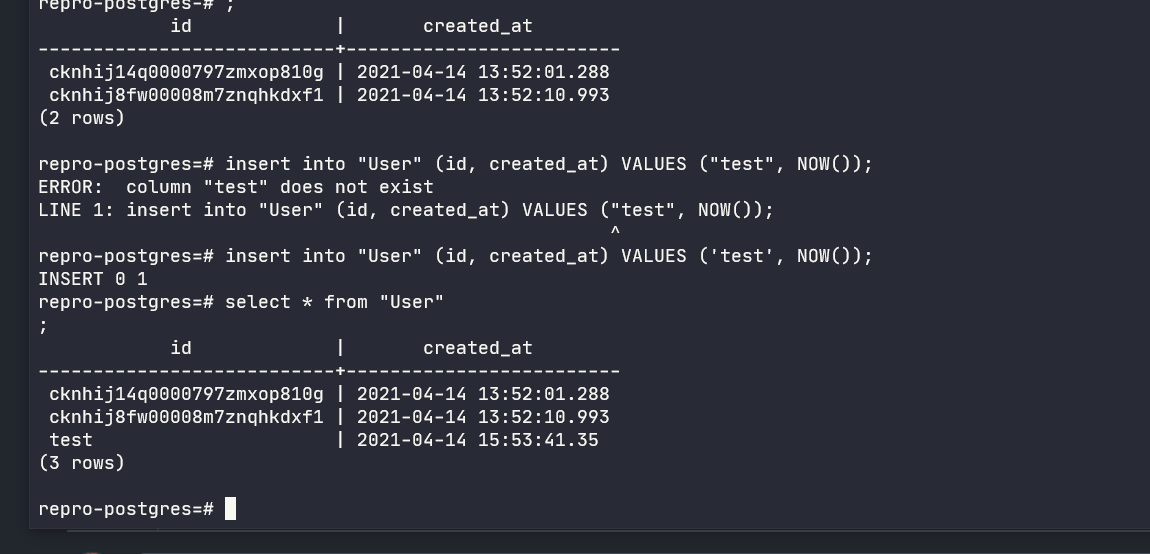
I can confirm the same with postgres.
These three values in the database are inserted almost at same time. The last values is inserted via SQL while first two are inserted via prisma: