

 primetwig
Get only visible items on table
I'm trying to implement striped rows (zebra) on my table, I can do it using indexOf on my items' array, but the problem is when a row has expanded, because it fetches the children and changes the array length when it's collapsed, so the rows looks weird. Is there any way to get only visible items on screen? I'm trying using querySelectorAll passing the className "nestable-item" but it doesn't refresh properly


@primetwig Hey, this is pretty much what I have by now

Basically what's happening right now is: I got a flat array of items, and I pass the indexOf of each item to styled components to do the striped. The problem is the flat array got all the items, if I collapse it the striped doesn't look good
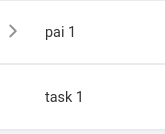
If there's a way to get only the visible items, should work well. Also can maybe add some prop to do it natively on nestable lib itself.
By the way, thanks for the amazing lib!
In your case task 1 would have dynamic color. That's unexpected UI. But if that's what you want, you can try to do something like:
import React from 'react';
import Nestable from 'react-nestable';
import 'react-nestable/dist/styles/index.css';

const styles = {
  position: "relative",
  padding: "10px 15px",
  fontSize: "20px",
  border: "1px solid #f9fafa",
  background: "#f9fafa",
  cursor: "pointer"
};

const stylesEven = {
  ...styles,
  background: "orangered",
};
const stylesOdd = {
  ...styles,
  background: "steelblue",
};

const items = [
  {id: 0, text: 'Andy'},
  {id: 1, text: 'Harry', children: [{id: 2, text: 'David'}]},
  {id: 3, text: 'Lisa', children: [{id: 4, text: 'Richard'}]}
];

let i;

class Example extends React.Component {
  renderItem = ({ item, collapseIcon, handler }) => {
    if (item.id === items[0].id && i !== 2) {
      i = 1;
    }
    i++;
    return (
      <div style={i%4 === 0 ? stylesOdd : stylesEven}>
        {handler}
        {collapseIcon}
        {item.text}
        {i}
      </div>
    );
  };

  render() {
    return (
      <div>
        <Nestable
          items={items}
          renderItem={this.renderItem}
        />
      </div>
    );
  }
}