

 primefaces
FilterMatchMode.CUSTOM & filterFunction broken + custom filter type errors
Describe the bug
Potentially deprecated custom match mode
We had a situation where we needed custom filtering. Details on custom filtering are in the middle of large "Documentation" page instead of "Filter" page. Googling for answers led to using FilterMatchMode.CUSTOM and a filterFunction on the column.
The result: filterFunction never fires and all content is permanently filtered out of the table. So I dug into the types and found this:
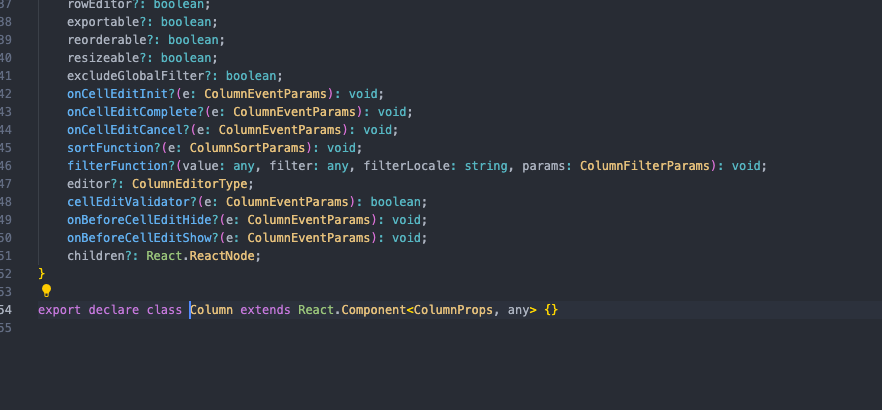 The return type for the filterFunction within the Column type is "void", whereas all examples I found online were expecting it to be a type of boolean. If this is being used in a .filter function, then it always returning void and the behavior of filtering out all data makes sense.
So all in all, this seems to be completely broken / abandoned, and yet there is no indication of that directly in the documentation or the types themselves, and is in fact the only method mentioned in the StackOverflow posts I found. (Maybe there is more? My Google skills aren't 100%.)
Bad documentation around real custom match mode
The real (?) custom filter method is found in the aforementioned Documentation page.
This method involves 1) register a custom filter with the FilterService 2) declare a match mode and pass it to the filterMatchModeOptions prop on the Column (the order in the documentation makes this unclear) 3) on your filters matchMode, give it the string name of the new custom match mode.
However, here is the example they give in the docs:
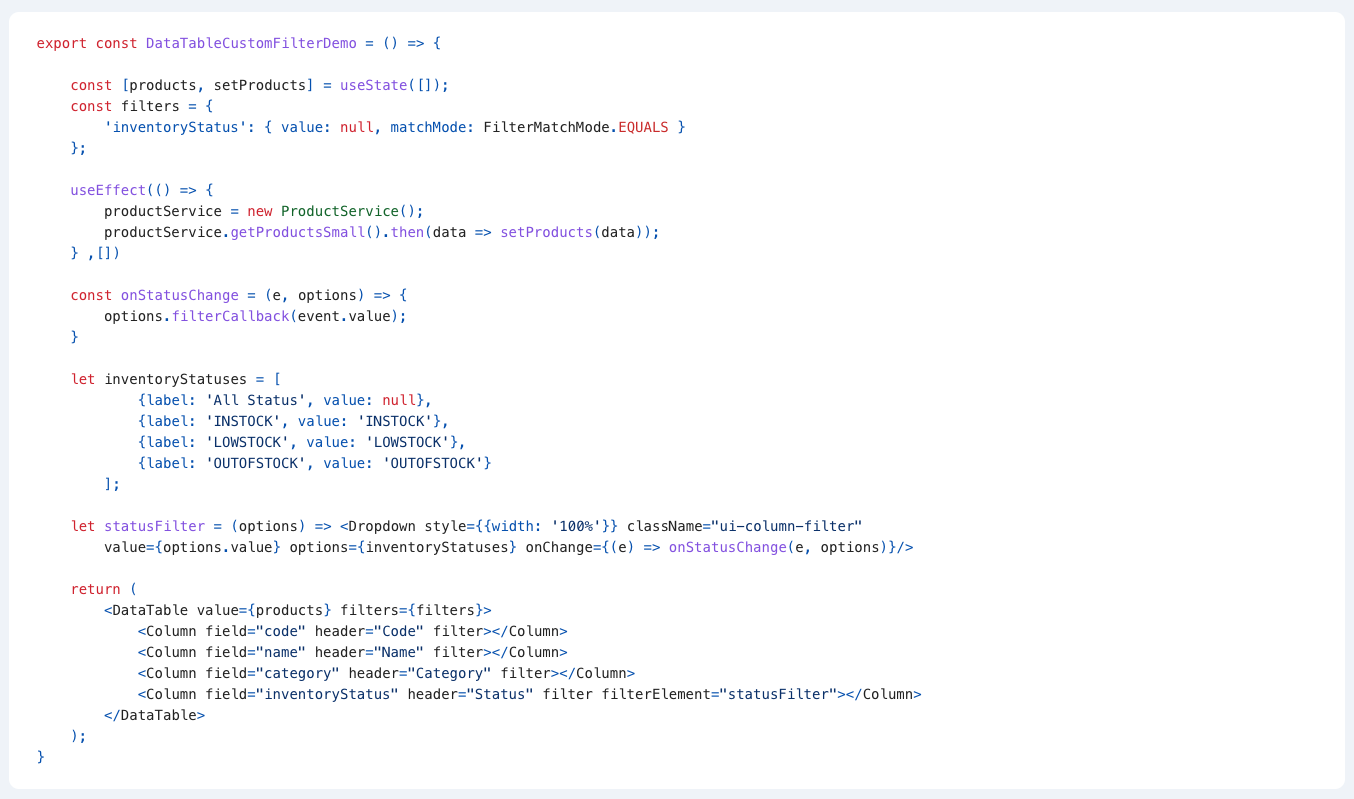
Notice there is no declaration of matchMode (that is done in a previous code snippet) and there is no use of custom filter match modes in this example. It's so bizarre, that I need to confirm - am I missing something? Why does the DataTableCustomFilterDemo have no custom filter matchMode implemented? It is demonstrating a custom filter element, but it's positioned below the section on custom filter match modes. And there is no other example on this.
Type errors on custom matchMode
If you do the steps above and pass a custom matchMode on your filters and pass those filters on the DataTable, I get a type error where it is expecting matchMode to be of type DataTableFilterMatchModeType, but is instead being given a string. Which is required by the official way of defining these custom matchModes outlined above.
The solution is to cast {filters as DataTableFilterMeta} on the filters input of the DataTable.
Being forced to cast types opens up possibility for better typing of the filters state
The filters are by default untyped. You can cast them as DataTableFilterMeta as well, but this creates the same type error around custom matchModes. So I made my own type for this that includes value, matchMode, operators, etc.
But let's say we stick with DataTableFilterMeta - it is a union type between DataTableFilterMetaData and DataTableOperatorMetaData. Because of this, you actually get type errors if you try to access any properties of a filter. (For example, if I have a filter called "name", filters.name.value will throw a type error because the property "value" does not exist, despite being declared on type DataTableFilterMetaData.)
Here is the type I declared to get intellisense out of it:

This seems to work? So I declare the filters with useState<FilterState>({...}). This will also throw a type error when passed to DataTable, but we already have to cast that anyways to get custom matchModes working.
But this seems to be emblematic of seemingly missing type usage / implicit any throughout the documentation and unhelpful types declared in the codebase. For example the options type in all examples in the docs is implicit type "any". There is a type ColumnFilterElementTemplateOptions, but I made my own custom type for it:

Now, we could use the ColumnFilterElementTemplateOptions, but that has a value of type "any". It would seem beneficial to be able to type this. Here is what it currently is
interface ColumnFilterElementTemplateOptions {
    field: string;
    index: number;
    filterModel: ColumnFilterModelOptions;
    value: any;
    filterApplyCallback(value?: any, index?: number): void;
    filterCallback(value?: any, index?: number): void;
}
This gives no intellisense on the value without casting. My solution defaults to any, but gives you the option to give it a strict type.
Requests / questions / TLDR
- Is "FilterMatchMode.CUSTOM" and filterFunction deprecated? Officially mark them deprecated and remove from documentation if so. If not deprecated, are they broken / why is there no documentation on their use?
- DataTable documentation poorly organized: break out individual sections out of the huge "Documentation" page into the already existing individual pages (e.g. Filtering documentation on Filtering page, Sorting docs on Sorting page, etc.) instead of leaving the them in one giant, difficult to parse mass.
- Custom match modes registration not recognized by type input on DataTable filter prop. Make that more seamless without requiring casting.
- Fix custom matchMode documentation to actually document custom matchModes usage
- Provide a useful type for the filters state that gives real intellisense. Currently defaults to any, using official type gives no intellisense, using custom type breaks type expected by DataTable filter prop.
- Just better typing in general (example: ColumnFilterElementTemplateOptions)
I'm sure there are reasons why some of these things are the way they are, but the process of learning this was not great. And having to implement workarounds to increase type usability does not feel good.
Reproducer
No response
PrimeReact version
8.0.0
React version
18.x
Language
TypeScript
Build / Runtime
Create React App (CRA)
Browser(s)
No response
Steps to reproduce the behavior
FilterMatchMode.CUSTOM:
- Set filter matchMode to FilterMatchMode.CUSTOM
- Pass a filterFunction to a column
- Observe that filterFunction never fires and all content is permanently filtered from the table
matchMode registration:
- Register a custom match match mode
- Define the match mode array
- Pass the matchModes to the appropriate column
- On the filters definition, set the matchMode for that column to the name of the custom matchMode
- Pass the filters to the DataTable
- Observe a type error on string not matching FilterMatchMode
Alternate path:
- Follow previous steps up to step 3
- Do not set match mode in filters - attempt to set filterMatchMode on Column to name of custom matchMode name
- Observe it is expecting one of the FilterMatchMode enum values and throws a type error
Expected behavior
There is only one method of implementing custom match modes. This method is clearly documented and throws no type errors. If FilterMatchMode.CUSTOM is broken, fix it. If it is deprecated, mark it as such / remove from docs. If it is functional, show documentation on correct use. There ought to be types for every value that provide useful intellisense and those types ought to be used in documentation examples. Documentation on DataTables should not be one single wall of text and should be broken up into the already existing discreet pages.

I think really the DataTable Filter demo needs to be updated to show Custom usage as well: https://primefaces.org/primereact/datatable/filter/

For now here is a code sandbox someone posted of a working Custom filter in column 1: https://codesandbox.io/s/loving-bush-5gr5y4?file=/src/demo
One thing to note about the example above - it is in JavaScript, so the type errors around custom matchModes don't occur. FilterMatchModes.CUSTOM issue still stands, but the issues around types are exclusive to using it in a TypeScript-based project.
Just had hours wasted trying to get this to work and found this issue on StackOverflow. From what I understand @luketpena is saying, this basically cannot work in TypeScript projects at the moment. Would really appreciate an update to the docs or the callback signature to be correct. Also I don't think the component tag for this issue is correct, is marked as documentation but in TypeScript projects this feature is just plain broken.

@margaretdax Can you update my Sandbox reproducer to TS to show what is not working. It will help get it fixed.

@lenard-a as I stated above can someone update my provided Code Sandbox to show the typescript issue?
@melloware Here is the updated CodePen I just did some small changes to highlight the typescript issue. Once you type the state variable that holds the filters with DataTableFilterMeta (line 31), the matchmode in initFilters1 function displays a warning (line 70) (and it prevents successful builds).
However, if you type the state variable as 'any' it works. So it indeed is just a documentation issue.
I thought you were supposed to use "custom" for match mode? I updated your example: https://codesandbox.io/s/vigorous-grass-qsrt7t?file=/src/demo/DataTableFilterDemo.tsx

Hello, Im facing this same issue. Is there any updates on this?
@juancamiloqhz what exactly is your issue. Did you see my code sandbox example 1 post above?
https://codesandbox.io/s/vigorous-grass-qsrt7t?file=/src/demo/DataTableFilterDemo.tsx
Hi @melloware,
Yes, I've tried the example. But I'm still having issues with the custom filter function. I did the same thing trying to put the custom filter function to work, but it's actually never called.
Ok if you can put a code sandbox together showing your issue or compare your code to above?
@melloware Does your codesandbox example works? Because I can see that is not data present in the table. But when I comment the name field in the initFilters function, all the data appears in the table.
@melloware sorry I was using the other link.
Now I have the data in the table. But when I try to apply the "My Filter" custom function in the name column, I dont get the custom function to be called at all.
I dont know if Im missing something, but I'm pretty sure I'm trying it the right way.
Please try to console log the custom filter function and check if something is in the console:
FilterService.register(FilterMatchMode.CUSTOM, (a, b) => { console.log(a, b); return a === null; });
Yeah something looks not good. I don't use this functionality so I have never really looked into it.
I ran into this issue when trying to add custom filtering to a data table, it seems filterFunction is never called the match mode is CUSTOM. Is there an alternate way of providing custom filtering? (e.g. for when the property is an enum).

I ran into this issue when trying to add custom filtering to a data table, it seems
filterFunctionis never called the match mode isCUSTOM. Is there an alternate way of providing custom filtering? (e.g. for when the property is anenum).
Yes, I facing the same problem.

Is there any deadline for this to get fixed, or any estimated time. @nitrogenous @gucal

Tips to work properly the custom filter until fixing this issue.
To apply a custom filter, the following conditions must be met.
- Set
FilterMatchMode.CUSTOMtomatchModeof the target column of the filters property in the DataTable components. - Define a filterFunction using FilterService.register.
- The first argument of FilterService.register should be a string in the format "custom_[field]".
Note: The filterFunction prop of Column components is a trap property that does not work.

@yunics-highfield is there any way you could update my Stackblitz to show a Custom Filter and then I will take your example and add it to the ShowCase for others to see!
StackBlitz: https://stackblitz.com/edit/vz6wt2?file=src%2FApp.tsx
@melloware Sure. Here's the example. I hope this will help many people. I added an activity column using a custom filter.
https://stackblitz.com/edit/vz6wt2-oq6xd9?file=src%2FApp.tsx
AWESOME I am going to update the showcase with this. Because a LOT of people ask this question.