primefaces
TreeTable: accessibility improvements for keyboard navigation
There is no guarantee in receiving an immediate response in GitHub Issue Tracker, If you'd like to secure our response, you may consider PrimeReact PRO Support where support is provided within 4 business hours
I'm submitting a ... (check one with "x")
[x] feature request
Current behavior
I can only navigate inside the TreeTable header via TAB or Shift + TAB with keyboard. A better support to "bypass blocks" (the table header) would be very welcome by supporting arrow key navigation inside the table header to access features for sorting and filtering (arrow left/right), similar to the navigation within table body rows (arrow up/down). Also Home/End and maybe even pageDown/pageUp should be supported.
Expected behavior
Be able to use arrow keys, Home/End and PageUp/PageDown like described in the W3C WAI-ARIA Best Practices: https://www.w3.org/TR/wai-aria-practices-1.1/#grid https://www.w3.org/TR/wai-aria-practices-1.1/examples/grid/dataGrids.html -> see Example 2: Sortable Data Grid With Editable Cells https://w3c.github.io/aria-practices/#table
Please tell us about your environment: Windows 10 Pro latest with Chrome latest & Mac OS X 10.15 with Chrome latest
-
PrimeReact version: https://www.primefaces.org/primereact/showcase/#/treetable
-
Browser: [all]

9 days ago · 0 comments = looks like primefaces does not care about the accessibility of their products.
Sorry for the delayed response. Thank you for your feedback. We're planning to release 6.5.0 next week. After that, the next version will be 7.0.0 and this release will contain accessibility improvements. Please check the link below. https://github.com/primefaces/primereact/wiki/Roadmap
Best regards.

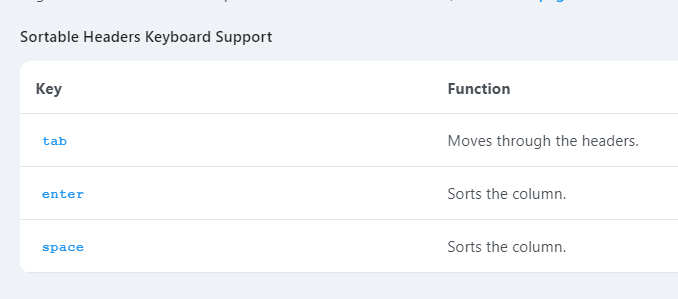
It looks like PrimeVue decided not to support this it only supports these keyboard commands in the header: