

 pressly
goose run: failed to collect migrations: no separator found ?
当我执行 goose postgres "string" status得到的提示: goose run: failed to collect migrations: no separator found
请问什么情况会出现以上提示。

Your migration files must be in the form nnn_name.extension.
- nnn: this is an int64 number. Example: 001, or 356, or 20220413211900.
- name: this can pretty much be anything that's a valid filename
-
extension: this is either
.goor.sql
A valid example could be:
- 20220413211900_initial-migration.go
- 00001_abc.sql
Based on the error your file is missing the _ separator between the nnn and name

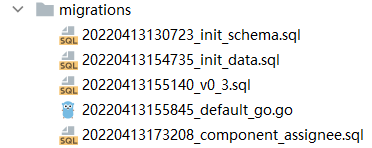
Based on those 5 files it looks okay. Can you copy/paste one of the file names here, exactly how it is? Are there any other files within that directory that could be causing issues?
Is the project open source and can be shared?
Side note, goose should include the filename instead of just outputting "no separator found".
I don't think it's the goose commands themselves, it's tripping up on a file in your migrations directory.
This function is failing. Do note that the separator must be the underscore unicode character _ (U+005F)
https://github.com/pressly/goose/blob/3ffdd78efc69582e72aee47bacfa2d9b2e30636d/migration.go#L126-L147
The migration files created by command "goose -dir ./migtations create xxx sql". So the character _ shoule not be a problem character . I want to know how the command call func "NumericComponent" when i run "goose postgres 'dsn' status "
To print the status goose needs to know all existing migrations, there is a CollectMigrations function that almost all commands call.
Each file in the migrations directory is parsed so a version can be established.
Could there be a hidden file starting with a . inside that directory? Run ls -ltra migrations
Scratch that, a hidden file would fail strconv.ParseInt parsing as a number. I'm a bit stumped, and have never seen this before.
If you could create a reproducible example, a public repo with the smallest possible example that would help.
I had this issue as well. I'm switching from a git-managed (and applied-by-hand) schema to using goose, and attempted to put the goose schemas in the same directory as the old schemas. Since there are other files in that directory, goose fails with this same no separator found, and it took me a while to figure out I had to delete the old schema and script files (or switch to a different directory).
There's nothing in the goose README indicating the directory with the schemas has to only contain schemas, so this behavior was surprising and difficult to debug.
I'm going to put up a PR to make goose return the file name in the error which will at least make it easier to determine what file it's failing on.
I'd also love it if goose had an option to ignore files that didn't match the required schema filename pattern (to allow storing scripts, or other files in the same directory). Or finding some other way to determine which files are and are not goose schema files.

Thanks for putting up a PR, surfacing the filename will make debugging a lot easier.
We'll either update the README or add a "Common Issues" section to the docs site so folks can look there for a quick answer.
I'd also love it if goose had an option to ignore files that didn't match the required schema filename pattern (to allow storing scripts, or other files in the same directory). Or finding some other way to determine which files are and are not goose schema files.
We typically store migrations in ./data/scheme/migrations and add scripts, etc. into the scheme directory, leaving the migrations directory for migration files only. We haven't found that to be an issue.
I think keeping the "migrations" directory avoids having to read and/or parse non-migration files. But more so, if we loosen the restrictions I suspect folks will bump into file naming issues and goose skips files. This is a worse situation as compared to failing hard and fast upon detecting erroneous files.
The only reason I mention having options to ignore files is because it may be difficult to fit the project organization goose assumes into an existing project with it's own pre-established organization.
These issues aren't impossible to resolve (I just adjusted the other junk in the repo so it didn't depend on scripts and schemas in the same dir), but it definitely adds friction to using goose.
I definitely agree it should fail fast with a clear error, rather than silently ignoring files. What I had in mind was a regex of filenames that goose should ignore, rather than assuming any file that doesn't parse should be ignored. There are other ways of approaching that problem, though, regex is just one option.
The error message change is probably sufficient to at least make the assumed organization clear. That's good enough for me, any additional config options to ignore files would be nice, but not required for what I'm trying to do, so it's okay with me if you decided not to implement that.
These issues aren't impossible to resolve (I just adjusted the other junk in the repo so it didn't depend on scripts and schemas in the same dir), but it definitely adds friction to using goose.
Curious, what other types of files would you have alongside those migration files (.sql or .go) ?
I suppose by default goose could ignore non- .sql or .go files and fail fast if only those particular files could not be parsed.
On the flip side it is quite common in CLI tools to have an -exclude or -ignore options for files or directories.
I'd also love it if goose had an option to ignore files that didn't match the required schema filename pattern (to allow storing scripts, or other files in the same directory). Or finding some other way to determine which files are and are not goose schema files.
Thanks for the throughful responses @zealws. This might not be a bad idea after all.
What are your thoughts if there was a flag, such as --strict-filename, when set to false would allow ignoring schema files not recognized by goose.
By default, however, we'd maintain the existing behaviour of raising an error as described above.
I already got past this hurdle for my own project, so I'd be okay either way.