nerdtree

nerdtree copied to clipboard
 preservim
Weird text after directory name in nerdtree.
Self-Diagnosis
Before creating an issue, take some time to search these resources for an answer. It's possible that someone else has already seen and solved your issue.
- old NERDTree issues
- NERDTree documentation -
:h NERDTree - NERDTree Wiki
- Other resources: https://stackoverflow.com, https://vi.stackexchange.com, etc.
Environment
- Operating System: Pop!_os
- Vim/Neovim version
:version: Vim 8.2 - NERDTree version, found on first line of quickhelp
?: 6.10.16 - Are you using any of these NERDTree-dependent plugins?
- [x] Xuyuanp/nerdtree-git-plugin
- [x] ryanoasis/vim-devicons
- [x] tiagofumo/vim-nerdtree-syntax-highlight
- [ ] scrooloose/nerdtree-project-plugin
- [ ] PhilRunninger/nerdtree-buffer-ops
- [ ] PhilRunninger/nerdtree-visual-selection
- [ ] jistr/vim-nerdtree-tabs
- [ ] Others (specify):
- Provide a minimal .vimrc file that will reproduce the issue.
autocmd VimEnter * NERDTree | wincmd p
autocmd BufEnter * if winnr('$') == 1 && exists('b:NERDTree') && b:NERDTree.isTabTree() | quit | endif

filetype plugin on

call plug#begin('~/.vim/plugged')

Plug 'https://github.com/ycm-core/YouCompleteMe.git'
Plug 'mbbill/undotree'
Plug 'vim-airline/vim-airline'
Plug 'vim-airline/vim-airline-themes'
Plug 'preservim/tagbar'
Plug 'jreybert/vimagit'
Plug 'tpope/vim-fugitive'
Plug 'pangloss/vim-javascript'
Plug 'elzr/vim-json'
Plug 'terryma/vim-multiple-cursors'
Plug 'scrooloose/nerdtree'
Plug 'ryanoasis/vim-devicons'
Plug 'Xuyuanp/nerdtree-git-plugin'
Plug 'tiagofumo/vim-nerdtree-syntax-highlight'
Plug 'preservim/nerdcommenter'

call plug#end()
Steps to Reproduce the Issue
- Use zsh & kitty full screened (Do Ctrl + Shift + F11)
- Make sure you have nerdtree open on startup
- Open a file
Current Behavior (Include screenshots where appropriate.)
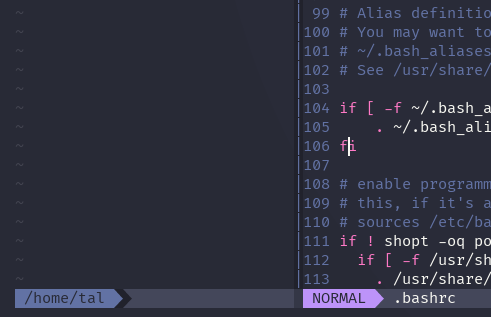
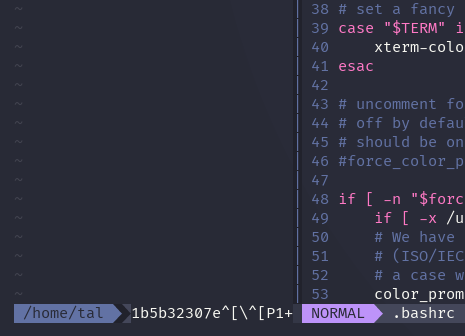 It shows strange text after the file directory, however, it doesn't show up when I use bash. Instead, it only shows up when I use zsh.
Expected Result
The expected result should be what it is when I click on the other window and it goes back to normal.