

 premake
Adding embedded resources to a Visual Studio project
What are you trying to do? Add an embedded resource to a VS2019 solution by using a premake script, so it can then be retrieved at runtime from the executable.
What have you tried so far?
files { "files:%{prj.location}/resource/splashscreen.png" }
filter "files:%{prj.location}/resource/splashscreen.png"
    buildaction "Embed"       -- Also tried "Resource"
filter {}
This adds the .png file to the solution explorer as a resource and seems to somehow build it, but no .rc and resource.h files are generated. When switching to 'Resource View' in VS and manually adding the image as a resource, it is taken and .rc and resource.h files are generated and everything works. How can this be achieved using premake?
What version of Premake are you using?
premake5 (Premake Build Script Generator) 5.0.0-alpha16

What changes does adding the resource make to the project file (vcxproj) when doing it through VS. Are there any other xml-like files generated by VS when you do this?

Yes, these lines are added.
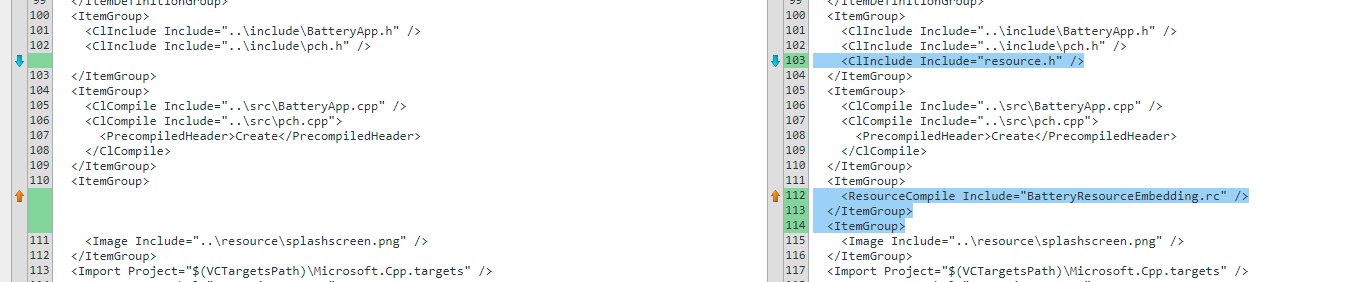
Additionally, BatteryResourceEmbedding.aps, BatteryResourceEmbedding.rc and resource.h are generated, nothing else.
EDIT: Attached the two important generated files, changed both file types to .txt. The .aps file seems to be binary tho... resource.txt MyProject.txt (BatteryResourceEmbedding.rc was renamed to MyProject.rc)
First thing I noticed, in the files parameter you have files:%{prj.location}/resource/splashscreen.png, that files: isn't supposed to be there.
