ppinard
Fine adjustment of the scalebar position.
Is there a way to fine adjust the scalebar position? I need to place the scalebar at the lower right of a image, but there is a label that also needs to be there and I´d like to raise the scalebar a few pixels, so both will be on the lower right but not overlapping each other.

Hi @altanir84, you could perhaps pass border_pad?
>>> import matplotlib.pyplot as plt
>>> from matplotlib_scalebar.scalebar import ScaleBar
>>> import numpy as np
>>> a = np.random.normal(size=100).reshape((10, 10))
>>> legend_kwds = dict(x=8, y=9, s="legend", bbox=dict(facecolor="w"))
>>> fig, ax = plt.subplots(ncols=2, figsize=(10, 5))
>>> ax[0].imshow(a)
>>> ax[0].text(**legend_kwds)
>>> ax[0].add_artist(ScaleBar(1, "px", dimension="pixel-length", location="lower right"))
>>> ax[1].imshow(a)
>>> ax[1].text(**legend_kwds)
>>> ax[1].add_artist(ScaleBar(1, "px", dimension="pixel-length", location="lower right", border_pad=3))

Horizontal and vertical padding will be the same, which isn't optimal, but you can at least move it diagonally away from the lower right corner. Actually, I think you might be better off changing the legend position.

Thank you for the quick reply.
I´ve tried passing the border_pad argument, but the problem is that I´m working on generating thousands of images with a strict layout and I can´t change that because of the company´s layout standards for such images. I was looking for something like tkinter´s pady and padx.
So, I managed to get it working by downloading the scalebar.py and dimensions.py to my working folder and changed it a little bit to enable the bbox_to_anchor argument to be passed. I guess it could be a future update to the module!
What I did:
Open scalebar.py
class ScaleBar(Artist): def init( ...
add this after rotation=None :
    bbox_to_anchor=None,  # bbox that the legend will be anchored.
    bbox_transform=None,  # transform for the bbox
add this after self.rotation = rotation :
self.bbox_to_anchor = bbox_to_anchor
... def draw(self,renderer,*args,**kwargs):
add this after label = self.label :
bbox_to_anchor = self.bbox_to_anchor
now scroll down to # Create final offset box :
We need to insert a if-else statement, to verify if the argument bbox_to_anchor was passed. Place it just before the box = AnchoredOffsetbox( and mind the indentation.
        if bbox_to_anchor != None:
            box = AnchoredOffsetbox(loc=location, pad=pad,  child=child, frameon=frameon,
                                        bbox_to_anchor=bbox_to_anchor, bbox_transform=ax.transAxes)
        else:
save it and place both py files on the work dir and import it using
from scalebar import ScaleBar
Now the ScaleBar can take a tuple to define where the scalebar will be placed.
example:
scalebar = ScaleBar(resolution, length_fraction=0.3, units='mm', color='red', box_color='black',bbox_to_anchor=(1,0.1))
Oops, sorry! I forgot to remove the location argument. When using both, weird stuff happens. It´s better to use only one of them.
If the module gets updated to use bbox_to_anchor in the future, great. If not, this workaround can be used.
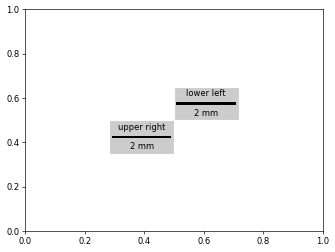
Actually, the location has a big influence on the output when using bbox_to_anchor. I modified the documentation accordingly and added an example in #40 (reproduced here below).
fig, ax = plt.subplots()

scalebar = ScaleBar(
    1,
    "cm",
    length_fraction=0.25,
    bbox_to_anchor=(0.5, 0.5),
    bbox_transform=ax.transAxes,
    location="lower left",
    label="lower left",
    box_color="0.8",
)
ax.add_artist(scalebar)

scalebar = ScaleBar(
    1,
    "cm",
    length_fraction=0.25,
    bbox_to_anchor=(0.5, 0.5),
    bbox_transform=ax.transAxes,
    location="upper right",
    label="upper right",
    box_color="0.8",
)
ax.add_artist(scalebar)