

 pop-os
Hint is "shifted" on some windows
(1) Issue/Bug Description:
On some windows, the hint gets shifted upwards and leftwards. Here's a screenshot of what DDterm looks like:
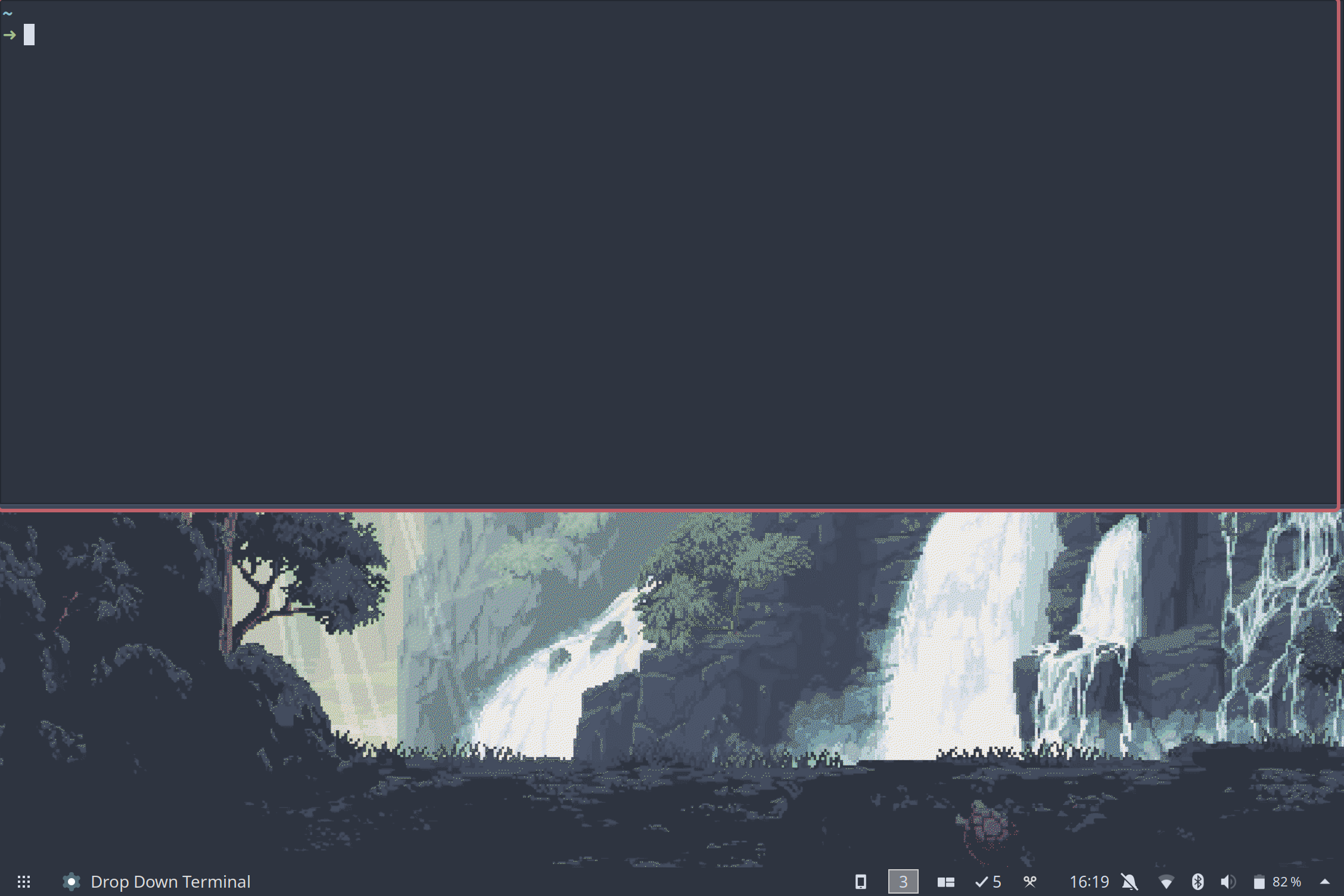
Notice, in the picture above, how the hint is only visible on the right and on the bottom of the window. I have encoutered similar behavior when using Smart Gaps, which I reported on issue 1035
(2) Steps to reproduce (if you know):
- Install DDterm from Gnome Shell Extensions
- Make sure "Show Active Hint" is toggled on
- Open DDterm and see the shifted hint
(3) Expected behavior:
The hint should be visible on every border of the window.
(4) Distribution (run cat /etc/os-release):
NAME="Ubuntu"
VERSION="20.04.2 LTS (Focal Fossa)"
ID=ubuntu
ID_LIKE=debian
PRETTY_NAME="Ubuntu 20.04.2 LTS"
VERSION_ID="20.04"
HOME_URL="https://www.ubuntu.com/"
SUPPORT_URL="https://help.ubuntu.com/"
BUG_REPORT_URL="https://bugs.launchpad.net/ubuntu/"
VERSION_CODENAME=focal
UBUNTU_CODENAME=focal
(5) Gnome Shell version: 3.36.9
(6) Pop Shell version (run apt policy pop-shell or provide the latest commit if building locally):
Latest commit: 4c9b6df feat(launcher): Close launcher on mouse click
(7) Where was Pop Shell installed from: Built locally
(8) Monitor Setup (2 x 1080p, 4K, Primary(Horizontal), Secondary(Vertical), etc): 1 x 1440p Primary (Horizontal).
(9) Other Installed/Enabled Extensions: Show Application View When Workspace Empty (bug persists if turned off)
(10) Other Notes: Many thanks for developing this amazing piece of software!

@jacobgkau @mmstick - is there an advise from UX on how to handle hints for quake style windows?

