

 polywock
Question(s) about addon
How exactly do I set up a volume up and volume down shortcut key making it go every single percent (1 2 3, etc up to 100)?

Hello. Create two "volume" shortcuts in the options page. Set the first one to -0.01 for 1% volume down. Set the other for 0.01 for 1% volume up. Newly created shortcuts aren't bound to any keys so click on "NoKey" and press your preferred shortcut key for both.
https://user-images.githubusercontent.com/31208859/165189189-0bcc185d-ad2f-4e1f-a5f6-604cd6340b44.mov

Ok. Also is it possible to set the volume to a default percentage? Like every tab or a specific website I got to, have it be at a specific percentage.
Sadly not. By the way, speaking of default volume. Some websites like Youtube only store volume changes if it's made through the video's volume slider.
Scanario 1: If you change volume to 80% using Youtube's own volume slider. If you refresh the page, volume should still be 80%.
Scanario 2: If you change volume to 80% using a Global Speed shortcut. If you refresh the page, volume will not be 80%.
This is is kind of annoying, you can use this script to fix that (for Youtube). To setup...
- Create a URL rule in the options page.
- Change it from "speed" mode to "javascript" mode. Click "edit" and paste the code from below.
- Click on "-- 0 --" to add a URL condition so that if the URL contains "youtube.com", it should run the code.
- Enable "ILO" so the code only loads once.
if (!window.ranScriptFlag) {
    window.ranScriptFlag = true

    // add event listener to persist volume on volume change
    window.addEventListener("volumechange", e => {
        const video = e.target
        if (!(video instanceof HTMLMediaElement)) return

        const now = new Date().getTime()
        const data = JSON.stringify({volume: Math.round(video.volume * 100), muted: video.muted})
        const payload = JSON.stringify({data, expiration: now + 2592000000, creation: now})
        localStorage.setItem("yt-player-volume", payload)
        sessionStorage.setItem("yt-player-volume", payload)
    }, true)
}
https://user-images.githubusercontent.com/31208859/165215878-b9e3b363-7886-4f4d-a1e8-659478cc3338.mov
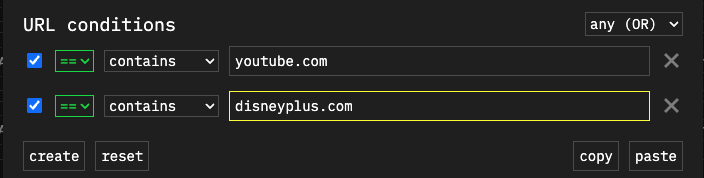
This should work on all sites. This script blocks the website from changing volume at all. The limitation is that you can only change volume using Global Speed, and it will remember the volume even if you refresh the page. I recommend only running it on sites that you notice issues like Youtube. To setup for Disney+ and Youtube, just change the URL condition and replace the javascript to this.
[ REMOVED ]
What about making it so when I set the volume to like 25 on Disney now and have it save there if the page refreshes or something?
Hello. Here's an updated version. You can now change your volume through Youtube or Disney's own controls as long as it's after 5 seconds of the video loading. It should save when you refresh the page.
[ REMOVED ]
@Fireworkstars46 I just noticed a big issue with a code. It should be setTimeout instead of setInterval. This could result in issues. Here's a fixed version.
if (!window.ranScriptFlag) {
    window.ranScriptFlag = true
    let blockTimeout
    // block website from changing volume for first 3 seconds.
    let BLOCK_DURATION = 3000

    // add event listener to store latest volume.
    window.addEventListener("volumechange", e => {
        const video = e.target
        if (!(video instanceof HTMLMediaElement)) return

        localStorage.setItem("gs-volume", video.volume)
    }, true)


    // function to get stored volume
    const getStoredVolume = () => {
        let volumeRaw = localStorage.getItem("gs-volume")
        if (volumeRaw) {
            return parseFloat(volumeRaw)
        }
    }

    // block page from changing volume
    const desc = Object.getOwnPropertyDescriptor(HTMLMediaElement.prototype, "volume")
    Object.defineProperty(HTMLMediaElement.prototype, "volume", {configurable: true, enumerable: true, get: desc.get, set: function(value) {
     return blockTimeout ? undefined : desc.set.call(this, value)
}})

    // on start of video, set volume to the stored one.
    window.addEventListener("loadedmetadata", e => {
        const video = e.target
        if (!(video instanceof HTMLMediaElement)) return
        clearTimeout(blockTimeout)
        blockTimeout = setTimeout(() => { blockTimeout = null }, BLOCK_DURATION)
        desc.set.call(video, getStoredVolume() ?? 0.5)
    }, true)
}