

 polybar
Manual geometry as option for monitor-agnostic bar placement
Is your feature request related to a problem? Please describe.
When using herbstluftwm I can set virtual monitors that are independent from the physical monitors used, so I can have two completely independent virtual monitors in a single ultrawide physical monitor, for example. So using MONITOR=$monitor polybar statusbar & does not solve the problem in this case. I need a way to set the bar position in a generic way that is independent from hardware, which should not be a concern to polybar.
Why does polybar need this feature?
Because this gives the users with big monitors more control of their systems without hacks, while maintaining the common MONITOR approach for basic needs.
Describe the solution you'd like
Something like:
polybar statusbar --width=1920 &
polybar statusbar --width=1920 --x=1920 &
polybar statusbar --width=1920 --y=1080 &
polybar statusbar --width=1920 --x=1920 --y=1080 &
This way I could set four bars in a 4k monitor with 4 virtual 1920x1080 monitors using the same bar configuration, provided that offset-x and offset-y are relative to the given bases.
Or passing the geometries in a more standard way:
polybar statusbar --geometry=1920x1080+0+0 &
polybar statusbar --geometry=1920x1080+1920+0 &
polybar statusbar --geometry=1920x1080+0+1080 &
polybar statusbar --geometry=1920x1080+1920+1080 &
Describe alternatives you've considered
It can be done by using offset-x and offset-y. The problem is that this solution requires having at least one different bar configuration for each monitor with different names, when the bars are essentially the same.
Additional context
Two virtual monitors inside a virtual machine, each with its own instance of a bar (dzen2):
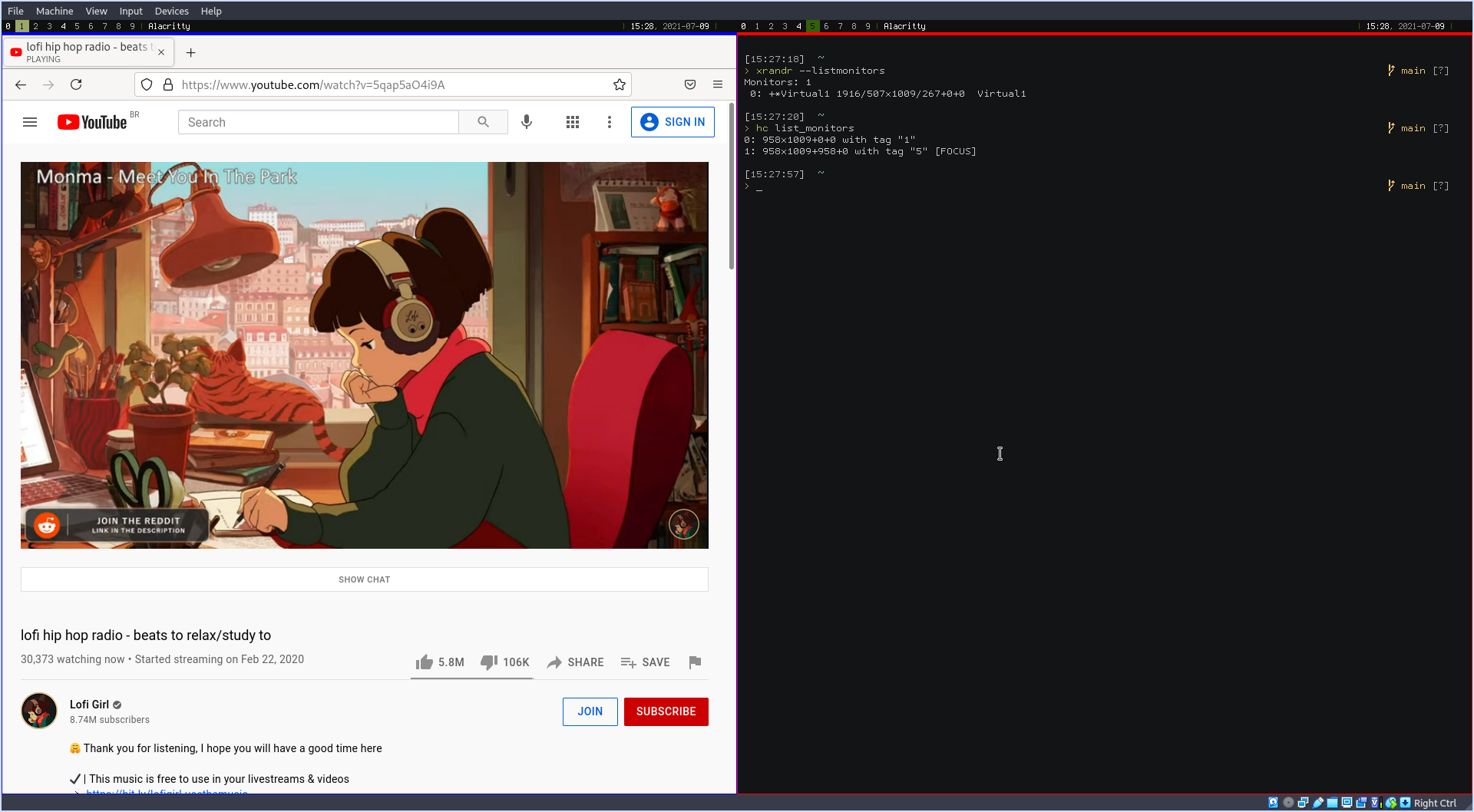
This is achieved with dzen2 by using:
dzen2 -w $panel_width -x $x -y $y

This is a good idea. It's actually something that bothered me quite a bit in the past. On of the only reasons polybar needs a monitor name, is to figure out its position and even worse, if the bar goes outside of the monitor frame, polybar throws an error. When in reality, polybar could position itself anywhere, regardless of monitor.
I'm a bit wary of using commandline arguments for this, as everything in polybar is configured through the config file and I'd very much like to keep it that way.
I would suggest the following things:
- A
geometrysetting that can be set using the standardWxH+X+Yformat - Adding
xandyfields to set the absolute position of the bar. (the width and height settings already exist)
Since polybar can read environment variables, these could also be set directly from the commandline when running polybar.
There are a few tricky things to consider though:
- How do percentages in
width.height, andoffset-*behave when no monior is given. - How does
ywork for bottom bars? - Which settings take precendence over others.
