

 pnp
pnp
When calling Get-PnPAzureADAppSitePermission no Roles property is ever returned
When calling Get-PnPAzureADAppSitePermission no Roles property is ever returned. Running Grant-PnPAzureADAppSitePermission or Set-PnPAzureADAppSitePermission will return an AzureADAppPermission object with the Roles property, but Get-PnPAzureADAppSitePermission will not.
Expected behavior
I expect this cmdlet to return an AzureADAppPermission object with the Roles property that is assigned.
Actual behavior
The returned AzureADAppPermission object has a Roles property of null.
Steps to reproduce behavior
$grant = Grant-PnPAzureADAppSitePermission -Permissions 'Write' -Site $site -AppId $appId -DisplayName $displayName

$permission = Get-PnPAzureADAppSitePermission -AppIdentity -AppId
NOTE: Running $permission = Get-PnPAzureADAppSitePermission -AppIdentity -AppId also returns null and not even an AzureADAppPermission object, which seems to also be wrong, but running the following will return an AzureADAppPermission object with a Roles property of null.
$permission = Get-PnPAzureADAppSitePermission -AppIdentity $appId -Site $site
What is the version of the Cmdlet module you are running?
ModuleType Version    PreRelease Name                                PSEdition ExportedCommands
---------- -------    ---------- ----                                --------- ----------------
Manifest   1.9.0                 PnP.PowerShell                      Core,Desk {Add-PnPClientSidePageSection, Add-PnPClientSideText, Add-PnPClientSideWebPart, Copy-PnPFolder…}
Which operating system/environment are you running PnP PowerShell on?
- [X] Windows
- [ ] Linux
- [ ] MacOS
- [ ] Azure Cloud Shell
- [ ] Azure Functions
- [ ] Other : please specify


Its a strange issue, I checked this in Postman as well making the same query and no roles were returned. Looks like they are not being returned by Graph itself, wondering why/

No matter which method I use to set up write permissions to a SharePoint site, Roles always return blank.
I tried with giving permissions given through Grant-PnPAzureADAppSitePermission and even using
Invoke-MgGraphRequest -Method POST -ContentType application/json -Uri https://graph.microsoft.com/v1.0/sites/$SiteId/permissions -Body @"
{
     "roles": [
         "write"
     ],
     "grantedToIdentities": [
         {
             "application": {
                 "id": "$($ManagedIdentity.AppId)",
                 "displayName": "$AutomationAccountName"
             }
         }
     ]
 }
"@
The output of any of the above is correct as expected, showing the {write} role assigned, but when retrieving the permissions with Get-PnPAzureADAppSitePermission or any other method it will always return Role in blank.

Hi @lbenkensteinGP , thanks for checking.
The issue is that, atleast in my case, it is not returning roles value for this one:
Invoke-MgGraphRequest -Method GET -ContentType application/json -Uri https://graph.microsoft.com/v1.0/sites/$SiteId/permissions
Not sure why, maybe some issue with Graph. This is the same endpoint that we use for Get-PnPAzureADAppSitePermission
Does anyone know where are these app grants are stored? I reviewed these 2 SPO screens and I don't see them listed here.
Site App Permissions /_layouts/15/appprincipals.aspx?Scope=Web
Site Collection App Permissions /_layouts/15/appprincipals.aspx

Skimming the source of Get-PnPAzureADAppSitePermission, the Roles value must be obtained using the -PermissionId parameter.
https://github.com/pnp/powershell/blob/dev/src/Commands/Apps/GetAzureADAppSitePermission.cs
if (siteId != Guid.Empty)
           {
   if (!ParameterSpecified(nameof(PermissionId)))
               {
                    ...
               }
               else
               {
                   var results = GraphHelper.GetAsync<AzureADAppPermissionInternal>(Connection, $"https://{Connection.GraphEndPoint}/v1.0/sites/{siteId}/permissions/**{PermissionId}**", AccessToken).GetAwaiter().GetResult();
                   WriteObject(results.Convert());
               }
           }
// Result with version 1.11.0 PnP.PowerShell

My guess is that this is the effect of the deprecated of GrantedToIdentities. The alternative grantedToIdentitiesV2 does not include roles.
https://learn.microsoft.com/en-us/graph/api/site-list-permissions?view=graph-rest-1.0&tabs=http#response-1
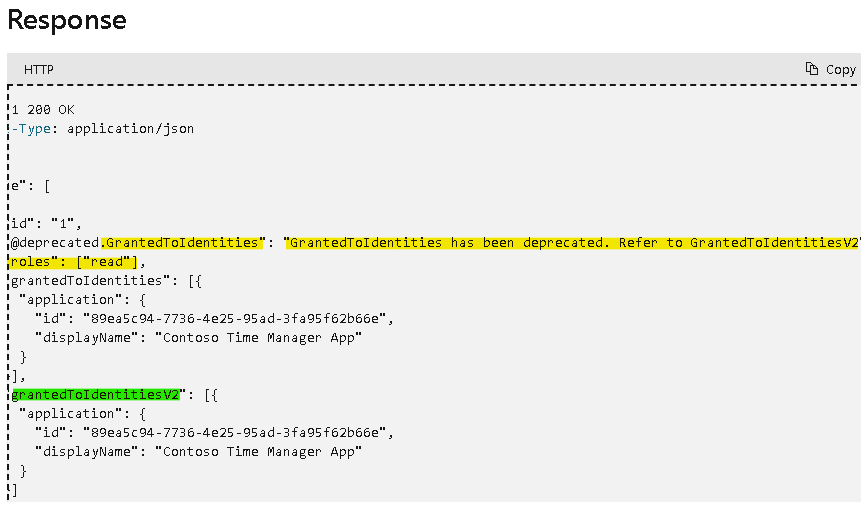
We now need use /permissions/permmisonId endpoint to get roles.
https://learn.microsoft.com/en-us/graph/api/site-get-permission?view=graph-rest-1.0&tabs=http
GET /sites/{sitesId}/permissions/{permissionId}

I had overlooked the command reffrence, but it was mentioned this behavioer. This seems to be the expected behavior.
https://pnp.github.io/powershell/cmdlets/Get-PnPAzureADAppSitePermission.html
EXAMPLE 1
Get-PnPAzureADAppSitePermission

Returns the apps that have permissions for the currently connected to site.
Note that if PermissionId is not specified then the Roles property is not populated. This is a current API limitation.
Thanks @kefujino for checking this. Will close this issue as it is by design and is an API limitation