
plotn
plotn
Hi! Firstly - i googled what does it mean - WDYT. Ok, I found :) But I still cannot catch the idea with "Tools" - I called popup menu on...
See two user scenarios, please 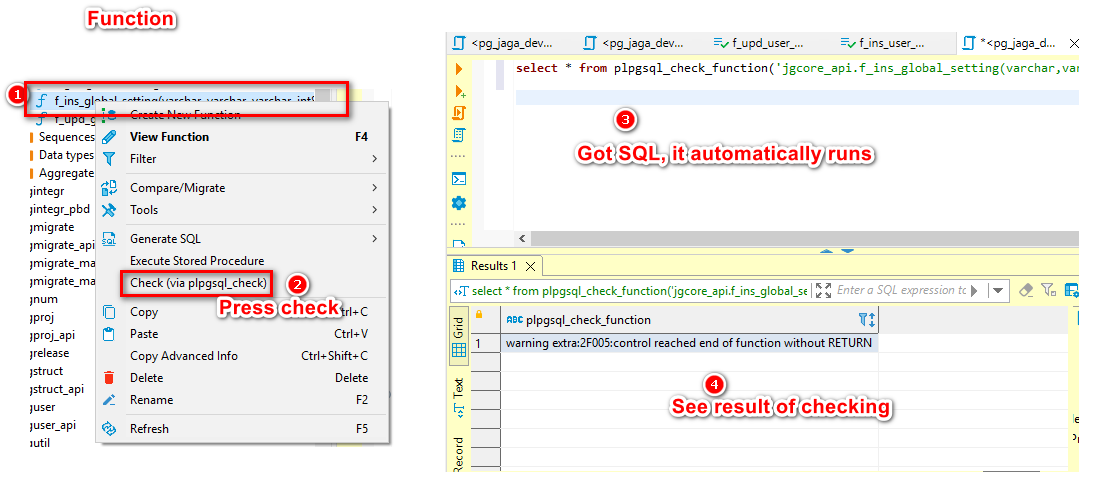 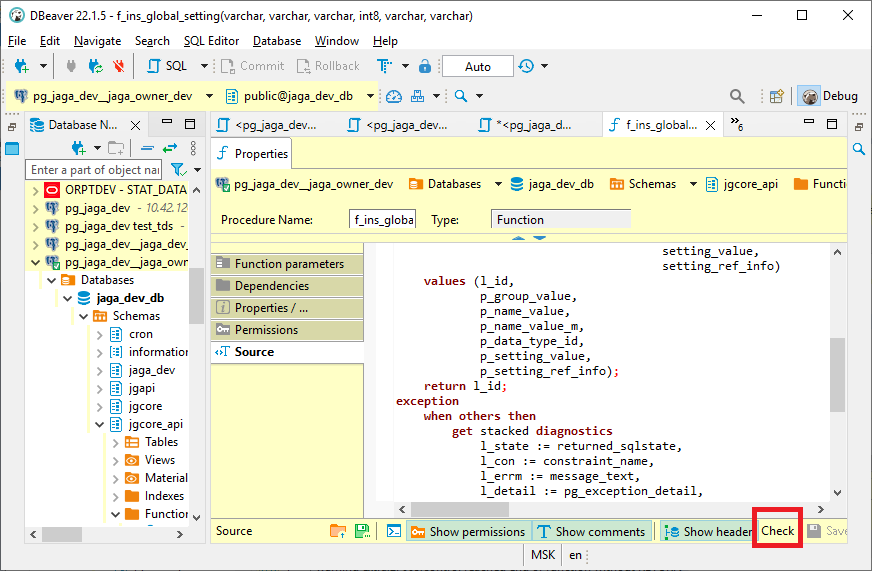
Lets confirm your suggestion: 1. We remove (pg_check) item from "Function submenu", "Generate SQL submenu"; 2. We put them under the "tools" menu; 3. But they do directly the same...
Let us do the following: 1. I will delete command, command handler and direct menu contributions for the "Check (via plpgsql_check)" item; 2. "UPDATE FROM", "INSERT ON CONFLICT", "DELETE USING"...
@serge-rider, see please
Thank you! I plan to continue contribution if this case will be successful (as we discussed and more). Additionally - look at my "merge generator fixed: - it is quite...
1. Update with merge syntax is: Vanilla doc: https://postgrespro.ru/docs/postgresql/9.6/sql-insert How I think it should work: insert into [selected_table] ([field_list]) select [field_list] from [another_table] on conflict ([comma_separated_key_field_list_from_selected_table]) do //nothing [I think...
2. Update from syntax: UPDATE [selected_table] SET non_key_field_1 = [another_table].non_key_field_1, non_key_field_n = [another_table].non_key_field_n FROM [another_table] WHERE [another_table].key_field_1= [selected_table].key_field_1 and [another_table].key_field_n= [selected_table].key_field_n Note is the same as above
3. Delete from syntax: DELETE FROM [selected_table] USING [another_table] [another_table].key_field_1= [selected_table].key_field_1 and [another_table].key_field_n= [selected_table].key_field_n Note is the same as above
Здесь же - как то запретить переходить выше файл рута, т.е. в /storage/emulated, если рут .../0