plotly
Background image gets cut in plot
(Maybe it's not an actual issue but I haven't gotten any real answer through other means)
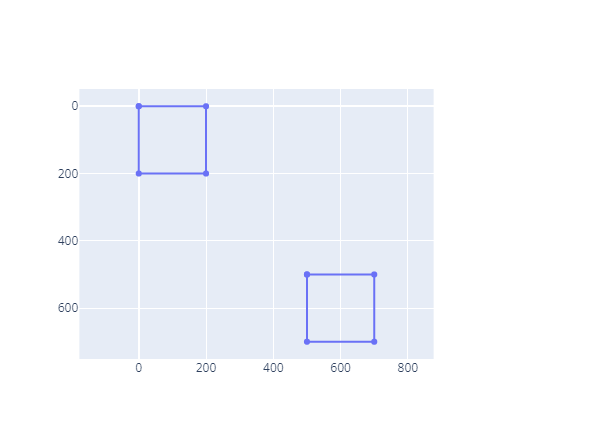
I'm trying to plot a set of boxes on top of an image to express a characteristic of each of these boxes (colourfulness, to be precise).
My idea is to get something like this:
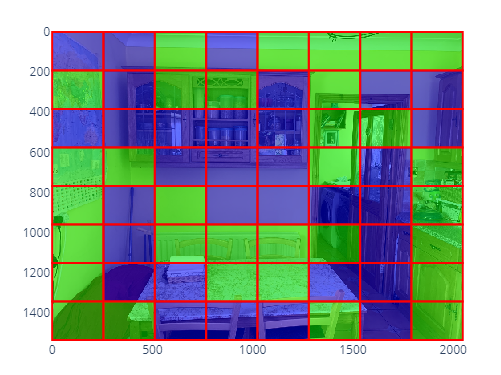
And, on hover, to get the colourfulness value of that specific box. Now, these boxes and the colourfulness of the part of the image contained inside of them are already calculated and stored in a DataFrame which looks like this:
"colourfulness_test (1).jpeg": [
    {
        "img_rect": [
            0.0,
            0.0,
            256.0,
            192.0
        ],
        "M": 40.86526507358546
    },
    {
        "img_rect": [
            256.0,
            0.0,
            512.0,
            192.0
        ],
        "M": 43.13601554186694
    },
    ... ]
}
The name of the column is the name of the file, and M is the colourfulness specified by the square (x0, y0, x1, y1). I'm trying to add the image on the background following the docs but there is a strange behaviour regarding the size. This is the snippet of code I'm using.
import plotly.graph_objects as go
from PIL import Image
fig = go.Figure()

# Add trace
# Instead of the whole dictionary of boxes, I'm using these tailored
# arrays with just two boxes to do small tests.
fig.add_trace(
    go.Scatter(
        x=[0, 200, 200, 0, 0, None, 500, 700, 700, 500, 500],
        y=[0, 0, 200, 200, 0, None, 500, 500, 700, 700, 500],
        customdata=[10,10,10,10,10,20,20,20,20,20,20],
        hovertemplate="%{customdata}")
)

fig.add_layout_image(
    dict(
        source=Image.open("./colourfulness_test (1).jpeg"),
        xref="x",
        yref="y",
        x=0,
        y=1536,
        sizex=2048,
        sizey=1536,
        sizing="fill",
        opacity=0.5,
        layer="below"
    )
)
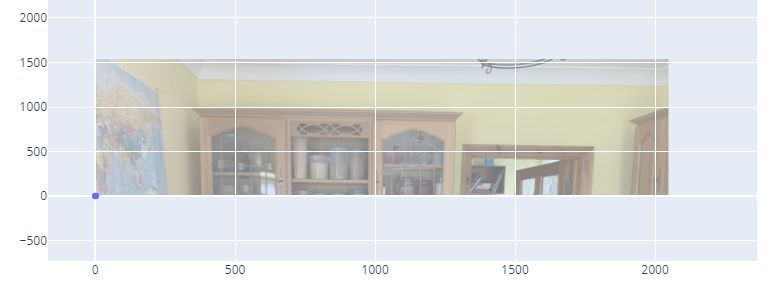
The image in the background is 2048 x 1536 (width x height). The width is set correctly, but somehow the height is not, and the image gets cut. I have to specify some random big height in sizey and y to get the picture in the right place.
This is how it looks if I set the height and width properly. The width of the picture is right, but height isn't.
This is the image I get if I set y to 4000 and sizey to 4000 as well (the image renders perfectly, respecting proportions, etc.).

I need the image to align correctly so that if I place a box in the square (1948, 1436, 2048, 1536) , it aligns correctly with the bottom-right edge of the image (also I need the y-axis to render in reverse so 0 is at the top, just like in the first image that I show in this post).

Have you tried sizing: "contain" instead? If that doesn't help, maybe try using an image trace instead of a layout image?

Contain seems to fix the y-dimension but not the x-dimension (notice x should go up until 2048).

And adding the image_trace doesn't work for some reason.
import plotly.graph_objects as go
from PIL import Image
import base64
from io import BytesIO

fig = go.Figure()

# Add trace
fig.add_trace(
    go.Scatter(
        x=[0, 200, 200, 0, 0, None, 500, 700, 700, 500, 500],
        y=[0, 0, 200, 200, 0, None, 500, 500, 700, 700, 500],
        customdata=[10,10,10,10,10,20,20,20,20,20,20],
        hovertemplate="%{customdata}")
)

def pil2datauri(img):
    #converts PIL image to datauri
    data = BytesIO()
    img.save(data, "JPEG")
    data64 = base64.b64encode(data.getvalue())
    return u'data:img/jpeg;base64,'+data64.decode('utf-8')

fig.add_trace(
    go.Image(
        dx=2048,
        dy=1536,
        source=pil2datauri(Image.open("./colourfulness_test (1).jpeg"))
    )
)

fig.show()