

 playcanvas
Text outline opacity does not follow element's opacity
I think outline's opacity should be multiplied by element's opacity just like other engines.
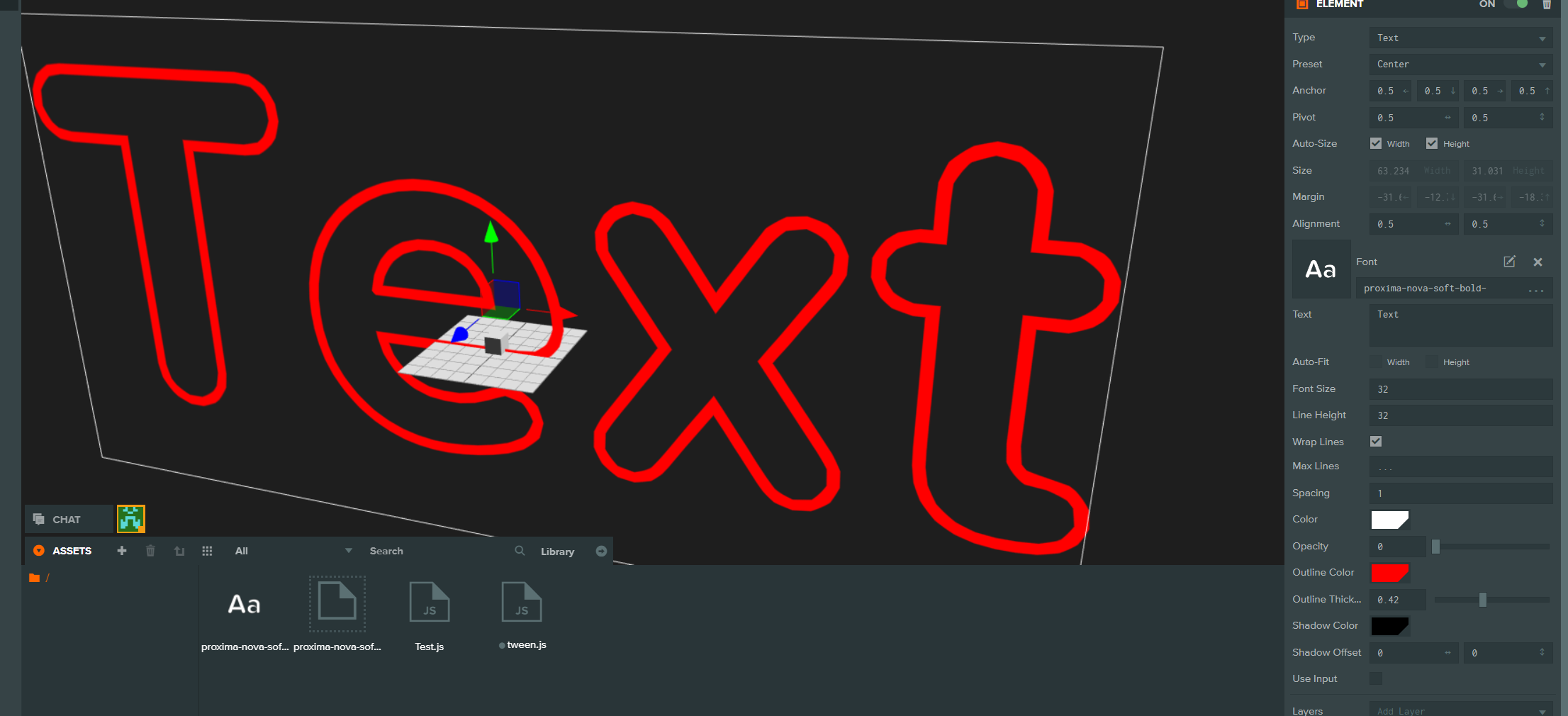


@pjc0247 I agree it seems more natural, however it is also more restrictive. If we multiply outline alpha with text alpha, then for example it's not possible to create transparent text with a solid outline.
I think ideally outline and shadow alpha would be a value between -1..1 and would be added to text alpha. This way the outline and shadow inherit text alpha setting, but the user is still able to set any combination of alpha/solid.
@codebon77 I never saw the range of -1 ~ 1 for opacity value. I think many people don't get it why there are negative values unless they find the documentation.
And, the main problem is here, what I want to do was link there opacity values between element and shadow's. because I want to make a fadeout text.
Unity has two properties for opacity, one is color.a and another is renderer.alpha. So they can be controlled each values text and element's opacity.
Cocos2d has a function to set multiplying opacity or not which is setCascadeOpacity(boolean).
(this one is not excatly same as current issue, but I just explain the case)
@pjc0247 Yes, a completely separate "Element opacity" could work fine. This would be multiplied into colour/outline/shadow opacity.
@pjc0247 I just want to confirm, there is nothing stopping you from setting all three opacity values directly yourself right? You can fade the text this way. What we are discussing here is a convenience function that allows you to fade with a single value.
@codebon77 I thought it is a bug, but after some comments and enhancement label, I realized that this is what you intended to.
So, I confirm that everything works fine, I can control these 3 values. It just confused me because I was a Unity dev before using PlayCanvas.
I would say the current implementation of handling opacity is not convenient for who wants to make fading effects. Here's what I'm doing now.
tween(...).on('update', (v) => {
    text.opacity = v;
    text.outlineOpacity = v;
    text.shadowOpacity = v;
});
Was able to achieve the shadow opacity doing the following in an update loop.
var oldColor = this.entity.element.shadowColor; var color = new pc.Color(oldColor.r, oldColor.g, oldColor.b, newAlpha); this.entity.element.shadowColor = color;

fillColor - as a property, would bring good flexibility. So there would be three separate colors with own opacities, gives flexibility. And all of them would be multiplied by element.opacity.
Was able to achieve the shadow opacity doing the following in an update loop.
var oldColor = this.entity.element.shadowColor; var color = new pc.Color(oldColor.r, oldColor.g, oldColor.b, newAlpha); this.entity.element.shadowColor = color;
Creating pc.Color in each update loop - is unnecessary allocation. If abused, will lead to garbage collection stalls. Tip: allocate pc.Color in initialize, and just change it's properties in update.

fillColor - as a property, would bring good flexibility. So there would be three separate colors with own opacities, gives flexibility. And all of them would be multiplied by element.opacity.
Was able to achieve the shadow opacity doing the following in an update loop. var oldColor = this.entity.element.shadowColor; var color = new pc.Color(oldColor.r, oldColor.g, oldColor.b, newAlpha); this.entity.element.shadowColor = color;
Creating pc.Color in each update loop - is unnecessary allocation. If abused, will lead to garbage collection stalls. Tip: allocate pc.Color in initialize, and just change it's properties in update.
Thanks Maksims I did this and it worked.
this.shadowColor.copy(this.text.element.shadowColor);
this.shadowColor.a = alpha;
this.text.element.shadowColor = this.shadowColor;
However out of curiosity I attempted this to reduce that extra allocation but it does not seem to work (Maybe something under the hood)
var shadowColor = this.text.element.shadowColor;
shadowColor.a = alpha;
this.text.element.shadowColor = shadowColor;
This would be a nice addition to further reduce allocations on boot
Bump issue with more requests from the forum: https://forum.playcanvas.com/t/opacity-of-text-text-shadow-color/21109

