

 pixie-io
NATS Streaming server unable to start due to unexpected EOF
Describe the bug We have a self-hosted Pixie deployment. This was working fine. When I opened the Pixie UI today, the home page kept showing the loading icon continuously and never loaded the data.
Upon checking the deployment, I found that the following pods had gone into a CrashLoopBackOff
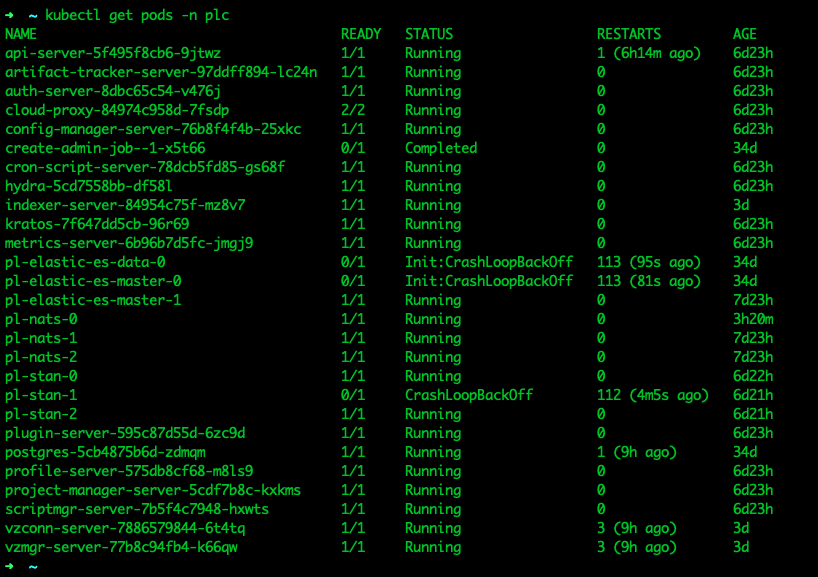
Logs of pl-stan-1 showed that NATS streaming server was unable to start because it was unable to recover a message store
To Reproduce This issue started occurring without me doing any changes. So I don't know what could be done to reproduce this
Expected behavior Expected the NATS Streaming Server to start
Logs
Logs of pl-stan-1
[1] 2022/07/15 11:16:59.588286 [INF] STREAM: Starting nats-streaming-server[pl-stan] version 0.22.1
[1] 2022/07/15 11:16:59.588321 [INF] STREAM: ServerID: XXXXX<redacted>XXXXXX
[1] 2022/07/15 11:16:59.588324 [INF] STREAM: Go version: go1.16.6
[1] 2022/07/15 11:16:59.588327 [INF] STREAM: Git commit: [27f1d60]
[1] 2022/07/15 11:16:59.697411 [INF] STREAM: Recovering the state...
[1] 2022/07/15 11:17:01.239304 [ERR] STREAM: Unexpected EOF for file "/data/stan/store/v2c.a4.a5326f2f-5b67-427d-9930-d9e91c574ca4.DurableMetadataUpdates/msgs.4.dat"
[1] 2022/07/15 11:17:01.239324 [ERR] STREAM: It is recommended that you make a copy of the whole datatstore "/data/stan/store".
[1] 2022/07/15 11:17:01.239330 [ERR] STREAM: Restart with the ContinueOnUnexpectedEOF flag to truncate this file to this offset: 32816735.
[1] 2022/07/15 11:17:01.239333 [ERR] STREAM: Dataloss may occur. Details about the first corrupted record follows...
[1] 2022/07/15 11:17:01.239340 [ERR] STREAM: Record header:
[1] 2022/07/15 11:17:01.239345 [ERR] STREAM:  Bytes:
[1] 2022/07/15 11:17:01.239351 [ERR] STREAM: XXXXX<redacted>XXXXXX
[1] 2022/07/15 11:17:01.239356 [ERR] STREAM:  Size: 547
[1] 2022/07/15 11:17:01.239362 [ERR] STREAM:  CRC : 0x6f09907b
[1] 2022/07/15 11:17:01.239365 [ERR] STREAM: Record payload:
<Record payload truncated>
[1] 2022/07/15 11:17:01.239695 [ERR] STREAM: record payload expected to be 547 bytes, only read 409
[1] 2022/07/15 11:17:01.608317 [FTL] STREAM: Failed to start: unable to recover message store for [v2c.a4.a5326f2f-5b67-427d-9930-d9e91c574ca4.DurableMetadataUpdates](file: "v2c.a4.a5326f2f-5b67-427d-9930-d9e91c574ca4.DurableMetadataUpdates/msgs.4.idx"): unexpected EOF
App information (please complete the following information):
- Pixie version: 0.7.14
- K8s cluster version: 1.22.6
- Node Kernel version:
- Browser version: Chrome Version 103.0.5060.114 (Official Build) (x86_64)
Additional context
The same issue occured about a week ago as well. In order to recover from the situation, I deleted the pl-stan pods and the stan-sts-vol-pl-stan PVCs. Then new pods and PVCs were created and everything went back to normal.

I looked into this and came across https://docs.nats.io/legacy/stan/changes/configuring/persistence/file_store#recovery-errors.
It had the following
With the -file_truncate_bad_eof parameter, the server will still print those bad records but truncate each file at the position of the first corrupted record in order to successfully start.

To prevent the use of this parameter as the default value, this option is not available in the configuration file. Moreover, the server will fail to start if started more than once with that parameter.
This flag may help recover from a store failure, but since data may be lost in that process, we think that the operator needs to be aware and make an informed decision.
According to this, data loss may occur due to this flag. Therefore would it make sense to add this flag?
Since Pixie uses a config map for NATS Streaming, I referred https://docs.nats.io/legacy/stan/changes/configuring/cfgfile#file-options-configuration to add the config. However the -file_truncate_bad_eof option is not available in the above documentation link.
So I tried the following methods to add it
file_truncate_bad_eof: true
file: {
  truncate_bad_eof: true
}
file_options: {
  truncate_bad_eof: true
}
But neither of these worked
We've just replaced NATS Streaming (STAN) with Jetstream. This should hopefully resolve this issue. Please feel free to reopen if anyone continues to see this problem with Jetstream!
