

 piccolo-orm
`TableConfig` media handlers
This is a big task, but unlocks a lot of great functionality in the admin.
Piccolo doesn't have a particular column type for storing media (images, video etc). It's possible to store them in binary columns, but this is generally frowned upon as it quickly leads to database bloat (and database storage is typically much more expensive than object storage).
The usual approach for storing media is to put the file in object storage (like S3), or in a local directory, and store a reference to it in the database (for example a URL or path).
Initially we can just store the media files in a local directory, but supporting the S3 protocol would be great in the future.
The steps required to implement this:
MediaHandler class
# This is just an abstract base class for all other media handlers:
class MediaHandler:
    pass

@dataclass
class LocalMediaHandler(MediaHandler):
    root_path: str

    def store_file(self, file):
        ...

    def retrieve_file(self, path: str):
        ...
TableConfig changes
media_handler = LocalMediaHandler(root_path='/var/www/files/')

app = create_admin(
    TableConfig(
        Movie,
        media_handler=media_handler,
        media_columns=[Movie.poster]
    )
)
PiccoloCRUD changes
There will be a new endpoint, something like:
/tables/director/1/media?column=poster
Which can be used to retrieve the actual media file.
UI improvements
The UI will know if a column is used for media storage by inspecting the JSON schema:
/api/tables/director/schema
PiccoloCRUD would've added an extra field to it called 'media_columns', using create_pydantic_model's schema_extra_kwargs feature.
The UI would then render a file upload box for that field. In the future we could support simple editing functionality like cropping images (there are several JS libraries for this), but that's down the road.

@dantownsend This would be a very nice feature. Local directory is useful if you have your own server where you can create an image upload folder, but almost all cloud providers don't have that and recommend external cloud storage (S3, Cloudinary, etc.), but all of these providers have a different API to use. I’ll play around with that a bit because I’ve already used multifile uploads (Dropzone for local directory and Cloudinary here). I hope to come up with something useful.

@sinisaos You're right - some cloud providers have different APIs.
Some of them have standardised around the Amazon S3 API though - for example, Digital Ocean is compatible with the S3 API. So after local storage, making S3 work is probably the best next step.
@dantownsend I’m going to play around with this a bit and maybe something useful comes out of it.
@dantownsend I did a little research on the internet and this proposed feature is quite different from uploading from html forms. Upload files is not a problem, we can do it like this to upload files to local static folder.
# in endpoints.py
api_app.add_api_route(
  path="/media/",
  endpoint=self.upload_images,  # type: ignore
  methods=["POST"],
  tags=["Media"],
)
...
def upload_images(self, files: t.List[UploadFile] = File(...)):
  for f in files:
    with open(
      f"static/{random.randint(100,100000)}.jpeg", "wb"
    ) as buffer:
      shutil.copyfileobj(f.file, buffer)
Result is:
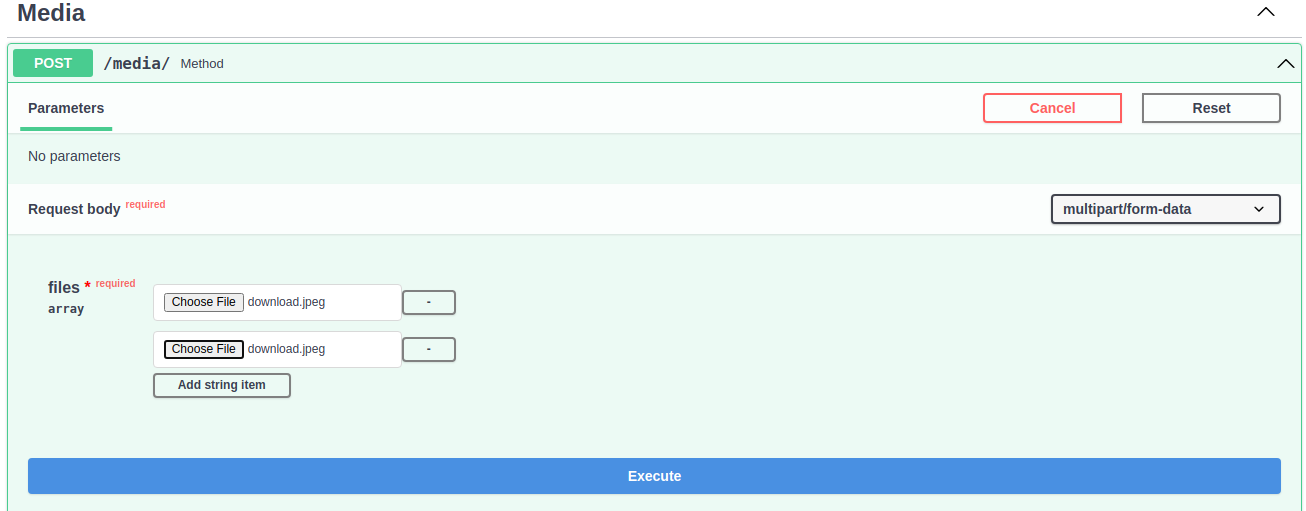
The main problem is that the admin UI generates forms from the Pydantic schema and then sends an json to the backend (different than html forms), so there's no way to form has a field for upload files (because it's multipart/form-data, not json), and that's the only way (at least as I understand it) to associate an image with a particular record. I don’t know how to do it and it’s a little beyond my capabilities.
The easiest way would be for the user to upload files to some external service (S3, Cloudinary) and then just pass links in admin UI form
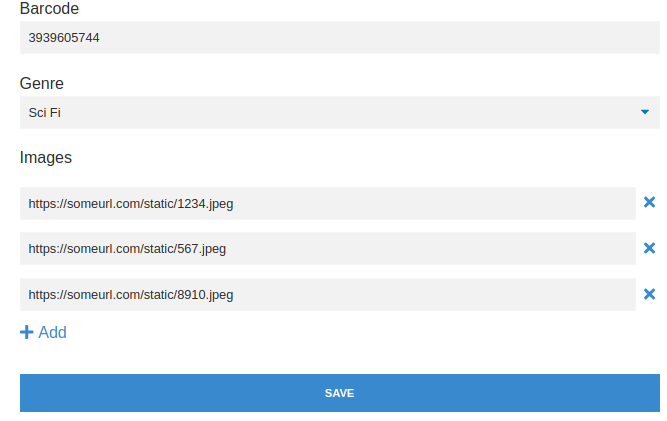
Sorry for long comment, but if someone else can implement this feature, that would be great.
@sinisaos Thanks for doing all that research - it's a good start.
You're right, files get submitted using multipart/form-data, so it wouldn't be possible to submit it as JSON.
It's possible to submit files using Axios. Something like:
const formData = new FormData();
formData.append('file',file)
const config = {
    headers: {
        'content-type': 'multipart/form-data'
    }
}
await axios.post(url, formData, config)
The admin would have to detect if files are present in the form, and submit using multipart/form-data.
Don't worry about it though - I could sort that out.
@dantownsend You are right about axios and that's work ok. Here is project from github for testing upload. Just replace line 36 with formData.append('files', file); and line 39 with axios.post( '/media/', and you can upload files to local static folder with upload_images function from previous comment. If you can somehow attach these files to a particular record (for example /tables/movie /17) that would be great.
@dantownsend I forgot about this, but yesterday I played a bit with uploading multiple images per record and this is the result.
https://user-images.githubusercontent.com/30960668/177300311-afdb7d21-eb6f-406e-81f7-68558a55a37f.mp4
I used Cloudinary because they have a free quota (I don't have an AWS account, so I haven't tried it, but as far as I can see, Cloudinary's upload widget is much easier to use and doesn't require any secret credentials in the configuration except for cloud_name and upload_preset, which we can add to the schema via TableConfig). As there are a lot of PRs for review and merge in Piccolo API (so that we can introduce new features in Piccolo Admin) I won't do anything, but when we do all that I can make a PR for this.
I guess Cloudinary uploads images from the front end. It looks cool - I like the UI you've built too.
The advantage of the S3 API is many other cloud providers have S3 compatible storage. At the moment I'm using OVH because it's S3 compatible and pretty cheap.
Having all of the file uploads handled on the backend will be harder, but will also be more flexible, as the user can write their own adapter to work with whatever storage provider they want.
If you did want to experiment with S3, you could possibly try Amazon's free tier which includes 5GB of S3 for 12 months.
Also, it would be cool to have a local storage adapter too, which just put the file in a local folder.
@dantownsend Yes, exactly Cloudinary uploads images from frontend with upload widget. Upload from backend would be better (probably using boto3). Thanks for the info and forget about this.