

 peterljq
Output of 3D pose Baseline to VMD is wrong on the legs when using with Openpose 1.5.1
Hello,
After replacing openpose to 1.5.1 version, everything still works from top to toe. But only the legs are at the wrong positions, and seem to be not moving.
Your OpenMMD at first didn't work with Openpose 1.5.1. To make it work I have done:
- Download pose_iter_584000.caffemodel from the getmodels.bat for the body_25 model. The file isn't required in the Openpose 1.3, which is used in your OpenMMD.
- Changed the code of /3D Pose Baseline to VMD/src/openpose_3dpose_sandbox_vmd_new.py, line 104, to
for o in range(0,len(_tmp_data),5):, from 3 to 5. Because when it was 3 your OpenMMD errored (when executed the "3D Pose Baseline to VMD"/OpenposeTo3D.bat):
(tensorflow) C:\Users\abc\Desktop\OpenMMD_openpose1.5.1_recommended\3D Pose Baseline to VMD>OpenposeTo3D.bat

(tensorflow) C:\Users\abc\Desktop\OpenMMD_openpose1.5.1_recommended\3D Pose Baseline to VMD>es (40 sloc) 1.62 KB
'es' is not recognized as an internal or external command,
operable program or batch file.
Please input the path of result from OpenPose Execution: JSON folder
Input is limited to English characters and numbers.
Γûáthe path of result from OpenPose Execution (JSON folder): ../_json
--------------
The max number of people in your video.
If no input and press Enter, the number of be set to default: 1 person.
The max number of people in your video: 1
--------------
If you want the detailed information of GIF, input yes.
If no input and press Enter, the generation setting of GIF will be set to default.
warn If you input warn, then no GIF will be generated.
the detailed information[yes/no/warn]:
experiments\All\dropout_0.5\epochs_200\lr_0.001\residual\depth_2\ls1024\bs64\np\maxnorm\batch_normalization\use_stacked_hourglass\predict_17
A subdirectory or file -p already exists.
Error occurred while processing: -p.
A subdirectory or file experiments\All\dropout_0.5\epochs_200\lr_0.001\residual\depth_2\ls1024\bs64\np\maxnorm\batch_normalization\use_stacked_hourglass\predict_17\log already exists.
Error occurred while processing: experiments\All\dropout_0.5\epochs_200\lr_0.001\residual\depth_2\ls1024\bs64\np\maxnorm\batch_normalization\use_stacked_hourglass\predict_17\log.
WARNING:tensorflow:From src/openpose_3dpose_sandbox_vmd.py:484: The name tf.app.run is deprecated. Please use tf.compat.v1.app.run instead.

WARNING:tensorflow:From src/openpose_3dpose_sandbox_vmd.py:484: The name tf.app.run is deprecated. Please use tf.compat.v1.app.run instead.

I0108 23:03:22.422491 12412 openpose_3dpose_sandbox_vmd.py:52] start reading data
Traceback (most recent call last):
  File "src/openpose_3dpose_sandbox_vmd.py", line 484, in <module>
    tf.app.run()
  File "C:\Users\abc\Anaconda3\envs\tensorflow\lib\site-packages\tensorflow\python\platform\app.py", line 40, in run
    _run(main=main, argv=argv, flags_parser=_parse_flags_tolerate_undef)
  File "C:\Users\abc\Anaconda3\envs\tensorflow\lib\site-packages\absl\app.py", line 299, in run
    _run_main(main, args)
  File "C:\Users\abc\Anaconda3\envs\tensorflow\lib\site-packages\absl\app.py", line 250, in _run_main
    sys.exit(main(argv))
  File "src/openpose_3dpose_sandbox_vmd.py", line 283, in main
    smoothed = read_openpose_json(now_str, idx, subdir)
  File "src/openpose_3dpose_sandbox_vmd.py", line 110, in read_openpose_json
    _tmp_points[n][_data_idx] = _tmp_data[o]
IndexError: list index out of range
So, by changing the range to 5, I managed to run the OpenMMD entirely. But only that the knees were held at higher positions, and the legs weren't moving. Please take at look at the gif file that was generated by Openposeto3D.bat:
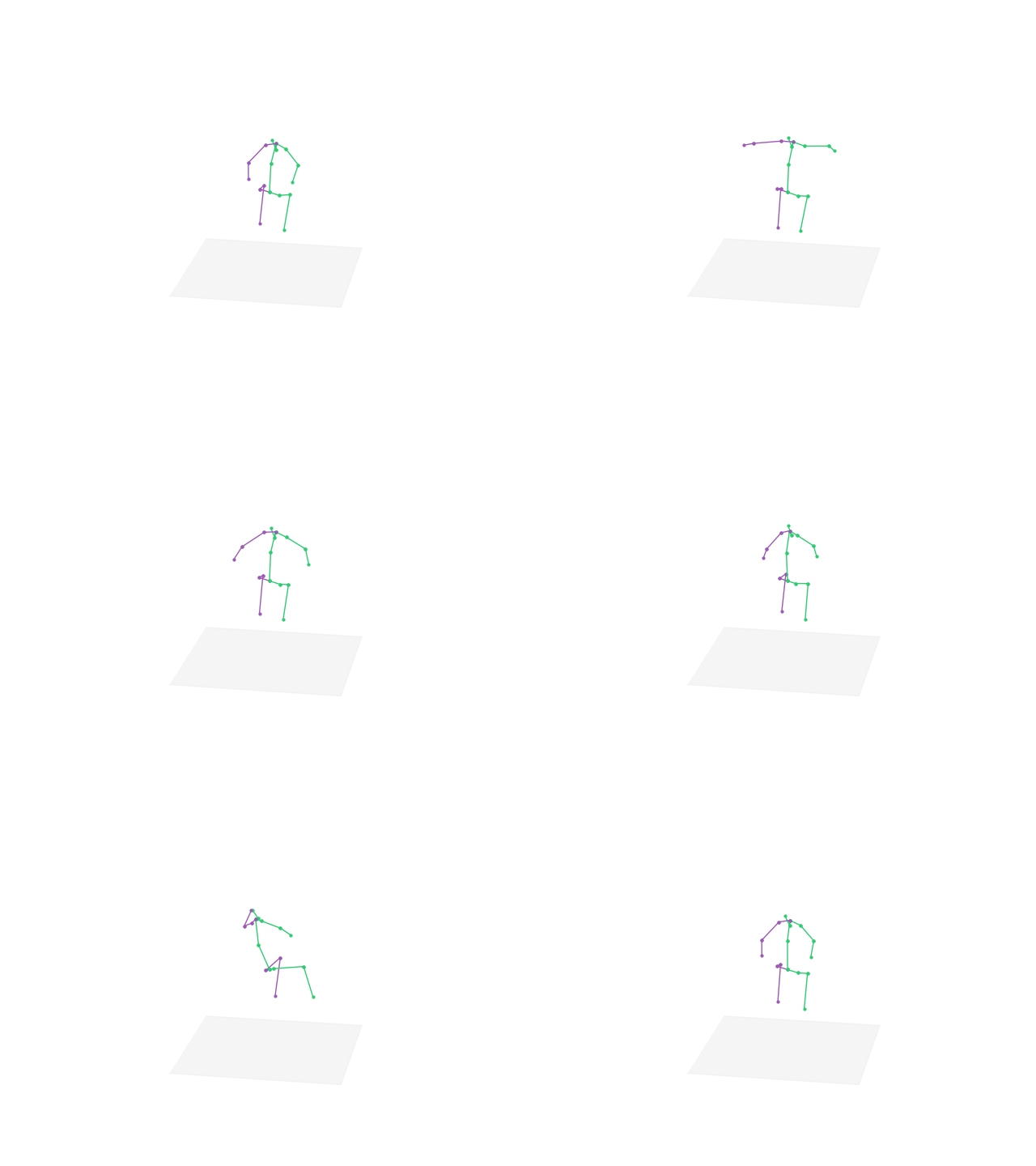
I am stuck here now. How to fix it? Thank you.

Hello. The first thing that I did has been to use openpose 1.3.1 that's inside your repo,but it didn't work. When I do "bin\OpenPoseDemo.exe --video rp.mov --write_json json_rp --write_video rp2.avi --number_people_max 1" I see that the openpose output window remains black. So,I used the installation of openpose 1.5 and I changed :
....the code of /3D Pose Baseline to VMD/src/openpose_3dpose_sandbox_vmd_new.py, line 104, to for o in range(0,len(_tmp_data),5):, from 3 to 5. Because when it was 3 your OpenMMD errored (when executed the "3D Pose Baseline to VMD"/OpenposeTo3D.bat):
after some time of work,the final message has been something like this :
Traceback (most recent call last):
File "src/openpose_3dpose_sandbox_vmd.py", line 484, in

I haven't been able to fix the error explained by @xamxixixo. (I've got the same exact error and I tried to fix it in the same way,because I haven't the right knowledge to do in a different way) and I opened a post on SO :
https://stackoverflow.com/questions/60386017/indexerror-list-index-out-of-range-when-converting-real-person-videos-to-the-mo
I haven't been able to fix the error explained by @xamxixixo. (I've got the same exact error and I tried to fix it in the same way,because I haven't the right knowledge to do in a different way) and I opened a post on SO :
https://stackoverflow.com/questions/60386017/indexerror-list-index-out-of-range-when-converting-real-person-videos-to-the-mo
Thank you. There is a temporary solution that I am using, is to keep using the GTX 1060 and keep the openpose 1.3. My PC now has 2 GPUs, I installed CUDA 10 and CUDA 8 (when install CUDA 8 just remember to not choose those drivers, software, etc. only CUDA 8.) And then I choose to run OpenMMD-master\bin\OpenPoseDemo.exe with the GTX 1060 and CUDA 8 by configuring the setting in the Nvidia Control Panel (you can see it by hitting right mouse on the desktop if you are using Nvidia)
The first step of OpenMMD will be a bit slower. But well, at least it works.
@xamxixixo,I have two computers. The old one is equipped with the GTX 1060 as your,the new one with the RTX 2080 ti on Windows 10. I would like to avoid using the old computer. I have already installed cuda 8.0 on the new computer. My hope is to set the path of CUDA to the version 8 on the enviromental variables table,and trying to configure the tensorflow and anaconda with cuda 8 and cudnn for cuda 8. Regarding the driver,I think that I can't install the driver attached with cuda 8 on the new pc,since the RTX 2080 ti does not support such old driver. What happens if I don't do it ? What happens if I keep installed the newest nvidia driver ? Anyway,whats your goal ? Which tool are u using ? Are u using blender ? I reached this repo because I wasn't able to make work this repo : https://gitlab.com/sat-metalab/blender-addon-openpose ; this is what really interest me.
@xamxixixo : can u explain to me why I get this error even if I have installed the cudatoolkit 8 and the cudnn 7.1.4 with conda ? The error wants that I do that and I did that. These are the commands that I've used :
pip install tensorflow==1.15 conda create -n tensorflow-old pip python=3.6 activate tensorflow conda install cudatoolkit==8 conda install cudnn==7.1.4
when I give this command :
bin\OpenPoseDemo.exe --video rp.mov --write_json json_rp --write_video rp2.avi --number_people_max 1
the error is :
F0225 16:57:10.675187 20208 pooling_layer.cu:212] Check failed: error == cudaSuccess (8 vs. 0) invalid device function *** Check failure stack trace: ***
these are my system variables :
CUDA_PATH=C:\Program Files\NVIDIA GPU Computing Toolkit\CUDA\v8.0
CUDA_PATH_V10_0=C:\Program Files\NVIDIA GPU Computing Toolkit\CUDA\v10.0
CUDA_PATH_V10_2=C:\Program Files\NVIDIA GPU Computing Toolkit\CUDA\v10.2
CUDA_PATH_V8_0=C:\Program Files\NVIDIA GPU Computing Toolkit\CUDA\v8.0
libnvvp=C:\Program Files\NVIDIA GPU Computing Toolkit\CUDA\v8.0\libnvvp
NVTOOLSEXT_PATH= C:\Program Files\NVIDIA Corporation\NvToolsExt\
PATH=C:\Program Files\NVIDIA GPU Computing Toolkit\CUDA\v8.0\bin;C:\Program Files\NVIDIA GPU Computing Toolkit\CUDA\v8.0\libnvvp;C:\Program Files\NVIDIA GPU Computing Toolkit\CUDA\v10.2\bin;C:\Program Files\NVIDIA GPU Computing Toolkit\CUDA\v10.2\libnvvp;C:\Program Files\NVIDIA GPU Computing Toolkit\CUDA\v10.0\bin;C:\Program Files\NVIDIA GPU Computing Toolkit\CUDA\v10.0\libnvvp
I suspect that the nvidia driver that I'm using (26.21.14.4219) decides everything
@xamxixixo : can u explain to me why I get this error even if I have installed the cudatoolkit 8 and the cudnn 7.1.4 with conda ? The error wants that I do that and I did that. These are the commands that I've used :
pip install tensorflow==1.15 conda create -n tensorflow-old pip python=3.6 activate tensorflow conda install cudatoolkit==8 conda install cudnn==7.1.4
when I give this command :
bin\OpenPoseDemo.exe --video rp.mov --write_json json_rp --write_video rp2.avi --number_people_max 1
the error is :
F0225 16:57:10.675187 20208 pooling_layer.cu:212] Check failed: error == cudaSuccess (8 vs. 0) invalid device function *** Check failure stack trace: ***
these are my system variables :
CUDA_PATH=C:\Program Files\NVIDIA GPU Computing Toolkit\CUDA\v8.0 CUDA_PATH_V10_0=C:\Program Files\NVIDIA GPU Computing Toolkit\CUDA\v10.0 CUDA_PATH_V10_2=C:\Program Files\NVIDIA GPU Computing Toolkit\CUDA\v10.2 CUDA_PATH_V8_0=C:\Program Files\NVIDIA GPU Computing Toolkit\CUDA\v8.0
libnvvp=C:\Program Files\NVIDIA GPU Computing Toolkit\CUDA\v8.0\libnvvp
NVTOOLSEXT_PATH= C:\Program Files\NVIDIA Corporation\NvToolsExt\
PATH=C:\Program Files\NVIDIA GPU Computing Toolkit\CUDA\v8.0\bin;C:\Program Files\NVIDIA GPU Computing Toolkit\CUDA\v8.0\libnvvp;C:\Program Files\NVIDIA GPU Computing Toolkit\CUDA\v10.2\bin;C:\Program Files\NVIDIA GPU Computing Toolkit\CUDA\v10.2\libnvvp;C:\Program Files\NVIDIA GPU Computing Toolkit\CUDA\v10.0\bin;C:\Program Files\NVIDIA GPU Computing Toolkit\CUDA\v10.0\libnvvp
I suspect that the nvidia driver that I'm using (26.21.14.4219) decides everything
Sorry I have not met your problem before. But, I would suggest you use the GTX 1060, in any case. In my case I installed the 1060 in my new PC together with the 2080Ti. Because I am using Windows 10, so I did not install CUDA via command lines as you did, but used the setup file. After some trial and error, besides the installed CUDA 10 with full of drivers and software, then I installed CUDA 8 with only the CUDA, unchecked all the drivers and software of the 8th version.
Look at your paths, I guess you are using Windows too. So I would suggest you remove all the CUDA, download the setup files of CUDA 10 and CUDA 8 and reinstall again. I did that and temporarily be able to use the program properly for now. If you would use both the 1060 and the 2080Ti in your new PC like me, first you should install full of CUDA 10, then the CUDA 8 (I repeat, uncheck everything except for the CUDA).
Then you go to desktop, hit right mouse button, click Nvidia control panel, click Manage 3d settings, choose tab Program settings. Select the program by click the Add button. Then you choose this file: OpenMMD-master\bin\OpenPoseDemo.exe.
And then below is step 2, Specify the settings for this program. You find the CUDA - GPUs and choose the 1060. Then you apply. That's how I did it. And you don't need to configure anything else.
Also I don't use the latest tensorflow and matplotlib. It has been a long time since I have installed it, so as I remember, the tensorflow is 1.13 or 1.14, and matplotlib maybe the 1.3.1. I failed to run the program with the latest packages.
@xamxixixo : I've been able to make it work on my old PC,cpu I5 and geforce gtx 1060. good. Now I would like to know if there is a way to produce more points for the face. You know,I would like to create an animation where there will be a lot of close up and I need more expressivity on the characters faces. I know that I can use open CV for this matter,but if I follow this route I should make more work in Blender. Infact I found a script that allows to track the face movements of someone in a video,but it uses a specific armature. For tracking the body movements I should use another specific armature. I should do the retargeting,wasting a lot of time. For me it's better to track everything (face and body) in one shot only,using only openpose with the maximum points tracked allowed.
@xamxixixo : I've been able to make it work on my old PC,cpu I5 and geforce gtx 1060. good. Now I would like to know if there is a way to produce more points for the face. You know,I would like to create an animation where there will be a lot of close up and I need more expressivity on the characters faces. I know that I can use open CV for this matter,but if I follow this route I should make more work in Blender. Infact I found a script that allows to track the face movements of someone in a video,but it uses a specific armature. For tracking the body movements I should use another specific armature. I should do the retargeting,wasting a lot of time. For me it's better to track everything (face and body) in one shot only,using only openpose with the maximum points tracked allowed.
I am afraid that your goal could not be done. Because when you capture the body, the face will be too small to capture. Even the openpose itself will export the wrong output if you take a video with too small body, or the camera is too far from the actor. With the current technology, I think it is still too hard to capture everything in one take with the correct result.
Your best bet is to capture in, well. many takes. One for the body, one for the face, one for the finger, etc. That will gives you the most correct result. Or else you may buy a mocap suit.
In case if you are making anime, about face animation, I suggest you to draw it. The amount of work and the "animeish" will be harder to do it in 3d instead of drawing it. If you are making western 2d animation, I suggest you to take a look on Cartoon Animator 4. They provide face mocap with phone camera or webcam. If you are making 3d, I think there is a bunch of mocap software, if you are using iphone X I think there is one in the appstore.
@xamxixixo : I'm not so sure that my goal can't be done. I can easily fix the problem dividing the scenes of my animation into two categories : 1) close ups,with large faces 2) non close ups. Basically what I want to do now and that I'm already doing. When I want to create a close ups I use open open cv + a blender script. When I want to make a distant recording I want use open pose. When the person is talking,the body does not move. When the body is moving also the face moves,but the facial expression remains neutral. But there is an important difference. Now,when I use open cv I should use a specific armature. When I want to use open pose I should use another armature (in this specific case is the armature used by the author of this project). I know that open pose can detect a lot of points on the face. I want to do that. In this manner,I can use only ONE armature. I can skip open cv completely. What is still the same is to divide the scenes in two categories. But I don't think that it is a real problem. It does not happens frequently that someone talks while is doing something else. And anyway,it makes sense to do like I want to do. My question is : do you know if someone already created another open pose project,but this time that's only related to the facial expressions ?
I did another experiment. I've chosen a scene with 3 people inside and I gave it to the script. Sounds interesting to track multiple people in one shot. I've got no errors during the scripts execution,but the final vmd file does not work at all. Did u already tried to do that ? @xamxixixo
I did another experiment. I've chosen a scene with 3 people inside and I gave it to the script. Sounds interesting to track multiple people in one shot. I've got no errors during the scripts execution,but the final vmd file does not work at all. Did u already tried to do that ? @xamxixixo
I did not do that. So far my scenes are with one character only. Even with multiple characters, I would still work with 1 character/take. Because I am making anime, my workflow and my genre of animation, I assume, are different from your. It will be too hard to control the shading to be correct with my shader I am using.
About an open project of face animation, sorry I don't know much. But if it 3d realistic animation, I only know a project for mouth animation called VOCA (https://github.com/TimoBolkart/voca)
If there is a lipsync technology that analyzes voice to animation, I think it is possible to turn real face expression to face animation in every genre. I am thinking of Deepfake more than Openpose. Did you watch Lion King remade by Deepfake?
Another experiment to do is to prepare the scene with multiple people,removing all the people except one and telling to the script that there is 1 only. and do the same with all the other ones. Anyway I suspect that it is not able to capture the movements when the character moves too much from it's starting point. Regarding for voca,it's a shame that it does not support the eye blinking,because in that case it would create more realistic results. I don't like DeepFakes. The graphic style of the deepfaked movie looks too much like the style of the original movies (I'm not talking about the face,but all the rest of the body). Now I'm interested to this :
https://gitlab.com/sat-metalab/blender-addon-openpose
and I have hired a programmer to make it work,on upwork :
https://www.upwork.com/ab/applicants/1233515541187842048/job-details
@xamxixixo. Can you help me a little bit ? I would like that openpose detects all the people in the scene. Since I've already tried to use the parameter --person_idx 3 and it didn't work,I've thought to use a different approach. I've used a tool and I have hidden 2 of the 3 characters shown inside the scene. The people that I don't want to be identified an tracked now have been obfuscated. You can give a look here to see how is the starting scene : https://drive.google.com/open?id=1SsPdbImw6T1UPE4xGW6CxVqdF_8b4roC ; instead this is the scene where I have removed the unwanted people : https://drive.google.com/open?id=1Xl1mBgfc0KuHtOIH1BCH5iGgdcx4TW0K : Now,I ran all the scripts provided but I haven't been able to make work the last one because this error :
Traceback (most recent call last):
File "applications\pos2vmd_multi.py", line 2305, in
I suspect that it happens because the character moves too much. Please,give a look at this pictures located inside the folder called "json_rend_3d_20200301_133750_idx01",showing the tracking hasn't been good :
https://drive.google.com/open?id=1qm5TdEal1WhWe4EnCo3pLwykzigkYAzF
what I would like that you do is to repeat all the steps using the same video file that I used (render.mp4),to see if you get the same error. thanks.
If you are doing an experiment instead of making it for your work, I assume you are testing it to know that will it work in this situation, then I am pretty sure that it will not. As I knew, this OpenMMD cannot predict things that are hidden, but it still has to calculate the bone of that object, hope you understand what I mean. Even if OpenMMD can export a motion from your scene, the rigs of hidden object (in this case are the feet) will be chaos, because OpenMMD could not see them from step 1, but a full-body bone is a must of its output . Basically, the output of x divide 0 (object is unseen) is an error. Hope it can be an answer for your experiment, this is just me guessing.
Or else if you want to make an animation from this scene for your use, I would suggest you to be the actor yourself, with your full-body can be seen. It is a simple human movement anyway, so I am pretty sure that the output will be correct. Because the models of OpenMMD are limited in simple movements (walk, run, jump, etc.) . I tested with some parkour movement and they all failed, OpenMMD can export output but they were all wrong. And I don't have time to research into training new models for it, so I decided to use OpenMMD for simple animations.
I don't want that it detects the hidden things. I've hidden them because I want that it detects only the people that I want to track. Here the idea is to tell to open pose to detect and track one object at a time. I'm doing like this because I realized that it does not work if I want to detect more than one object at the same time. Since I have to detect 3 people in the scene,on the second round I will do the same as the first round,but this time I will cover different people in the scene. Are you telling that it can detect and track the walking ? This is exactly what I'm tryng to do,but it failed. Can you show me that you can stick a 3d character mesh to the man that is walking on the video file that I used ?
Sorry I cannot. Because as I had written, this OpenMMD cannot work properly with the actor whose part (of him) is hidden. I did not tell you that OpenMMD can track any walking movement, I meant it can work with fullbody and simple movements. The legs is hidden, but OpenMMD's output is a fullbody rig, so what is hidden (the legs) would still be calculated, but wrong calculated, so the output is wrong, even if it can be exported or not. I also have some motion that are complicated enough to not use OpenMMD, and in that case I have to choose another solution: traditional animation by mouse.
I once tried with a scene that has multiple people in it, but I set the people quantity is 1. So that when running, OpenMMD automatically switches the detecting bone from one to another. I would like to choose the scene that has only 1 actor in it, even if I have to be the actor, than a multiple people scene.
Though OpenMMD is not made by me, I think it needs a lot of improvement. And I am talking about OpenMMD here, not Openpose. I have not used the new Openpose yet. I need the armature of MMD and only this OpenMMD can satisfy that condition.
ok. I'm not sure that only OpenMMD can satisfy your needs. Actually I'm looking for some programmers for making the debugging of https://gitlab.com/sat-metalab/blender-addon-openpose/ ; beause it does not work for me,but from a recent video,I see that it works fine : https://vimeo.com/341660082 ; in this video you will see only the face that has been tracked,but the addon for blender allows to track the head or the full body with a lot of points. Actually I'm using another addon to convert to/from fbx to mmd file format.
Thank you for the share. Looks interesting, I will take a deep look into it when I have time. Just that there is a problem with face mocap, it is not so stable for anime making. The addon of that video distorts the face, which I don't want in my production. But still, it has potential with proper research.
And your way to approach from fbx to MMD is good. I forgot to think about it that way long time ago. It all because of the shading. In MMD I can apply one shader to rule them all, but in BlenderI have to set every single thing, which made me to just do basic things in Blender and bring them all to MMD.
I will take a look into the Blender addon openpose. Anyway, this OpenMMD still cannot do the fingers, which is in my need right now.
The problem that it has with the face could depends by my little experience. The author says that it works good for the face. Anyway,I asked to a team of programmers to investigate. I would like to find the money to continue the development. In any case the author says that they will continue their work on spring. I'm working on the fingers too. I'm using the leap motion + a tool called "brekel pro hands". Sorry to tell you,but the leap motion device costs 80 dollars + 70 dollars for the brekel tool. I've also bought the "Oculus Rift DK2" that you can see in action here :
https://www.youtube.com/watch?v=LJPxyWM9Ujg&fbclid=IwAR2aUOFC9ob4x5qQNDSB_uHjIQnpaQW7QaKqG0jQ6UTYXCuhM356C5VioeA
Il giorno lun 2 mar 2020 alle ore 14:28 xamxixixo [email protected] ha scritto:
Thank you for the share. Looks interesting, I will take a deep look into it when I have time. Just that there is a problem with face mocap, it is not so stable for anime making. The addon of that video distorts the face, which I don't want in my production. But still, it has potential with proper research.
And your way to approach from fbx to MMD is good. I forgot to think about it that way long time ago. It all because of the shading. In MMD I can apply one shader to rule them all, but in MMD I have to set every single thing, which made me to just do basic things in Blender and bring them all to MMD.
I will take a look into the Blender addon openpose. Anyway, this OpenMMD still cannot do the fingers, which is in my need right now.
— You are receiving this because you are subscribed to this thread. Reply to this email directly, view it on GitHub https://github.com/peterljq/OpenMMD/pull/29?email_source=notifications&email_token=AAFYNC3GE7EUGEKFI7PEXSLRFOX6BA5CNFSM4KE2YOU2YY3PNVWWK3TUL52HS4DFVREXG43VMVBW63LNMVXHJKTDN5WW2ZLOORPWSZGOENPJMAQ#issuecomment-593401346, or unsubscribe https://github.com/notifications/unsubscribe-auth/AAFYNC3UVC7MHATMOEJVTHDRFOX6BANCNFSM4KE2YOUQ .
-- Mario.
what about this,also : https://github.com/CMU-Perceptual-Computing-Lab/MonocularTotalCapture
Amazing, but since it is from CMU, I think it is basically Openpose. Worth expecting anyway.
do u want to give me your email ? do u want to cooperate with me ? I want to install the monocular total capture repo files.
yeah,me too. I go with some kind of trial and errors and asking for some help here and there.