

 pbek
pbek
document tag user process
Documentation only.
Expected behaviour
New users can find a description of the designed processes for using tags.
For example, if I click
QOwnNotes app > a note title in the Search or create note block, right-click > New note
a new note pops up with a title including the creation date and time. How might a user find that page useful?
A good place for this documentation: https://www.qownnotes.org/getting-started/demo.html
Actual behaviour
If the requested documentation exists, I haven't found it. Maybe it could be easier to find.

I'm not sure I understand the question/request yet. You need information on how to add tags to a note?

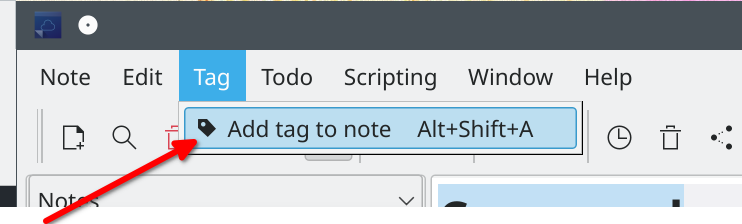
Thanks for responding.
My problem is that I don't know anything about these tags or how to use them. Maybe they're like OneNote links; using them takes focus to the right file and the right paragraph within the file. Or, maybe they take focus only to the right file.
I just used the "Add tag to note" menu option (thanks for pointing that out!); I don't see anything on the screen indicating any status is different and I don't know what to click to continue on the path of using tags. I don't know what notation to expect on-screen (if any; OneNote doesn't use on-screen notation at the target position of the note).
You should see a panel with the tag. Can you please make a screen shot of your screen? And best turn on all tagging panels in the windows menu.
Ah, good! I found the panel added when I clicked Tag > Add tag to note. (Since I found that, I'm not sending a screen shot.) I created a tag. I see that it starts to appear in the four panels normally displayed on the right by default. A dialog box indicated tags can get colors; I see how two of the default panels highlight note titles with the assigned tag color.
I repeated the process, giving me tags with different colors. I associated both tags with the note; only one color displayed (seems reasonable).
Is a tag otherwise useful?
Thanks for explaining this.
Tags are useful for filtering or if you don't want to use different sub-folders (like me).
And your documentation? Some like it sparse. Others want it "complete". This suggestion is to add some information about tags.
Oh yes, most of the functionality that is deemed "self-explanatory" isn't documented yet. I'm open for pull requests! Something like a tags.md in https://github.com/pbek/QOwnNotes/tree/develop/webpage/src/getting-started, you could try to add screenshots too if you like. I'd do the integration work.
Great! I'm happy to do a pull request for this later. My understanding of the feature is too low for now.
This issue is stale because it has been open for 30 days with no activity.
![github-actions[bot] avatar](https://avatars.githubusercontent.com/in/15368?v=4 "Published by a pub.dev verified publisher")
This issue was closed because it has been inactive for 14 days since being marked as stale.