

 pbek
pbek
Allow to switch between tabs by COMMAND/CTRL+<NUMBER>
Expected behaviour
- Default behavior to switch between open tabs is set to COMMAND/CTRL+<NUMBER> (e.g. COMMAND+1 moves you to the first opened tab, COMMAND+3 moves you to the third opened tab, CMD+9 moves you to the last opened tab, i.e. we mimic Firefox behavior).
- Is it possible to configure your own shortcut in Settings > Shortcuts.
Actual behaviour
Does not exist.

Those shortcuts are already reserved for the note text bookmarks... But there are shortcuts to move to the next and previous tab.

@pbek,
Those shortcuts are already reserved for the note text bookmarks
I don't use note text bookmarks (btw, I haven't even found these shortcuts in settings), so I'd just remap already defined shortcuts for a new switch between tabs shortcuts (by COMMAND+<NUMBER>). Would that be hard to implement? :)
(thanks a lot in advance!)
@pbek,
The note text bookmarks shortcuts are hardcoded. Or what are we talking about?
It is impossible (as of now) to set shortcuts for note text bookmarks (they are hardcoded as you clarified), and my suggestion here is that it would be nice to introduce shortcuts for tabs and note text bookmarks so that user could remap them as necessary from the defaults (for example to have tab switch by COMMAND/CTRL+<NUMBER>).
And that's what would be complicated, because those shortcuts are hard-coded in the Edit-Widget. 😅

I'd also prefer CTRL+PGUP/PGDN for prev/next notes tabs navigation :)
Just set a shortcut in the Shortcuts settings
I'd also prefer CTRL+PGUP/PGDN for prev/next notes tabs navigation :)
Just set a shortcut in the Shortcuts settings
For some reason, it doesn't work. These shortcuts give no response, at the same time setting them to Ctrl+Shift+PgUp/PgDn (adding Shift) makes it work perfectly well.
I don't see if any other app is intercepting the shortcuts, but this seems the most probable explanation. Is there a simple way to find it out?
Did you set a global shortcut? Hard to tell if there are interferences.
UPD: This is getting even more weird. After setting up the shortcuts with added "Shift", the ones without shift (the desired "Ctrl+PguP/PgDn") began to perform action, but leveraging the "Move up in note list" / "Move down in notes list" actions to which the Alt+Up/Down are clearly assigned to.
No global shortcuts are set.
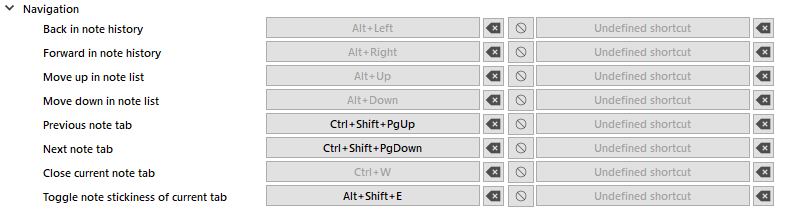
I'm on Windows 10 21H2, ver. 10.0.19044.1526
CTRL+PGUP/PGDN
Those shortcuts are unfortunately hard-coded since https://github.com/pbek/QOwnNotes/issues/194. Best open another issue, all this has nothing to do with this issue. 😉