

 pbek
pbek
[Visual Glitch] Some "overlapping" in the Note Tag panel area.
As they say here "an image is worth a thousand words" .. so look at the picture xD
(I humbly made a sort of suggestion too)
I think there's no need for logs on this one.. it's only a visual glitch.
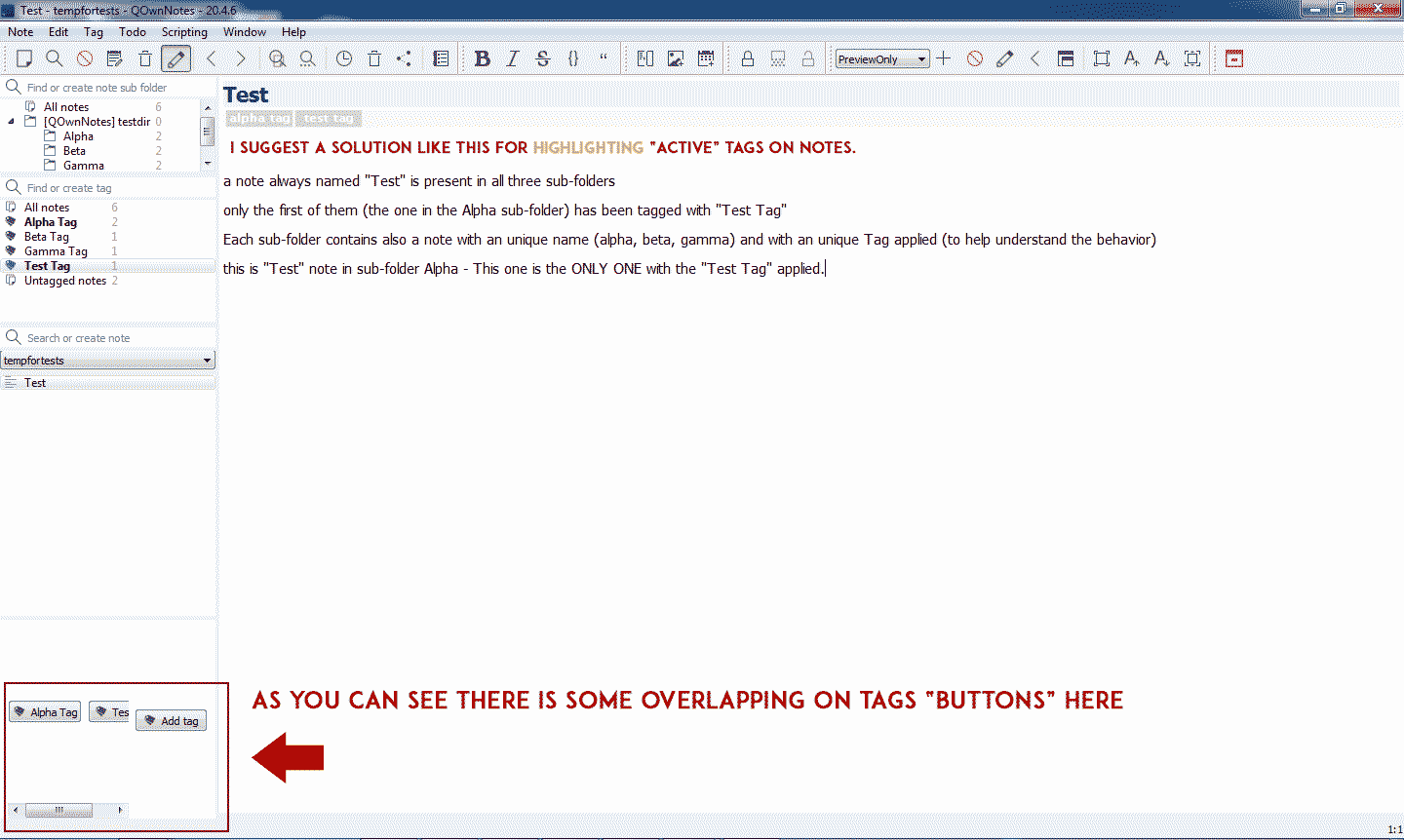

Yes, I know this behavior. There is no easy way to improve that as long there needs to be a scrollbar visible. If you are using that many tags you can always move the tagging panel to the center bottom.

You can also turn off the panel completely, since assigned tags are bold in the tag tree and you can also easily tag notes by double-clicking the tags.
You can also turn off the panel completely, since assigned tags are bold in the tag tree and you can also easily tag notes by double-clicking the tags.
Yes, I know. But when you have a lot of tags it's easier to have listed only the one associated to the note you're working on.
Like I said, there is a scrollbar. You can also move the panel to an area where you have more horizontal space.
Like I said, there is a scrollbar. You can also move the panel to an area where you have more horizontal space.
Yes, I've already placed it in the bottom area.. it's more fitted there, you can use all the width of the screen this way.
Another visual glitch is in the Tag Panel: it doesn't use the space available very well. There are two "fields" in the panel: the tag name and the number: it's impossibile to resize the fields and for some reason the number field occupies most of the area even if it's always 1 digit/character!
Even extending the "panel area" (dragging the border with the edit area) the ratio of space occupied by the two fields remains constant and even if there's a lot of empty space available it is occupied by the number field and the content of the tag-name field is often brutally truncated!
I don't know how the application decides how many space to give to the tag-name field, because it's not fixed. Sometimes, without a reason, it enlarges, but there's no apparent reason for it .Even closing and reopening the application doesn't make any difference: it seems that the application sometimes enlarge it by itself.. but most of the times does not.
Sizes are determined automatically but currently only when the tree is rebuilt. But can we please talk about treewidget column width resizing in a different feature request. :grin:
@chrixxxx, before you open a new feature requests, does this already help?
20.4.11
- the column widths of the tag tree panel are now also recalculated when the tree items are expanded or collapsed, not only when the tree is rebuilt or the application window is resized
There now is a new release, could you please test it and report if it works for you?
There now is a new release, could you please test it and report if it works for you?
I'm to download it right now (after I'll finish this post) and I'll test it later in the night and share with you my thoughts tomorrow.
I still have to open the 2 "new" issues (one is more like a "feature request) I mentioned in the other post yesterday.. but I think it's better if I'll give you some break,.. I don't want you to hate me xD
(I'll do it tomorrow xD )
Thank you again for your hard working in the meanwhile.