

 patternfly
pfe-dropdown dropdown item menus do not adjust correctly for color context
Description of the issue
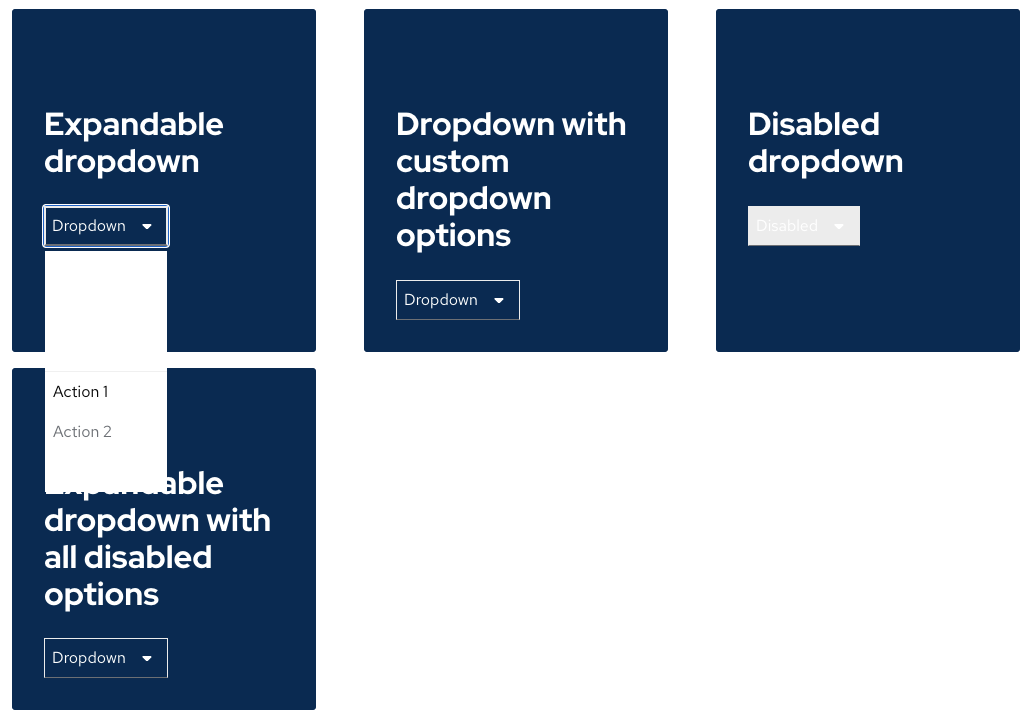
pfe-dropdown menu items when applied with a given color context have incorrect styles applied.
Steps to reproduce
- Open Color Contrast Preview Demo for pfe-dropdown: https://deploy-preview-1976--patternfly-elements.netlify.app/components/dropdown/demo/
- In browser console type
document.querySelectorAll('pfe-card').forEach(card => card.setAttribute('color', 'darker')) - Click a dropdown.
You can set the card setSttribute color to darker|darkest|accent|complement|lighter|lightest to see differing results.
The different values cause varying outcomes in the dropdown menu background, link, and text colors.
Expected behavior
The expected behavior is to have the dropdown item menu background, link, and text colors reflect the color-palette of its parent context.
Suggested Fix
Add color context provider and consumer to pfe-dropdown.ts. Applying the provider would allow the dropdown to set its own color property as well. The current approach is the dropdown as a transparent background.
Add color context consumer to pfe-dropdown-item.ts
Add CSS to swap CSS properties based on on attribute in pfe-dropdown-item.scss

@zeroedin I can provide specs when we prioritize migrating this component.

Closing as out of date. When pf-dropdown is built it will no longer have these context colors.