

 patchthecode
JTACMonth View is Unselectable on tvOS
**(Required) Version Number: 8.0.3 **
Description
When my app with a JTAppleCalendar boots up, the JTACMonth view is unselectable. I am running it on tvOS, and the Apple TV Remote is unable to select any date cells despite having the code added to show where the current selection is. I tried tapping the arrow keys and swiping the touchpad of the remote, but there was no reaction.
Steps To Reproduce
I followed steps 1, 2, and 3-2 from the Patch the Code guide, and followed the Migration Guide for version 8. The code is the same as in the guide.
Expected Behavior
The calendar(_ didSelectDate) function should be configuring the cell that is selected with a view that indicates where the view is.
Additional Context
Any help would be appreciated.

Well thank you for being one of the few TVOS users :D ! As there are few users, they might be some missed issues.
First, are you saying that this worked with version 7 and has stopped working in version 8? Or did you just encounter this in version 8 only.

Well thank you for being one of the few TVOS users :D ! As there are few users, they might be some missed issues.
First, are you saying that this worked with version 7 and has stopped working in version 8? Or did you just encounter this in version 8 only.
Version 8 only. Should I try re-starting my app in version 7?
oh, i am just trying to determine where the error could have started. I'll look into it.
Do you have a very very minimal app which reproduces this issue?
Right now the app is just the calendar view, the code is virtually identical with the tutorial with a few minor changes.
got the link to which tutorial? I think i had a couple up there. I'll look at it after work
Here is a screenshot of my app. I tried placing a Segmented Control at the top, and so the focus starts on Sun. However, when I hit the down arrow, the focus vanishes and cannot return to any other part of the app. It would seem the calendar "consumes" the focus, but nothing can be done once it is selected.
-- Update: I accidentally had Slow Animations turned on, and the focus can actually return to the Segmented Control. The focus was indeed going to the calendar, but the code to have a cursor appear over a day to indicate the selection is not functioning properly.
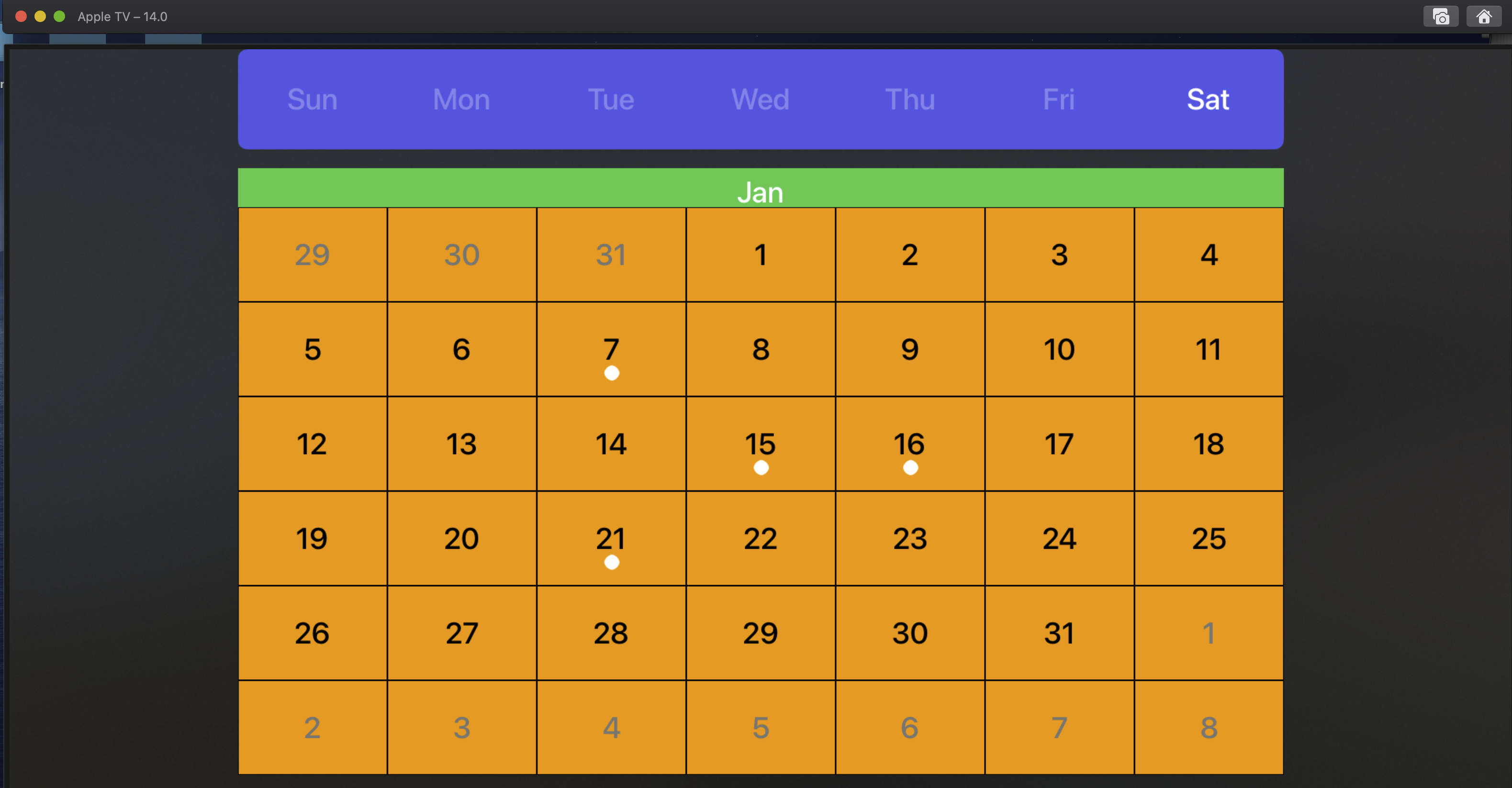
Any thoughts?
Going on vacation tomorrow. I'll be free to work on this. I got caught up with work.
After looking at it, i have a sneaking suspicion that you used the 7.0 tutorial to build a 8.0 project. Without realizing that the function names have been changed? as shown here -> https://patchthecode.com/jtapplecalendar-version-8-0-0-migration-guide/
func calendar(_ calendar: JTACMonthView, didSelectDate date: Date, cell: JTACDayCell?, cellState: CellState, indexPath: IndexPath) {
        configureCell(view: cell, cellState: cellState)
    }

    func calendar(_ calendar: JTACMonthView, didDeselectDate date: Date, cell: JTACDayCell?, cellState: CellState, indexPath: IndexPath) {
        configureCell(view: cell, cellState: cellState)
    }
This seems to match up with the migration guide.
Let me know if there is any difficulty sending it. Part of the reason i am asking for the sample tvOS app is because I am more used to creating iOS apps.
Ok thats one of the reasons i hate working with tvOS... maybe because i do not know how to use that remote thing. Using your project, i am able to select dates.
the code to have a cursor appear over a day to indicate the selection is not functioning properly.
Are you saying that a hovering cursor should appear over the area where the remote is moving? If yes, then I will need help to do this code. I have never coded on tvOS before.
Interesting, so it's working for you but not me... this was the intended effect I wanted to see, but for some reason the selection is invisible for me. Regarding your second paragraph, that's not what I was hoping for. I will also need to be able to scroll between months... but before that, how do we get this working for me? I'm assuming you didn't touch any of the code?
You are right. I didnt touch any code. My i must admit, that Siri remote controller simulator is a pain in the ass to use. I had to read tutorials on how to use it.
You have to keep your finger on the Option button while pressing the blank area of the remote.
I am aware of that, but you can also make selections by hitting the arrows on the remote, which can be accessed in the simulator with the arrow keys on your keyboard. But either way, the selection does not appear for me.
I am using XCode Version 12.2 tvOS 14.2 simulators.
If its working for me then it should work for you. Can you let me know your version?
I can confirm XCode is on Version 12.2 and the simulator is on version 14.2.
closing this issue. assuming resolved.
If you still have an issue with this let me know.