

 patchthecode
Horizontal Calendar cell height issue
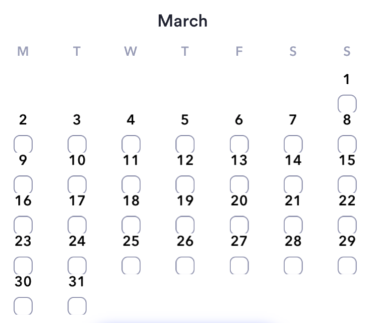
Hi there I am facing issue with no of row 6 when the month of 5 rows came like april 2020 then everything ok otherwise everything is messed up please see the ss.
I used calendarView.cellSize = UIScreen.main.bounds.width / 7 but no impact of this please help I am stuck.


Hi, what is the problem? Showing me a screenshot and expecting me to know what the problem is will not work.
You need to tell me exactly what this means
everything is messed up"

Hi @patchthecode I am using the horizontal month calendar view and my configuration is
func configureCalendar(_ calendar: JTACMonthView) -> ConfigurationParameters {

    let parameter = ConfigurationParameters(startDate: startDate,
                                            endDate: endDate,
                                            numberOfRows: 6,
                                            calendar: self.calendar,
                                            generateInDates: .forAllMonths,
                                            generateOutDates: .tillEndOfRow,
                                            firstDayOfWeek: .monday,
                                            hasStrictBoundaries: true)
    return parameter

}
and in my viewdidload the code is
    calendarView.isPagingEnabled = true
    calendarView.allowsMultipleSelection = false
    calendarView.allowsRangedSelection = false
    calendarView.scrollDirection = .horizontal
    calendarView.isScrollEnabled = true
    calendarView.alwaysBounceVertical = false
    calendarView.minimumLineSpacing = 0
    calendarView.minimumInteritemSpacing = 0
    calendarView.cellSize = UIScreen.main.bounds.width / 7
My issue is when the month having all dates lie between 5 rows then everything is good no issue in UI (like April 2020) but when the month required 6 rows for showing all dates then UI is messed up (like May 2020).