

 pacoweb
Install Failed
When attempting to update the extension installed to Azure Data Studio:
When v1.36.2 Azure data studio and vs code preview, are both closed, then double click the (Unblocked) vsix.
Message is: Install Failed 'One or more extensions are for Visual Studio Code. Try installing them in Visual Studio Code'
Log contents:
10/06/2022 12:51:26 PM - Microsoft VSIX Installer
10/06/2022 12:51:26 PM - -------------------------------------------
10/06/2022 12:51:26 PM - vsixinstaller.exe version:
10/06/2022 12:51:26 PM - 17.3.22-preview1
10/06/2022 12:51:26 PM - -------------------------------------------
10/06/2022 12:51:26 PM - Command line parameters:
10/06/2022 12:51:26 PM - C:\Program Files (x86)\Microsoft Visual Studio\Installer\resources\app\ServiceHub\Services\Microsoft.VisualStudio.Setup.Service\VSIXInstaller.exe,C:\Users\MYUSERNAME\Downloads\extra-sql-script-as-0.5.0.vsix
10/06/2022 12:51:26 PM - -------------------------------------------
10/06/2022 12:51:26 PM - Microsoft VSIX Installer
10/06/2022 12:51:26 PM - -------------------------------------------
10/06/2022 12:51:26 PM - Initializing Install...
10/06/2022 12:51:26 PM - Extension Details...
10/06/2022 12:51:26 PM - Identifier : extra-sql-script-as
10/06/2022 12:51:26 PM - Name : Extra Sql Script As
10/06/2022 12:51:26 PM - Author : pacoweb
10/06/2022 12:51:26 PM - Version : 0.5.0
10/06/2022 12:51:26 PM - Description : This extension adds several missing options to the context menu of the object tree: Script Table as INSERT, Script Table as UPDATE...
10/06/2022 12:51:26 PM - Locale : en-US
10/06/2022 12:51:26 PM - MoreInfoURL :
10/06/2022 12:51:26 PM - InstalledByMSI : False
10/06/2022 12:51:26 PM - SupportedFrameworkVersionRange : [0.0,2147483647.2147483647]
10/06/2022 12:51:26 PM -
10/06/2022 12:51:26 PM - SignatureState : Unsigned
10/06/2022 12:51:26 PM - Supported Products :
10/06/2022 12:51:26 PM - Microsoft.VisualStudio.Code
10/06/2022 12:51:26 PM - Version :
10/06/2022 12:51:26 PM - ProductArchitecture : x86
10/06/2022 12:51:26 PM -
10/06/2022 12:51:26 PM - References :
10/06/2022 12:51:26 PM - Signature Details...
10/06/2022 12:51:26 PM - Extension is not signed.
10/06/2022 12:51:26 PM -
10/06/2022 12:51:26 PM - Searching for applicable products...
10/06/2022 12:51:26 PM - Found installed product - Global Location
10/06/2022 12:51:26 PM - Found installed product - Visual Studio Professional 2022 Preview
10/06/2022 12:51:26 PM - VSIXInstaller.NoApplicableSKUsException: One or more extensions are for Visual Studio Code. Try installing them in Visual Studio Code.
at VSIXInstaller.ExtensionService.GetInstallableDataImpl(IInstallableExtension extension, String extensionPackParentName, Boolean isRepairSupported, IStateData stateData, IEnumerable1& skuData) at VSIXInstaller.ExtensionService.GetInstallableData(String vsixPath, String extensionPackParentName, Boolean isRepairSupported, IStateData stateData, IEnumerable1& skuData)
at VSIXInstaller.ExtensionPackService.IsExtensionPack(IStateData stateData, Boolean isRepairSupported)
at VSIXInstaller.ExtensionPackService.ExpandExtensionPackToInstall(IStateData stateData, Boolean isRepairSupported)
at VSIXInstaller.App.Initialize(Boolean isRepairSupported)
at VSIXInstaller.App.Initialize()
at System.Threading.Tasks.Task`1.InnerInvoke()
at System.Threading.Tasks.Task.Execute()
--- End of stack trace from previous location where exception was thrown ---
at Microsoft.VisualStudio.Telemetry.WindowsErrorReporting.WatsonReport.GetClrWatsonExceptionInfo(Exception exceptionObject)

Hi
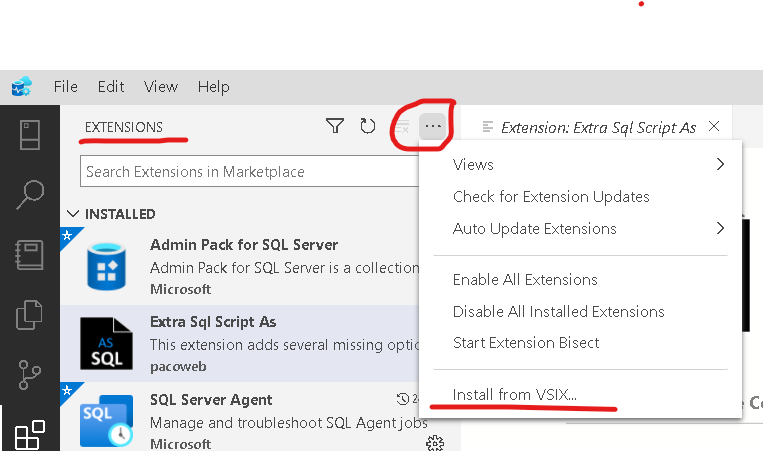
You have to use the option INSTALL FROM VSIX in Extensions section, in Azure Data Studio
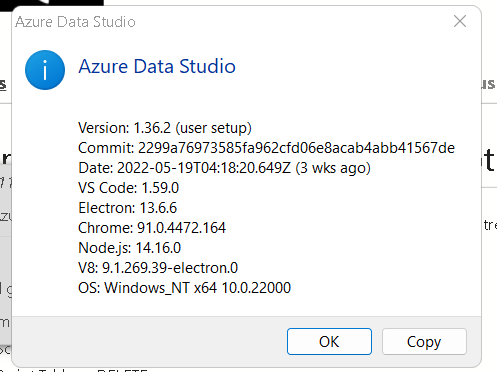
Tested with this version
Thanks
