

 ottomated
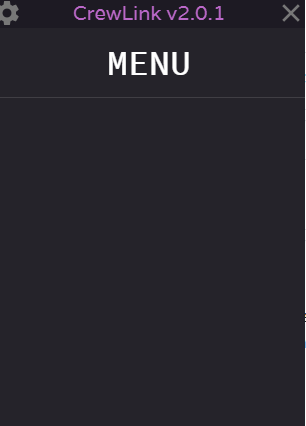
Stuck on MENU
You MUST use this template or your issue will be deleted.
Pre-Flight Checklist
Please use this checklist to avoid spamming:
- [ yes] I am not asking a question => use the Discord if you are
- [ yes] I am using the Steam version of Among Us
- [ yes] I have tried to use an alternative voice server
- [ yes] I have checked everyone in my lobby is on the same CrewLink server
- [ yes] I have used
Ctrl+Ron the CrewLink app when I can't hear some people (this is a known issue) - [yes ] I have checked that the CrewLink server I'm using is up to date
- [yes] I have a screenshot of any errors
- [yes and there is, I need it to get more attention ] I have checked that someone else has not reported this using the search bar
Describe the bug
When I open up crewlink (I have tried normally and run as administrator) is shows only the top bar which says "MENU" To Reproduce Steps to reproduce the behaviour:
- Go to 'Your crewlink app'
- Click on 'nothing'
- Scroll down to 'nothing'
- See error
Expected behaviour
It should show all players either with a red circle around them (They are not using crewlink) or a green circle when they are speaking Screenshots
Desktop (please complete the following information):
- OS: [Windows 10]
- Version: [IDK Latest]
Additional context

Do not create another issue as already have 3 issues on the same subject, this is caused because of the new update of Among Us that ended up breaking the CrewLink and have to wait for Ottomated to solve this problem but have a solution for this, look the issue in #623 that solves this problem.

This is because crewlink is not updated for the lastest among us ver... Everyone have to wait for Ottomated to fix it.
