
instagram-without-api-node
 instagram-without-api-node copied to clipboard
 orsifrancesco
A simple Node.js code to get unlimited instagram public pictures by every user without api, without credentials.

Instagram Without APIs
Instagram Scraping in August 2022, no credentials required
This is a Node.js library, are you looking for the same in PHP? go to https://orsi.me/instagram-without-api/.
A simple Node.js code to get unlimited instagram public pictures by every user without api, without credentials (just token from cookies), just Instagram Scraping in 2022 (with cookie and image data in base64).
You can get the latest pictures/information from an account or a single picture/information by id.
📦 npm link
🎮 Demo / Example
⚖️ Licensed under MIT
🤓 Author @orsifrancesco
☕ Offer me a coffee
📦 Installation
npm i instagram-without-api-node

# download the file https://github.com/orsifrancesco/instagram-without-api-node/blob/master/test.js
# add your cookie, user-agent and x-ig-app-id following the next step "How to get Instagram Cookie"

node test.js
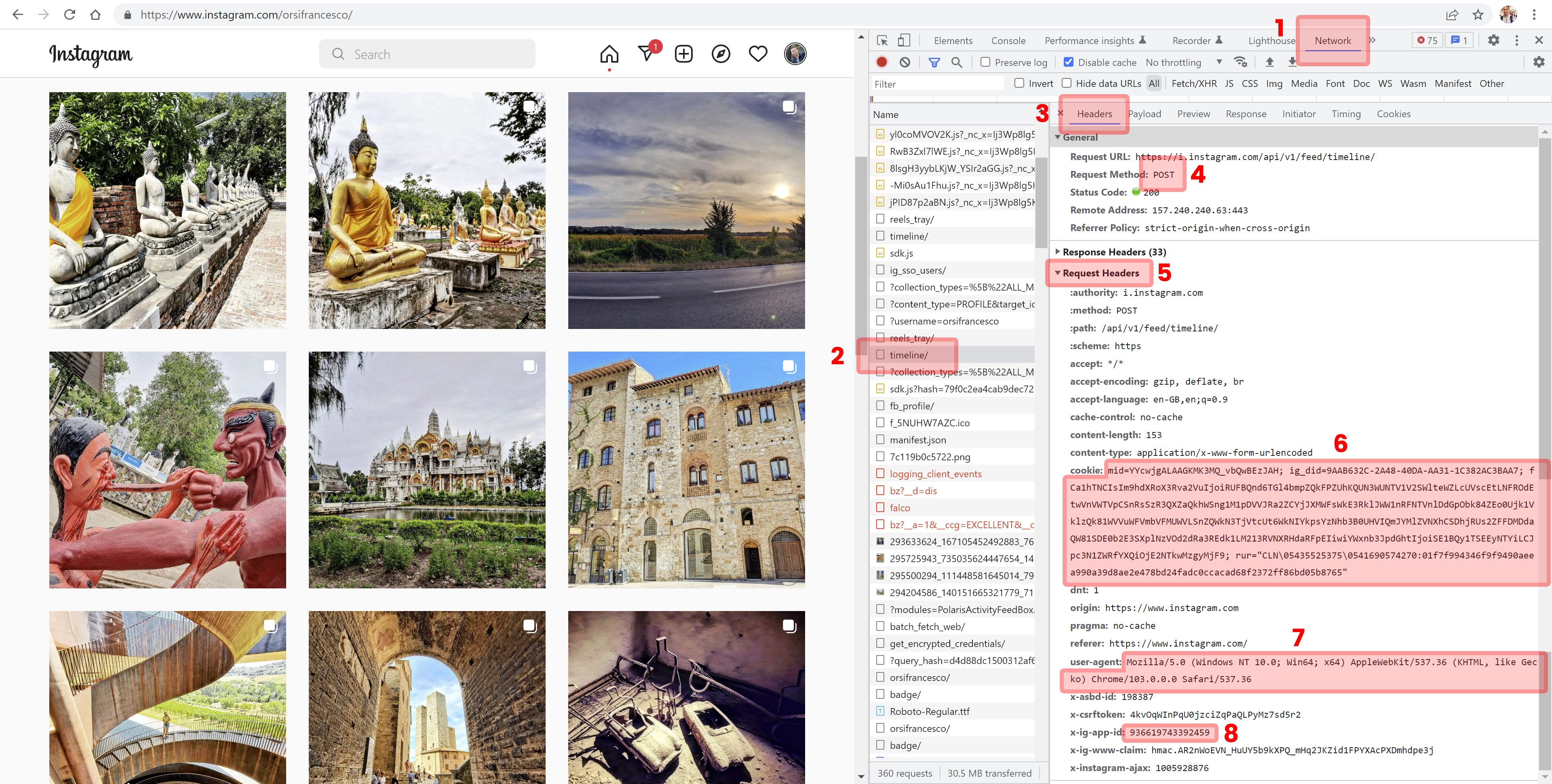
🍪 How to get Instagram Cookie
- Login to Instagram
- Go to your https://instagram/yourUsername
- Open your Browser Console (on Chrome just pressing F12)
- Select the "Network" tab
- Search and click on "timeline/" file; if it is empty just refresh the page
- Select "Headers" bar
- Be sure the file is Request Method "POST" (if it is "OPTIONS" search the other "timeline/" file in the list)
- Scroll down and select "Request Headers" tab
- Copy all the code after the word "cookie: " and paste it on
_cookievariable - Copy all the code after the word "user-agent: " and paste it on
_userAgentvariable - Copy all the code after the word "x-ig-app-id: " and paste it on
_xIgAppIdvariable
- don't share your cookie code with anyone!!! it is the same of your credentials
- That's it, enjoy :)
💻 Images Base64
Although you can get the URLs of the images, Instagram doesn't give you the possibility to include and showing those images on your projects (they will be automatically blocked from their servers).
To solve this problem you will get all the URLs and all the images data in base64.
You can easily show the image data on your project with the following snippets of code:
<img src="data:image/jpg;base64, hereYourBase64String.."/>
.example { background-image: url('data:image/jpg;base64, hereYourBase64String..'); }
Check https://orsifrancesco.github.io/instagram-without-api/how-to-show-base64-images.html for Base64 example.
🎮 Demo / Example
example on https://github.com/orsifrancesco/instagram-without-api-node/blob/master/test.js
const { iwa, iwaId, iwaIdUrl } = require('instagram-without-api-node');

const _cookie = 'mid=Ywj....hFLUdjNT55f0"'      // <!-- required!! please get your cookie from your browser console (6)
const _userAgent = 'Mozilla/5.0.../537.36'      // <!-- required!! please get your user-agent from your browser console (7)
const _xIgAppId = '93661974...'                 // <!-- required!! please get your x-ig-app-id from your browser console (8)

async function fetch() {

    // get the latest 12 feeds from an account (example https://www.instagram.com/orsifrancesco/)

    const responseIwa = await iwa({

        headers: {
            'cookie': _cookie,
            'user-agent': _userAgent,
            'x-ig-app-id': _xIgAppId
        },

        base64images: false,                    // <!-- optional, but without it, you will be not able to store/show images
        maxImages: 2,                           // <!-- optional, 12 is the max number
        file: "instagram-cache.json",           // <!-- optional, instagram-cache.json is by default
        pretty: true,                           // <!-- optional, prettyfy json true/false
        time: 3600,                             // <!-- optional, reload contents after 3600 seconds by default

        id: "orsifrancesco"                     // <!-- id is required

    })

    console.log({ responseIwa });


    // get picture and info from instagram id url (example https://www.instagram.com/p/Cgczi6qMuh1/)

    const responseIwaIdUrl = await iwaIdUrl({

        headers: {
            'cookie': _cookie,
            'user-agent': _userAgent,
            'x-ig-app-id': _xIgAppId
        },

        base64images: false,                    // <!-- optional, but without it, you will be not able to store/show images
        file: "instagram-cache-byidurl.json",   // <!-- optional, instagram-cache.json is by default
        pretty: true,                           // <!-- optional, prettyfy json true/false
        time: 3600,                             // <!-- optional, reload contents after 3600 seconds by default

        id: "Cgczi6qMuh1"                       // <!-- id is required

    })

    console.log({ responseIwaIdUrl });


    // get picture and info from instagram id (2890411760684296309 is the id of https://www.instagram.com/p/Cgczi6qMuh1/)

    const responseIwaId = await iwaId({

        headers: {
            'cookie': _cookie,
            'user-agent': _userAgent,
            'x-ig-app-id': _xIgAppId
        },

        base64images: false,                    // <!-- optional, but without it, you will be not able to store/show images
        file: "instagram-cache-byid.json",      // <!-- optional, instagram-cache.json is by default
        pretty: true,                           // <!-- optional, prettyfy json true/false
        time: 3600,                             // <!-- optional, reload contents after 3600 seconds by default

        id: "2890411760684296309"               // <!-- id is required

    })

    console.log({ responseIwaId });

}
fetch()
🕹️ JSON outputs
output example for iwa function on https://github.com/orsifrancesco/instagram-without-api/blob/master/instagram-cache.json
[
  {
    "id": "2696840872190940431",
    "time": 1635708506,
    "imageUrl": "https://scontent-lcy1-1.cdninstagram.com/v/t51.2885-15/e35/p1080x1080/249938862_1214260935751176_32...",
    "likes": 18,
    "comments": 0,
    "link": "https://www.instagram.com/p/CVtGnwashUP/",
    "text": "#helloworld #domain #check",
    "image": "/9j/4AAQSkZJRgABAQAAAQABAAD/7QB8UGhvdG9zaG9wIDMuMAA4QklNBAQAAAAAAGA............."
  },
  {
    "id": "2654027113529608497",
    "time": 1630604708,
    "imageUrl": "https://scontent-lcy1-1.cdninstagram.com/v/t51.2885-15/e35/p1080x1080/241221239_8640769...",
    "likes": 38,
    "comments": 0,
    "link": "https://www.instagram.com/p/CTU_5keMAkx/",
    "text": "#london #uk #unitedkingdom #tube #underground #overground #sunrise #morning #morningvibes #sky #metro #line #prospective",
    "image": "/9j/4AAQSkZJRgABAQAAAQABAAD/7QB8UGhvdG9zaG9wIDMuMAA4Qkl..........."
  }
]
output example for iwaId or iwaIdUrl functions
[
  {
    "id": "289855367...",
    "width": 1385,
    "height": 1731,
    "imageUrl": "https:\/\/scontent-lhr8-1.cdnin...",
    "time": 1659754546,
    "topLikers": [
        "franko"
    ],
    "likes": 32,
    "commentCount": 2,
    "comments": [
      {
        "time": 1659756069,
        "text": "This is a comment...",
        "user": {
          "username": "test",
          "fullName": "DearTest",
          "imageUrl": "https:\/\/scontent-lhr8-1.cdninstagram.com..."
        }
      }
    ],
    "link": "https:\/\/www.instagram.com\/p\/Cgczi6qMuh1\/",
    "text": "If you know it, you know it...",
    "user": {
      "username": "orsifrancesco",
      "fullName": "Frank",
      "imageUrl": "https:\/\/scontent-lhr8-1.cd..."
    },
    "image": "\/9j\/4AAQSkZJR....Q=="
  }
]
⚖️ License
Licensed under MIT
☕ About
Any feedback to @orsifrancesco and/or coffee is welcome :)
Metadata
Owner
 orsifrancesco
Metadata
A simple Node.js code to get unlimited instagram public pictures by every user without api, without credentials.