

 oracle
Enable defining remote hosts on localhost
Is your feature request related to a problem? Please describe.
Yes, it's related to the following problem :
I have a JRE, with JMX exposed on 1099, running in a Docker container on Kubernetes
I'm port forwarding this 1099 port on my computer
I start VisualVM 2.1.4 on my computer
I don't see anywhere this JRE in the left panel, so I try to define a new remote host on hostname localhost
VisualVM reply that :
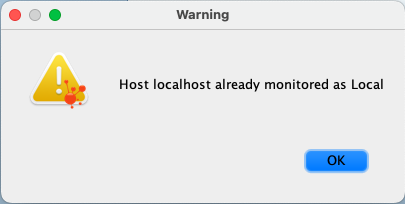
On the other hand, I do manage to monitor this 1099 (forwarded) port whenever I start VisualVM from the command line with the following option :
visualvm --openjmx localhost:1099
Thus it is extra cumbersome to be able to connect to it from the command line, but not been able to do so in a straightforward way from the UI
I think been able to do so would make user's life much easier.
Describe the solution you'd like Been allowed to create a remote on localhost, or else to get an extra entry on the left side that give access to a new option enabling to easily monitor such a forwarded JMX port
Describe alternatives you've considered none
Additional context I'm running VisualVM from a Java 17 version on MacOS if it's of any interest :)

To add your JMX connection, just right-click on 'Local' node and invoke 'Add JMX Connection...' action.

@thurka : thanks you for the tips. Didn't noticed there was this option associated to the Local node 😋