

 openv
openv
When trying to install no telnet is possible
I had the vcontrol running for years now, now my sd crashed and I tried to replicate a fresh installation according: https://github.com/openv/openv/wiki/vcontrold-mit-Raspberry-Pi
I always get stopped with chapter 3 when executing: wget https://github.com/openv/vcontrold/releases/download/v0.98.10/vcontrold_0.98.10-176_armhf.deb sudo apt install ./vcontrold_0.98.10-176_armhf.deb
I get this message: pi@raspberrypi:~/openv $ sudo apt install ./vcontrold_0.98.10-176_armhf.deb Reading package lists... Done Building dependency tree... Done Reading state information... Done Note, selecting 'vcontrold' instead of './vcontrold_0.98.10-176_armhf.deb' vcontrold is already the newest version (0.98.10-176). 0 upgraded, 0 newly installed, 0 to remove and 0 not upgraded.
in /usr/local/bin there is no file copied.
When trying the steps with the compilation: Source mit 'git clone' holen: git clone https://github.com/openv/vcontrold.git
Ggf. CMake nachinstallieren! Auf Raspberry mit Debian wie folgt: sudo apt-get install cmake
Im Verzeichnis 'openv' folgendes Kommando ausführen: sudo cmake ./vcontrold/ -DVSIM=ON -DMANPAGES=OFF
This looks OK: pi@raspberrypi:~/openv $ sudo cmake ./vcontrold/ -DVSIM=ON -DMANPAGES=OFF -- Configuring done -- Generating done -- Build files have been written to: /home/pi/openv
But the next installation step fails: pi@raspberrypi:~/openv $ sudo make install [ 4%] Updating version header. -- Updating version information to 0.98.10-23-g600f59e ... [ 4%] Built target UpdateVersion Scanning dependencies of target vclient [ 9%] Building C object CMakeFiles/vclient.dir/src/common.c.o [ 14%] Building C object CMakeFiles/vclient.dir/src/socket.c.o [ 19%] Building C object CMakeFiles/vclient.dir/src/io.c.o [ 23%] Building C object CMakeFiles/vclient.dir/src/client.c.o [ 28%] Building C object CMakeFiles/vclient.dir/src/vclient.c.o [ 33%] Linking C executable vclient [ 33%] Built target vclient Scanning dependencies of target vsim [ 38%] Building C object CMakeFiles/vsim.dir/src/socket.c.o [ 42%] Building C object CMakeFiles/vsim.dir/src/vsim.c.o [ 47%] Linking C executable vsim [ 47%] Built target vsim Scanning dependencies of target vcontrold [ 52%] Building C object CMakeFiles/vcontrold.dir/src/io.c.o [ 57%] Building C object CMakeFiles/vcontrold.dir/src/common.c.o [ 61%] Building C object CMakeFiles/vcontrold.dir/src/xmlconfig.c.o [ 66%] Building C object CMakeFiles/vcontrold.dir/src/parser.c.o [ 71%] Building C object CMakeFiles/vcontrold.dir/src/socket.c.o [ 76%] Building C object CMakeFiles/vcontrold.dir/src/semaphore.c.o [ 80%] Building C object CMakeFiles/vcontrold.dir/src/framer.c.o [ 85%] Building C object CMakeFiles/vcontrold.dir/src/unit.c.o [ 90%] Building C object CMakeFiles/vcontrold.dir/src/arithmetic.c.o [ 95%] Building C object CMakeFiles/vcontrold.dir/src/vcontrold.c.o [100%] Linking C executable vcontrold /usr/bin/ld: cannot open output file vcontrold: Is a directory collect2: error: ld returned 1 exit status make[2]: *** [CMakeFiles/vcontrold.dir/build.make:239: vcontrold] Error 1 make[1]: *** [CMakeFiles/Makefile2:155: CMakeFiles/vcontrold.dir/all] Error 2 make: *** [Makefile:149: all] Error 2
again, no files in /usr/local/bin
If anyone knows to help, I would appreciate it. German is good as well ;-) Thanks a lot

vcontrold is already the newest version (0.98.10-176).
Well, seems like you already successfully installed it? I think nothing is installed to /usr/local/bin, but vcontrold should go into /usr/sbin. I'm not a Debian user, but I think you can see what files a package installed by dpkg-query -L vcontrold (should list /usr/sbin/vcontrold).
Apart from that, the "normal" building works without a problem here:
Checking out the sources:
git clone https://github.com/openv/vcontrold.git
Creating a build directory and entering it:
cd vcontrold/
mkdir build
cd build/
Running cmake:
cmake -DMANPAGES=OFF ..
Building:
make
Well, and if you want to install it, you can do so as root (make install), or the Debian way via sudo make install.

in /usr/local/bin there is no file copied.
The deb package install locations are /usr/sbin/vcontrold and /usr/bin/vclient
pi@raspberrypi:~/openv $ sudo cmake ./vcontrold/ -DVSIM=ON -DMANPAGES=OFF [...] /usr/bin/ld: cannot open output file vcontrold: Is a directory
You're running into a name clash because your invocation of cmake sets up a directory vcontrold in a directory where the compiled binary vcontrold should be generated.
Please follow the instructions in INSTALL.md as Tobias wrote beforehand.

Ah, now I see. He didn't build in a build directory inside the sources, but in some dorectory containing the vcontrold sources. I didn't get that at once, because it's a bit weird to do so ;-)
btw INSTALL.md is not correct, as we initialize the install prefix to be /usr, not /usr/local:
if(CMAKE_INSTALL_PREFIX_INITIALIZED_TO_DEFAULT)
    # CMAKE_INSTALL_PREFIX defaults to /usr/local, but it should go to /usr
    set(CMAKE_INSTALL_PREFIX /usr)
endif()
I'll fix that. EDIT: Done via e424ec469dd6c4fdd77b7d806bbddaa9d5bbf33d
The directory "/usr/local/bin" comes with the https://github.com/openv/openv/wiki/vcontrold-mit-Raspberry-Pi - End of Step 3 Thanks for you feedback, I will try during the next days to continue with step 4.
Well, should be corrected as well then. As well as the -DVSIM=ON for the cmake invocation – why would you like to build the vsim development helper program in this case?
I continued now including step 6 with the configuration, but with the step I get again a message which seems to differ from the instructions:
pi@raspberrypi:/etc/init.d $ sudo update-rc.d vcontrol start 99 2 3 4 5 . stop 99 0 1 6 . update-rc.d: warning: start and stop actions are no longer supported; falling back to defaults
the next step pi@raspberrypi:/etc/init.d $ sudo /etc/init.d/vcontrol start brings no error or any message but if I than try : pi@raspberrypi:/etc/init.d $ telnet localhost 3002 Trying ::1... Trying 127.0.0.1... telnet: Unable to connect to remote host: Connection refused
If I start pi@raspberrypi:/etc/vcontrold $ sudo vcontrold -n [741] Sat Feb 26 22:21:22 2022 : started vcontrold version 0.98.10-24-ge424ec4 [741] Sat Feb 26 22:21:22 2022 : Protocol command sync (at sync) not defined
I have edited the vcontrol with my device 2049 -> which I compared to my 2014 version backup and still listed here: https://github.com/openv/openv/wiki/Ger%C3%A4te
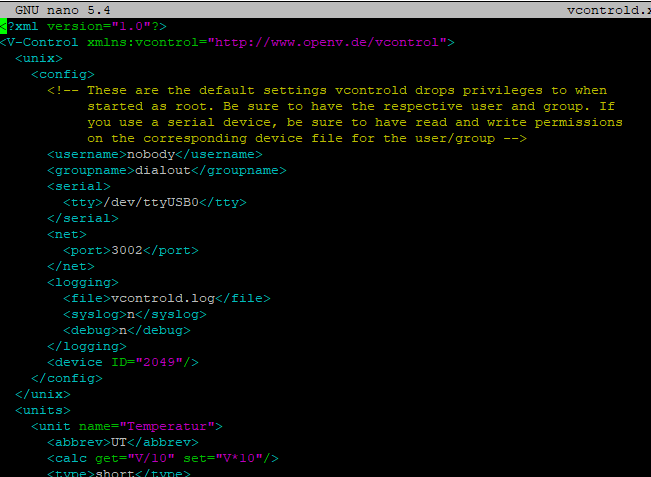
the vito.xml I copied from my backup - but it seems that there was changed a lot and those files are incompatible with the current 2021 version.

A little bit frustrated at the moment that it is so hard to get the system setup again, even if I made backups from the config files. I hope some can help me again...
Apparently, the wiki is a bit out of date.
You know how to start a daemon and how to check if it actually runs? Like check something like checking the output of ps -ef | grep vcontrold or such?
However, I'd first be sure that no vcontrold instance is running, and then, I'd start it manually in no-daemon and verbose mode. Like, in your case, sudo -n -v /usr/sbin/vcontrold. And then check the output. And then, if the output is okay, try to connect. E.g. using vclient, something like vclient -h 127.0.0.1 -p 3002 -c getTempA.
Maybe, your configuration is out of date, too. There have been quite some changes. I'd try to use the shipped default configuration and adapt it to your heating from scratch. Always using the verbose non-background mode of vcontrold, so that you can see at once what happens.
After trial and error I at least get data back when running vcontrold -n My vito.xml backup file had more commands defined than in the vcontrol.xml So I started rebuilding the files based on my backup, which worked. The remaining Issue for me is now that the vcontrold is not running automatically
In der Heizung ist bei mir immer noch ein alter Windows XP PC im Einsatz. Nicht nur dass dieser unnötig viel Energie verbraucht: im Frühling 2014 ist auch das Aus von Windows XP gegeben.
Yeah, I mean that text is like 10 years old or so ;-)
About running vcontold automatically:
I run Gentoo/OpenRC on my Raspberry Pi. So I simply use a good ole init script, which is nothing more than
#!/sbin/openrc-run
command="/usr/sbin/vcontrold"
And added this to my "default" runlevel using rc-update add vcontrold default.
If you run Debian, you will need some systemd unit or such. Or can simple init scripts be used as well there? Maybe, someone using systemd can clarify this.
EDIT:
I'd try something like this: https://unix.stackexchange.com/questions/47695/how-to-write-startup-script-for-systemd Or check https://www.google.de/search?q=write%20systemd%20init%20script ;-)
Sadly, I can't help here, as I have no systemd machine running here :-(