

 openclassify
Docker File
Hi
Has anyone managed to install this application using the docker file provided ?

Have you tried this one:
https://github.com/openclassify/openclassify/blob/master/docker-compose.yml

Also tried docker-compose with no success..
I downloaded the last release and just did docker-compose up
/openclassify-2.0.17>docker-compose up
WARNING: The NGINX_HOST variable is not set. Defaulting to a blank string.
WARNING: The PHP_VERSION variable is not set. Defaulting to a blank string.
WARNING: The MYSQL_HOST variable is not set. Defaulting to a blank string.
WARNING: The MYSQL_VERSION variable is not set. Defaulting to a blank string.
WARNING: The MYSQL_DATABASE variable is not set. Defaulting to a blank string.
WARNING: The MYSQL_ROOT_PASSWORD variable is not set. Defaulting to a blank string.
WARNING: The MYSQL_USER variable is not set. Defaulting to a blank string.
WARNING: The MYSQL_PASSWORD variable is not set. Defaulting to a blank string.
ERROR: Couldn't find env file: openclassify-2.0.17/.env
after getting this error I set up a simple .env file:
NGINX_HOST=localhost
PHP_VERSION=7.4.0
MYSQL_HOST=mysql
MYSQL_VERSION=latest
MYSQL_DATABASE=db
MYSQL_ROOT_PASSWORD=***
MYSQL_USER=dbuser
MYSQL_PASSWORD=***
trying docker-compose again got me this:
openclassify-2.0.17>docker-compose up
Creating network "openclassify-2017_default" with the default driver
Creating openclassify-2017_php_1      ... done
Creating openclassify-2017_composer_1 ... done
Creating mysql                        ... done
Creating phpmyadmin                   ... done
Creating openclassify-2017_web_1      ... done
Attaching to openclassify-2017_composer_1, openclassify-2017_php_1, mysql, phpmyadmin, openclassify-2017_web_1
mysql       | 2021-11-16 11:30:32+00:00 [Note] [Entrypoint]: Entrypoint script for MySQL Server latest started.
mysql       | 2021-11-16 11:30:33+00:00 [Note] [Entrypoint]: Switching to dedicated user 'mysql'
mysql       | 2021-11-16 11:30:33+00:00 [Note] [Entrypoint]: Entrypoint script for MySQL Server latest started.
mysql       | 2021-11-16 11:30:33+00:00 [Note] [Entrypoint]: Initializing database files
mysql       | 2021-11-16T11:30:33.102838Z 0 [System] [MY-013169] [Server] /usr/sbin/mysqld (mysqld 8.0.27) initializing of server in progress as process 43
mysql       | 2021-11-16T11:30:33.110504Z 0 [Warning] [MY-010159] [Server] Setting lower_case_table_names=2 because file system for /var/lib/mysql/ is case insensitive
mysql       | 2021-11-16T11:30:33.118447Z 1 [System] [MY-013576] [InnoDB] InnoDB initialization has started.
composer_1  | Composer could not find a composer.json file in /app
composer_1  | To initialize a project, please create a composer.json file. See https://getcomposer.org/basic-usage
php_1       | [16-Nov-2021 11:30:32] NOTICE: fpm is running, pid 1
php_1       | [16-Nov-2021 11:30:32] NOTICE: ready to handle connections
web_1       | 2021/11/16 11:30:33 [notice] 1#1: using the "epoll" event method
web_1       | 2021/11/16 11:30:33 [notice] 1#1: nginx/1.21.4
web_1       | 2021/11/16 11:30:33 [notice] 1#1: built by gcc 10.3.1 20210424 (Alpine 10.3.1_git20210424)
web_1       | 2021/11/16 11:30:33 [notice] 1#1: OS: Linux 5.4.72-microsoft-standard-WSL2
web_1       | 2021/11/16 11:30:33 [notice] 1#1: getrlimit(RLIMIT_NOFILE): 1048576:1048576
web_1       | 2021/11/16 11:30:33 [notice] 1#1: start worker processes
phpmyadmin  | AH00558: apache2: Could not reliably determine the server's fully qualified domain name, using 172.23.0.2. Set the 'ServerName' directive globally to suppress this message
phpmyadmin  | AH00558: apache2: Could not reliably determine the server's fully qualified domain name, using 172.23.0.2. Set the 'ServerName' directive globally to suppress this message
phpmyadmin  | [Tue Nov 16 11:30:33.598737 2021] [mpm_prefork:notice] [pid 1] AH00163: Apache/2.4.38 (Debian) PHP/7.4.20 configured -- resuming normal operations
phpmyadmin  | [Tue Nov 16 11:30:33.598797 2021] [core:notice] [pid 1] AH00094: Command line: 'apache2 -D FOREGROUND'
calling localhost:8000 resulted in this:
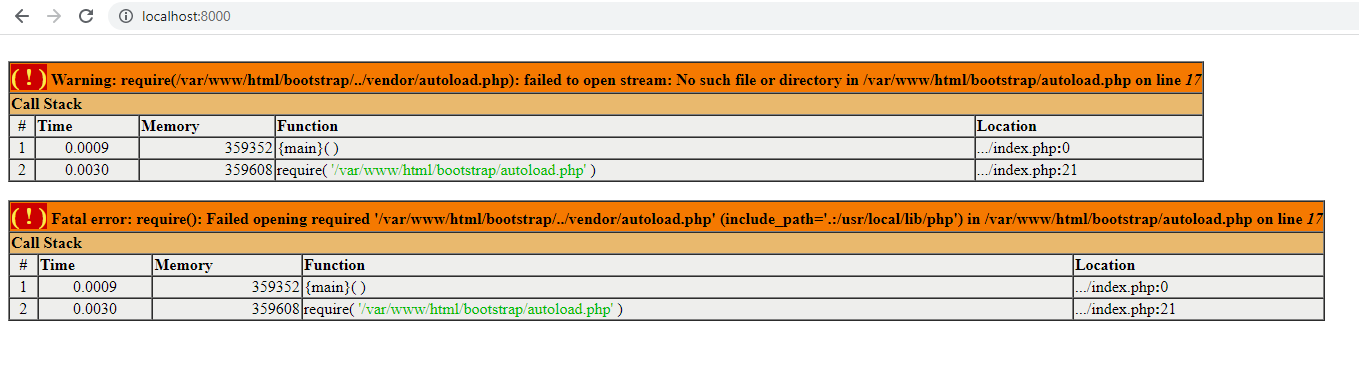

I had made some changes in docker-compose.yml:
    php:
        build: .
        restart: always
        volumes:
            - "./etc/php/php.ini:/usr/local/etc/php/conf.d/php.ini"
            - "./:/var/www/html"
    composer:
        image: composer
        volumes:
            - "./:/app"
        command: install
And added Dockerfile to build php 8.0:
FROM php:8-fpm

RUN apt-get update && apt-get install -y \
    libfreetype6-dev \
    libjpeg62-turbo-dev \
    libpng-dev \
    && docker-php-ext-configure gd --with-freetype --with-jpeg \
    && docker-php-ext-install -j$(nproc) gd \
    && docker-php-ext-install mysqli pdo_mysql bcmath
With this I could get the /installer up 🎉
But after entering all relevant info in the form and clicking on install the installation failed:
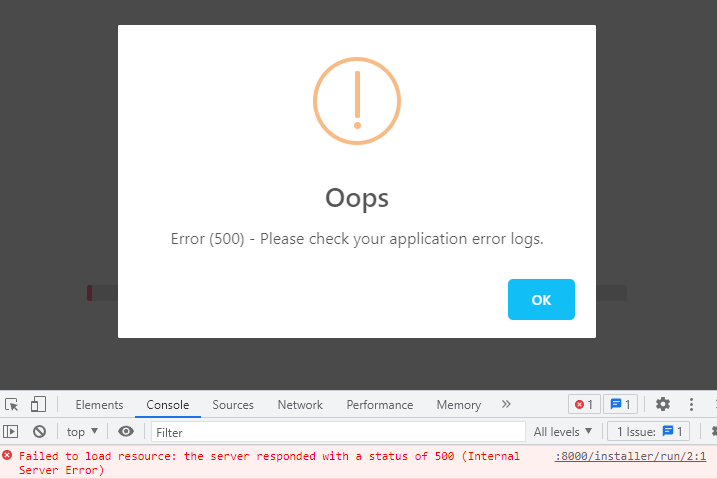
These where my installation settings (written by the steup into .env):
APP_ENV=local
INSTALLED=false
APP_KEY=ejqyzdHTkvhArjTiqeobLRP6l7oWgGcv
APP_DEBUG=true
DEBUG_BAR=false
DB_CONNECTION=mysql
DB_HOST=mysqldb
DB_PORT=3306
DB_DATABASE=db
DB_USERNAME=dbuser
DB_PASSWORD="pw"
APPLICATION_NAME="Default"
APPLICATION_DOMAIN=localhost:8000
APPLICATION_REFERENCE=default
DEFAULT_LOCALE=de
APP_TIMEZONE=Europe/Berlin
APP_URL=http://localhost:8000
ADMIN_USERNAME=admin
[email protected]
ADMIN_PASSWORD=1234
But when I used 7.4.0 an error occurred. It said that same installed dependencies from composer require php 8.0