

 openblocks-dev
Possible to not run as root in container?
Firstly, thanks for all your hard work. I just setup openblocks on my local Portainer Raspberry Pi cluster and it seems so far to be working great. My only recommendation is don't run the Docker container as root.
I noticed the Dockerfile is running a lot of processes all in the same container... Redis, MongoDB, Java, NGINX. I assume then using root was the easy solution to get this all working?
Is there anyway to run everything with lower privileges and not root in the container?

Hi @nodesocket , thanks for your advice, could you please give us some more enlightenment on why not using root user, maybe this can prevent some potential security issues?


Since you are running everything via supervisord in a single container root might be required. It’s perhaps worth the effort to split the dependency services (NGINX, MongoDB, Redis) out into separate containers and use docker-compose to construct the service relationships.
Hi, we've released a new image openblocksdev/openblocks-ce:beta with non-root user permissions. Check it out.

@jerry-goodman oh wow crazy. I'll try this tonight. What user is supervisord running under now?
@jerry-goodman just updated the application in my Portainer cluster and used the beta image tag.
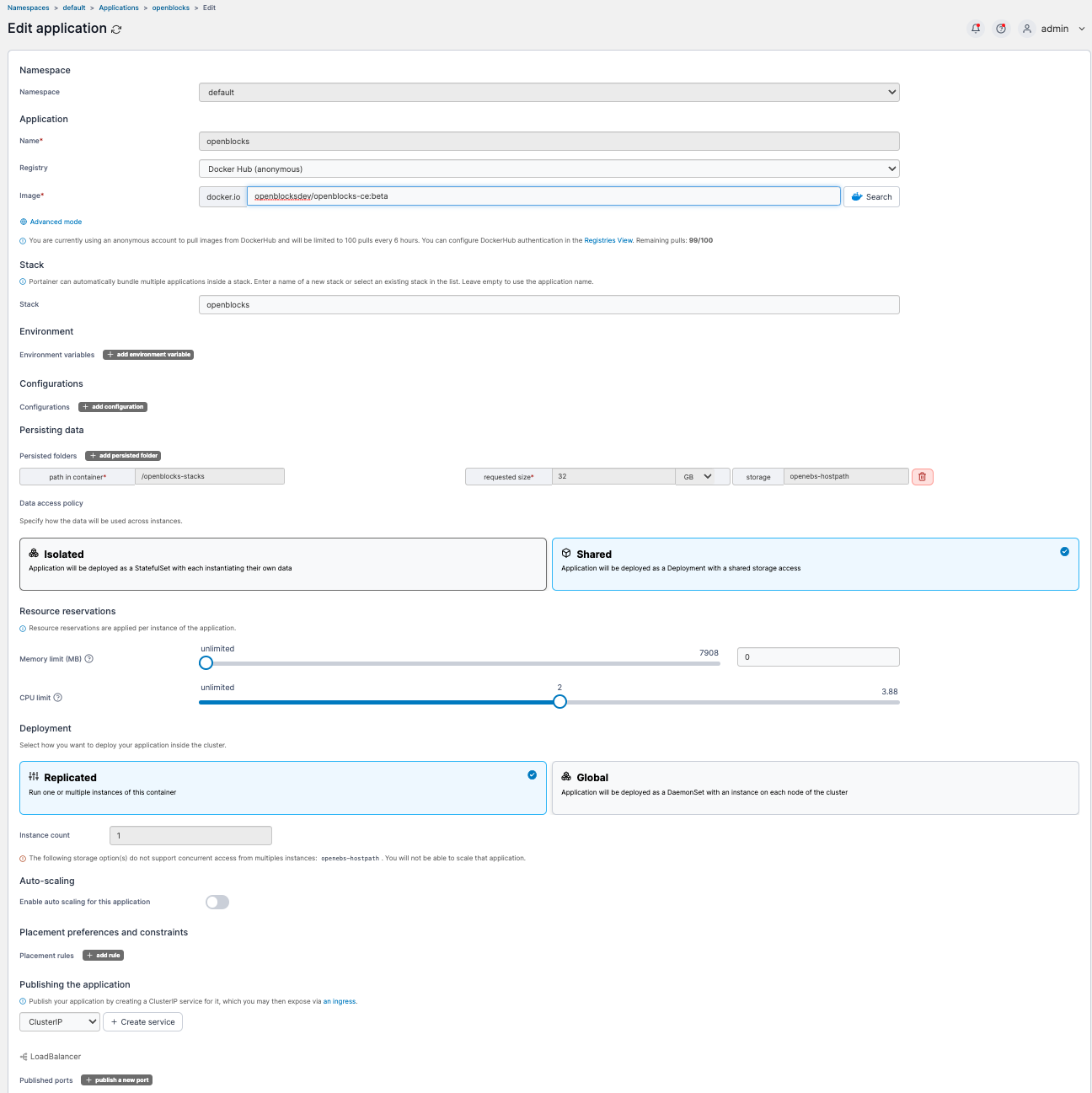
The pod comes up, but fails to start. The logs show the following:
pi@kube-master:~ $ kubectl get pods
NAME                            READY   STATUS    RESTARTS        AGE
openblocks-6d9f9b78b9-c8ms2     1/1     Running   0               74s
openspeedtest-5cf786888-gvmfh   1/1     Running   0               7d
portainer-7f8b958c8c-8m57l      1/1     Running   0               7d
traefik-865cf58b45-dv7zc        1/1     Running   0               25d


pi@kube-master:~ $ kubectl logs openblocks-6d9f9b78b9-c8ms2
Init mongoDB
Init configuration
2022-11-17 00:23:33,461 INFO Included extra file "/etc/supervisor/conf.d/backend.conf" during parsing
2022-11-17 00:23:33,461 INFO Included extra file "/etc/supervisor/conf.d/frontend.conf" during parsing
2022-11-17 00:23:33,461 INFO Included extra file "/etc/supervisor/conf.d/mongodb.conf" during parsing
2022-11-17 00:23:33,461 INFO Included extra file "/etc/supervisor/conf.d/redis.conf" during parsing
2022-11-17 00:23:33,461 INFO Set uid to user 1203 succeeded
2022-11-17 00:23:33,475 INFO RPC interface 'supervisor' initialized
2022-11-17 00:23:33,475 CRIT Server 'inet_http_server' running without any HTTP authentication checking
2022-11-17 00:23:33,476 INFO RPC interface 'supervisor' initialized
2022-11-17 00:23:33,476 CRIT Server 'unix_http_server' running without any HTTP authentication checking
2022-11-17 00:23:33,477 INFO supervisord started with pid 1
2022-11-17 00:23:34,480 INFO spawnerr: unknown error making dispatchers for 'redis': EACCES
2022-11-17 00:23:34,482 INFO spawnerr: unknown error making dispatchers for 'mongodb': EACCES
2022-11-17 00:23:34,484 INFO spawnerr: unknown error making dispatchers for 'backend': EACCES
2022-11-17 00:23:34,486 INFO spawnerr: unknown error making dispatchers for 'frontend': EACCES
2022-11-17 00:23:35,489 INFO spawnerr: unknown error making dispatchers for 'redis': EACCES
2022-11-17 00:23:35,492 INFO spawnerr: unknown error making dispatchers for 'mongodb': EACCES
2022-11-17 00:23:35,494 INFO spawnerr: unknown error making dispatchers for 'backend': EACCES
2022-11-17 00:23:35,496 INFO spawnerr: unknown error making dispatchers for 'frontend': EACCES
2022-11-17 00:23:37,501 INFO spawnerr: unknown error making dispatchers for 'redis': EACCES
2022-11-17 00:23:37,503 INFO spawnerr: unknown error making dispatchers for 'mongodb': EACCES
2022-11-17 00:23:37,506 INFO spawnerr: unknown error making dispatchers for 'backend': EACCES
2022-11-17 00:23:37,508 INFO spawnerr: unknown error making dispatchers for 'frontend': EACCES
2022-11-17 00:23:40,514 INFO spawnerr: unknown error making dispatchers for 'redis': EACCES
2022-11-17 00:23:40,515 INFO gave up: redis entered FATAL state, too many start retries too quickly
2022-11-17 00:23:40,517 INFO spawnerr: unknown error making dispatchers for 'mongodb': EACCES
2022-11-17 00:23:40,517 INFO gave up: mongodb entered FATAL state, too many start retries too quickly
2022-11-17 00:23:40,520 INFO spawnerr: unknown error making dispatchers for 'backend': EACCES
2022-11-17 00:23:40,520 INFO gave up: backend entered FATAL state, too many start retries too quickly
2022-11-17 00:23:40,521 INFO spawnerr: unknown error making dispatchers for 'frontend': EACCES
2022-11-17 00:23:40,522 INFO gave up: frontend entered FATAL state, too many start retries too quickly
pi@kube-master:~ $ kubectl exec -it openblocks-6d9f9b78b9-c8ms2  -- bin/bash

openblocks@openblocks-6d9f9b78b9-c8ms2:/$ whoami
openblocks

openblocks@openblocks-6d9f9b78b9-c8ms2:/$ ls -alh
total 72K
drwxr-xr-x   1 root       root 4.0K Nov 17 00:23 .
drwxr-xr-x   1 root       root 4.0K Nov 17 00:23 ..
-rwxr-xr-x   1 root       root    0 Nov 17 00:23 .dockerenv
drwxr-xr-x   6 root       root 4.0K Nov 11 06:20 app
lrwxrwxrwx   1 root       root    7 Oct 19 16:52 bin -> usr/bin
drwxr-xr-x   2 root       root 4.0K Apr 15  2020 boot
drwxr-xr-x   5 root       root  340 Nov 17 00:23 dev
drwxr-xr-x   1 root       root 4.0K Nov 17 00:23 etc
drwxr-xr-x   2 root       root 4.0K Apr 15  2020 home
lrwxrwxrwx   1 root       root    7 Oct 19 16:52 lib -> usr/lib
drwxr-xr-x   2 root       root 4.0K Oct 19 16:52 media
drwxr-xr-x   2 root       root 4.0K Oct 19 16:52 mnt
drwxr-xr-x   1 openblocks root 4.0K Nov 16 05:15 openblocks
drwxrwxrwx   5 root       root 4.0K Nov 15 03:36 openblocks-stacks
drwxr-xr-x   2 root       root 4.0K Oct 19 16:52 opt
dr-xr-xr-x 209 root       root    0 Nov 17 00:23 proc
drwx------   2 root       root 4.0K Oct 19 17:13 root
drwxr-xr-x   1 openblocks root 4.0K Nov 17 00:23 run
lrwxrwxrwx   1 root       root    8 Oct 19 16:52 sbin -> usr/sbin
drwxr-xr-x   2 root       root 4.0K Oct 19 16:52 srv
dr-xr-xr-x  12 root       root    0 Nov 17 00:22 sys
drwxrwxrwt   1 root       root 4.0K Nov 17 00:23 tmp
drwxr-xr-x   1 root       root 4.0K Nov 11 05:43 usr
drwxr-xr-x   1 openblocks root 4.0K Nov 11 05:43 var
Hi @nodesocket, thanks for your feedback, I will solve this problem as soon as possible.
Hi @nodesocket, I have found the cause of this problem, and a new image(openblocksdev/openblocks-ce:beta) has been released and tested on my macOS and Ubuntu. Currently supervisor will run under the user uid=9001 by default, you can also specify uid by setting the docker environment variable LOCAL_USER_ID.
docker-compose.yml:
version: "3"
services:
  openblocks:
    image: openblocksdev/openblocks-ce:beta
    container_name: openblocks
    environment:
      - LOCAL_USER_ID=1000
    ports:
      - "3000:3000"
    volumes:
      - ./stacks:/openblocks-stacks
    restart: unless-stopped
root@f6b0213a26a1:/# ls -alh
total 84K
drwxr-xr-x   1 root       root       4.0K Nov 19 17:39 .
drwxr-xr-x   1 root       root       4.0K Nov 19 17:39 ..
-rwxr-xr-x   1 root       root          0 Nov 19 17:39 .dockerenv
drwxr-xr-x   6 root       root       4.0K Nov 19 14:01 app
lrwxrwxrwx   1 root       root          7 Oct 19 16:47 bin -> usr/bin
drwxr-xr-x   2 root       root       4.0K Apr 15  2020 boot
drwxr-xr-x   5 root       root        340 Nov 19 17:39 dev
drwxr-xr-x   1 root       root       4.0K Nov 19 17:39 etc
drwxr-xr-x   2 root       root       4.0K Apr 15  2020 home
lrwxrwxrwx   1 root       root          7 Oct 19 16:47 lib -> usr/lib
lrwxrwxrwx   1 root       root          9 Oct 19 16:47 lib32 -> usr/lib32
lrwxrwxrwx   1 root       root          9 Oct 19 16:47 lib64 -> usr/lib64
lrwxrwxrwx   1 root       root         10 Oct 19 16:47 libx32 -> usr/libx32
drwxr-xr-x   2 root       root       4.0K Oct 19 16:47 media
drwxr-xr-x   2 root       root       4.0K Oct 19 16:47 mnt
drwxr-xr-x   1 openblocks openblocks 4.0K Nov 19 17:23 openblocks
drwxr-xr-x   5 openblocks openblocks 4.0K Nov 19 17:39 openblocks-stacks
drwxr-xr-x   2 root       root       4.0K Oct 19 16:47 opt
dr-xr-xr-x 252 root       root          0 Nov 19 17:39 proc
drwx------   2 root       root       4.0K Oct 19 16:50 root
drwxr-xr-x   1 openblocks openblocks 4.0K Nov 19 17:39 run
lrwxrwxrwx   1 root       root          8 Oct 19 16:47 sbin -> usr/sbin
drwxr-xr-x   2 root       root       4.0K Oct 19 16:47 srv
dr-xr-xr-x  13 root       root          0 Nov 19 17:39 sys
drwxrwxrwt   1 root       root       4.0K Nov 19 17:39 tmp
drwxr-xr-x   1 root       root       4.0K Nov 19 13:53 usr
drwxr-xr-x   1 openblocks openblocks 4.0K Nov 19 13:54 var

root@f6b0213a26a1:/# ps -ef
UID          PID    PPID  C STIME TTY          TIME CMD
openblo+       1       0  0 17:39 ?        00:00:00 /usr/bin/python3 /usr/bin/supervisord -n -c /etc/supervisor/supervisord.conf
openblo+      37       1  0 17:39 ?        00:00:00 redis-server 127.0.0.1:6379
openblo+      38       1  0 17:39 ?        00:00:01 mongod --port 27017 --dbpath . --logpath log --bind_ip localhost
openblo+      39       1 11 17:39 ?        00:00:27 /app/bin/java -Djava.security.egd=file:/dev/./urandom -Dlog4j2.formatMsgNoLookups=true -Dspring.config.location=file:///openblocks/env/application.yml,file:///openblocks-stacks/configuration/ap
openblo+      40       1  0 17:39 ?        00:00:00 nginx: master process nginx -g daemon off;
openblo+      46      40  0 17:39 ?        00:00:00 nginx: worker process
root         159       0  0 17:43 pts/0    00:00:00 bash
root         168     159  0 17:43 pts/0    00:00:00 ps -ef
Hi all, this enhancement is supported in the latest version, check it out.
Just a quick only slightly related question but is there a documentation page somewhere, so I can have a look at all possible environmental variables liek the one shown below?
docker-compose.yml:
version: "3"
...
    environment:
      - LOCAL_USER_ID=1000
...

Hi @ovizii,
Currently there's no documentation yet(we'll add that), for now you can refer to settings in this YAML file, which are needed during for backend server setup.