

 openanalytics
Authentication for influxdb on the shinyproxy_usagestats
Apologies for this might not be the right place to post. Initially posted on Open Analytics Community Support and received zero response.
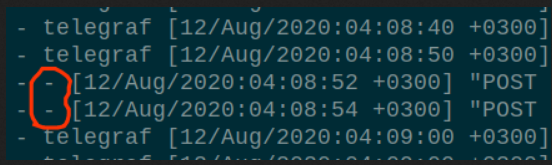
I have configured shinyproxy 2.3.1 to send usage statistics to influxdb 1.8.1. The crazy thing I’m experiencing is that without influxdb authentication enabled, usage statistics are successfully stored. However, when I enable influxdb auth and introduce proxy.usage-stats-username and proxy.usage-stats-password into application.yml, usage statistics hit influxdb without a username and thus rejected with a 401 response code. I must be doing something wrong! Is proxy.usage-stats-username and proxy.usage-stats-password the right context for the shinyproxy_usagestats credentials?

Hi @jaysnm
Unfortunately, currently we do not support authentication when connecting to InfluxDB. The properties you mentioned are not used by shinyproxy.
We will consider adding this feature in the future and keep this issue open as a reference.

Hi @tverbeke @LEDfan
I have run a couple of tests using current release 2.4.3 and everything looks fine including authentication for SQL based databases. Kindly confirm this is the case (and as well close the issue).
Hi @jaysnm
Unfortunately, the usage-stats-username and usage-stats-password properties are still only used by the SQL based usage-statistics backends. It's not yet used when connecting with influxdb. So authentication with influxdb will not yet work.
It would probably be a good idea to remove or make a note about this on the documentation page.
What does work for the authentication is to use the compatibility API if you're using v2 or Cloud at least. With this you can provide the u and p url parameters to fill in the username and password/api-token. Just like this: usage-stats-url: <URL>/write?db=<BUCKET NAME>&u=<API-TOKEN-USERNAME>&p=<API-TOKEN>. This way you don't need to use the usage-stats-username and usage-stats-password. I hope that this helps.

Hi,
I have some issues to run correctly shinyproxy with influxdb.
Shinyproxy works fine without usages-stats-url argument but when this argument is added I can not identify.
For the usages-stats-url I tried the 2 methods because I'm using the influxdb 2

The docker-compose file is like this:
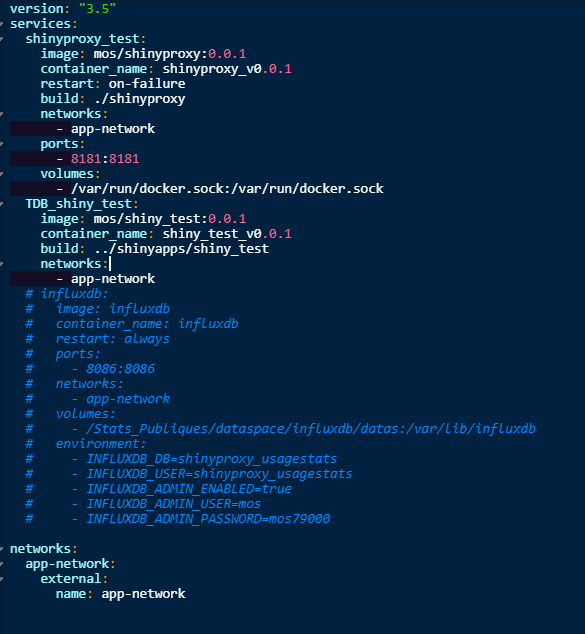
The influxdb container is running with the following command (not included in docker-compose):
docker run -d --name influxdb -p 8086:8086 -e INFLUXDB_ADMIN_USER=mos -e INFLUXDB_ADMIN_PASSWORD=mos79000 -v /Stats_Publiques/dataspace/influxdb/datas:/var/lib/influxdb --net=app-network influxdb
Have you some idea about this issue ? Thanks
