
mmselfsup

mmselfsup copied to clipboard
 open-mmlab
KeyError: 'MMClsImageClassifierWrapper is not in the models registry'
wanted to build an images classifier using the SimMIM pretraining strategy
Step 1: converted the dataset into imagenet format
>|- dataset
	|- training_set
		|- training_set
			|- 10--g1
				|- 0012.jpg
				|- 0013.jpg

	|- val_set
		|- val_set
			|- 10--g1
				|- 0012.jpg
				|- 0013.jpg

	|- test_set
		|- test_set
			|- 10--g1
				|- 0012.jpg
				|- 0013.jpg

	>|- classes.txt
	>|- val.txt
	>|- test.txt
	>|- train.txt
Step 2: Modify the Config and save it
# Load the base config file
from mmcv import Config
cfg = Config.fromfile('configs/mobilenet_v2/mobilenet-v2_8xb32_in1k.py')

# Modify the number of classes in the head.
cfg.model.head.num_classes = 112
cfg.model.head.topk = (1, )

# pretrain checkpoint
checkpoint_file ='checkpoints/mobilenet_v2_batch256_imagenet_20200708-3b2dc3af.pth'

# Load the pre-trained model's checkpoint.
cfg.model.backbone.init_cfg = dict(type='Pretrained', checkpoint=checkpoint_file, prefix='backbone')

# Specify sample size and number of workers.
cfg.data.samples_per_gpu = 32
cfg.data.workers_per_gpu = 2

# Specify the path and meta files of training dataset
cfg.data.train.data_prefix = 'data/rs120/training_set/training_set'
cfg.data.train.classes = 'data/rs120/classes.txt'

# Specify the path and meta files of validation dataset
cfg.data.val.data_prefix = 'data/rs120/val_set/val_set'
cfg.data.val.ann_file = 'data/rs120/val.txt'
cfg.data.val.classes = 'data/rs120/classes.txt'

# Specify the path and meta files of test dataset
cfg.data.test.data_prefix = 'data/rs120/test_set/test_set'
cfg.data.test.ann_file = 'data/rs120/test.txt'
cfg.data.test.classes = 'data/rs120/classes.txt'

# Specify the normalization parameters in data pipeline
normalize_cfg = dict(type='Normalize', mean=[124.508, 116.050, 106.438], std=[58.577, 57.310, 57.437], to_rgb=True)
cfg.data.train.pipeline[3] = normalize_cfg
cfg.data.val.pipeline[3] = normalize_cfg
cfg.data.test.pipeline[3] = normalize_cfg

# Modify the evaluation metric
cfg.evaluation['metric_options']={'topk': (1, )}

# Specify the optimizer
cfg.optimizer = dict(type='SGD', lr=0.005, momentum=0.9, weight_decay=0.0001)
cfg.optimizer_config = dict(grad_clip=None)

# Specify the learning rate scheduler
cfg.lr_config = dict(policy='step', step=1, gamma=0.1)
cfg.runner = dict(type='EpochBasedRunner', max_epochs=2)

# Specify the work directory
cfg.work_dir = 'data/rs120'

# Output logs for every 10 iterations
cfg.log_config.interval = 10

cfg.max_epochs = 10 # Epochs for the runner that runs the workflow
cfg.runner.max_epochs = 10
cfg.num_last_epochs = 5

# Set the random seed and enable the deterministic option of cuDNN
# to keep the results' reproducible.
from mmcls.apis import set_random_seed
cfg.seed = 0
set_random_seed(0, deterministic=True)

cfg.gpu_ids = range(1)
print(f'Config:\n{cfg.pretty_text}')

# write the config file
cfg.dump('configs/rs_dashcam/custom_dashcamp_rs120_mobilenetV2.py')
Step3: Start the Pre-Training using the SimMIM strategy:
bash tools/dist_train.sh configs/selfsup/simmim/simmim_swin-base_16xb128-coslr-100e_in1k-192_custom_pretrain_rs120.py 1 --work-dir work_dirs/selfsup/simmim_custom_rs120
Step4: Extract the backbone weights :
python tools/model_converters/extract_backbone_weights.py \
 work_dirs/selfsup/simmim_custom_rs120/epoch_20.pth \
 work_dirs/selfsup/simmim_custom_rs120/simmim_backbone-weights.pth
Step 5 : Prepare the config :
# Load the basic config file
from mmcv import Config
benchmark_cfg = Config.fromfile('configs/benchmarks/classification/imagenet/swin-base_ft-8xb256-coslr-100e_in1k-224.py')

# Modify the model
checkpoint_file = 'saved_models/simmim_encoder_rs120/simmim_backbone-weights.pth'
# Or directly using pre-train model provided by us
# checkpoint_file = 'https://download.openmmlab.com/mmselfsup/moco/mocov2_resnet50_8xb32-coslr-200e_in1k_20220225-89e03af4.pth'

# benchmark_cfg.model.backbone.frozen_stages=4
benchmark_cfg.model.backbone.init_cfg = dict(type='Pretrained', checkpoint=checkpoint_file)


# Modify the path and meta files of Train dataset
benchmark_cfg.data.train.data_source.data_prefix = 'dataset/rs120/training_set/training_set/'
benchmark_cfg.data.train.data_source.ann_file = 'dataset/rs120/train.txt'

# As the imagenet_examples dataset folder doesn't have val dataset
# Modify the path and meta files of validation dataset
benchmark_cfg.data.val.data_source.data_prefix = 'dataset/rs120/val_set/val_set/'
benchmark_cfg.data.val.data_source.ann_file = 'dataset/rs120/val.txt'

# Specify the data settings
benchmark_cfg.data.samples_per_gpu = 64
benchmark_cfg.data.workers_per_gpu = 2

# Specify the learning rate scheduler
benchmark_cfg.lr_config = dict(policy='step', step=[1])

# Output logs for every 10 iterations
benchmark_cfg.log_config.interval = 20

# Modify runtime settings for demo
benchmark_cfg.runner = dict(type='EpochBasedRunner', max_epochs=120)

# Specify the work directory
benchmark_cfg.work_dir = './saved_models/simimim_linear_eval_rs120/'

# Modify the evaluation metric
benchmark_cfg.evaluation['metric_options']={'topk': (1, )}

# Set the random seed and enable the deterministic option of cuDNN
# to keep the results' reproducible.
from mmselfsup.apis import set_random_seed
benchmark_cfg.seed = 0
set_random_seed(0, deterministic=True)

benchmark_cfg.gpu_ids = range(1)

#write the config file
benchmark_cfg.dump('configs/selfsup/simmim/simmim_swin-base_16xb128-coslr-100e_in1k-192_custom_linear_eval.py')
Step6: Start the Downstream Model Training :
bash tools/dist_train.sh configs/selfsup/simmim/simmim_swin-base_16xb128-coslr-100e_in1k-192_custom_linear_eval.py 1 --work-dir saved_models/simimim_linear_eval_rs120
Step7: Running the eval on a single image to test model performances
# Specify the path of the config file and checkpoint file.
config_file = 'configs/selfsup/simmim/simmim_swin-base_16xb128-coslr-100e_in1k-192_custom_linear_eval.py'
checkpoint_file = 'saved_models/simimim_linear_eval_rs120/epoch_13.pth'

# Specify the device, if you cannot use GPU, you can also use CPU
# by specifying `device='cpu'`.
device = 'cuda:0'
# device = 'cpu'

# Build the model according to the config file and load the checkpoint.
model = init_model(config_file, checkpoint_file, device=device)
getting an error while loading the downstream model checkpoints as seen in the screenshot below
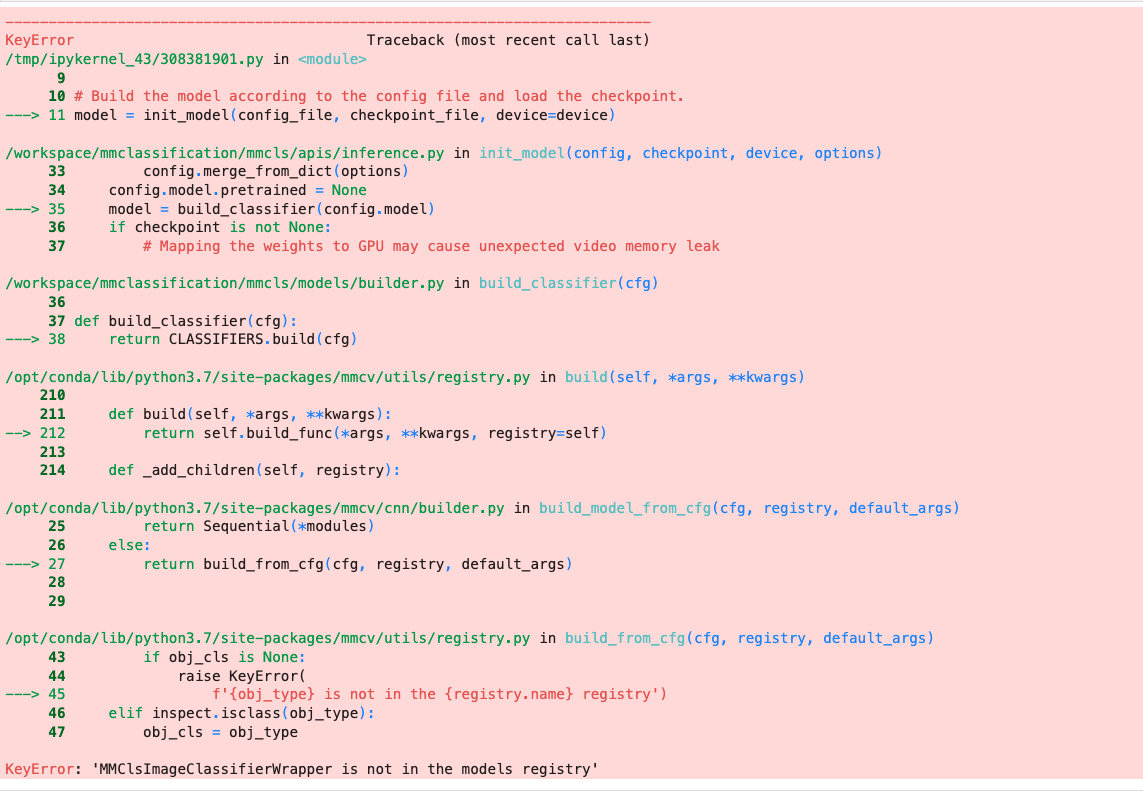
Any pointers on why this may occur will help a lot .. thanks


Closing due to inactivity, please reopen if there are any further problems.