

 ollm
ollm
Possible bugs to be fixed
-
OK first bug I encounter was this exact same one from this other issue here https://github.com/ollm/OpenComic/issues/54 which it is said it is caused by by an incorrect path to the language file. Thank god there is a link on that page to a working version of the app else I would be stuck with that error forever. Note that everything I say from here on is regarding my use of OpenComic on a Windows10 x64 environment using the ‘fixed’ version from the link I mention above.
-
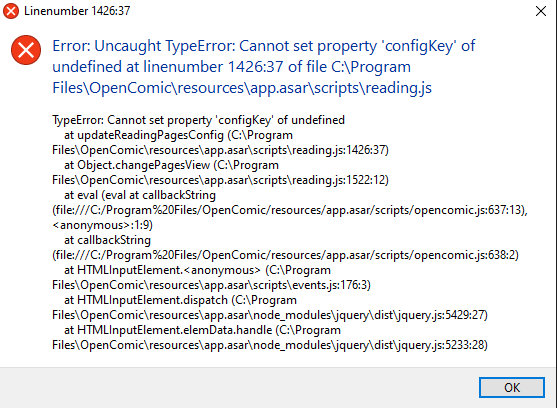
Second error I encounter was when trying to change the value of the ‘Delay in changing comics’. When I use the slider it immediately popups the following error window and then proceeds to ignore the new value I entered and resets it to the default one. Good thing the app doesn’t completely crash thou.
-
Now this one is a bit annoying, when we have the option ‘Reading manga (Inverted)’ enabled, it is also inverting the left-right mouse clicks to change pages, the keyboard left-right arrows to change pages, the previous & next buttons on the header bar, the previous & next options in the ‘Goto’ top menu, and even the page animation thou this one I could care less, not sure if anything else gets inverted, I’m only asking that when that option is enabled it only inverts the image position and nothing else. One thing is for sure, I am used to left-click my mouse to change to the next page and right-click to go to the previous page, on OpenComic however by default the right-click is the one that changes to the next page and the left-click to the previous page, so I wonder if there is any possible way to change this behaviors besides enabling ‘Reading manga (Inverted)’ which will also make all the aforementioned unsolicited inversions.
-
For some odd reason when you Zoom in on an image your mouse left and right clicks stops working as a means to change to ne next or previous page.
-
The ‘Zoom in’ & ‘Zoom out’ option on the top ‘View’ menu are only changing the header and lateral bars size and not the image at all. While this option may in fact be intended to do such a thing it is a bit misleading to name it just ‘Zoom in’ & ‘Zoom out’ making us think that it will only affect the image size. Also the default attributed keyboard shortcuts for making use of this options don’t seem to work at all plus if you by any chance circumvent that by using your mouse to make Zoom changes to the bars they will simple reset to their default values upon restarting the app. Don’t get me wrong, the ability to change the header and lateral bar sizes is definitely welcome, I only wish that you could change the size for each bar individually and in addition to that choose where the ‘lateral’ bar is placed on the interface like at left, bottom, right or top. I even think that the lateral bar alone could be substantially improved by just reducing the horizontal space occupied by the numbers on the left side of the thumbnails, currently if you were to ignore the numbers it’s as if you have enough space to fit 2 thumbnails side by side which can be tiresome when you have large images to display and every little bit of space counts.

Second error I encounter was when trying to change the value of the ‘Delay in changing comics’. When I use the slider it immediately popups the following error window and then proceeds to ignore the new value I entered and resets it to the default one. Good thing the app doesn’t completely crash thou.
This should be resolved here 1342c6816673461e2d7342c1a70e0577dcd3762e and here 2678152
Here's a beta version with these changes applied https://mega.nz/file/mWxFzYzJ#1OvulZjQVs6N2ZLWsyO_ZHbM2CpQibvVgrkGQKTgP34
I will look to correct the other mistakes when I have some more free time available.

Some of these things are fixed/implemented in the beta version (v1.0.0-beta.3), the others are the expected behavior but I will try to make it possible to change it from the settings.
- Custom keyboard and gamepad shortcuts 0a4a4597883c7c6c837acdd61e4d80dc8c0a0ec1
Feel free to comment if you find any bugs.