
obs-studio

obs-studio copied to clipboard
Published
2 months ago
•
 obsproject
obsproject
"Sec. Software Status" is not logged by Windows language setting
Operating System Info
Windows 11
Other OS
No response
OBS Studio Version
28.1.2 / 29.0.2
OBS Studio Version (Other)
No response
OBS Studio Log URL
There are two log files, listed under "Current Behavior".
OBS Studio Crash Log URL
No response
Expected Behavior
Security Software name is logged in the log file.
Current Behavior
If the Windows language setting is not English (e.g., Japanese), the security software name is not logged in the log file.
log file (If the Windows language setting is "English")
2022-11-21 08-57-30.txt

log file (If the Windows language setting is "Japanese")
2022-11-21 09-00-16.txt
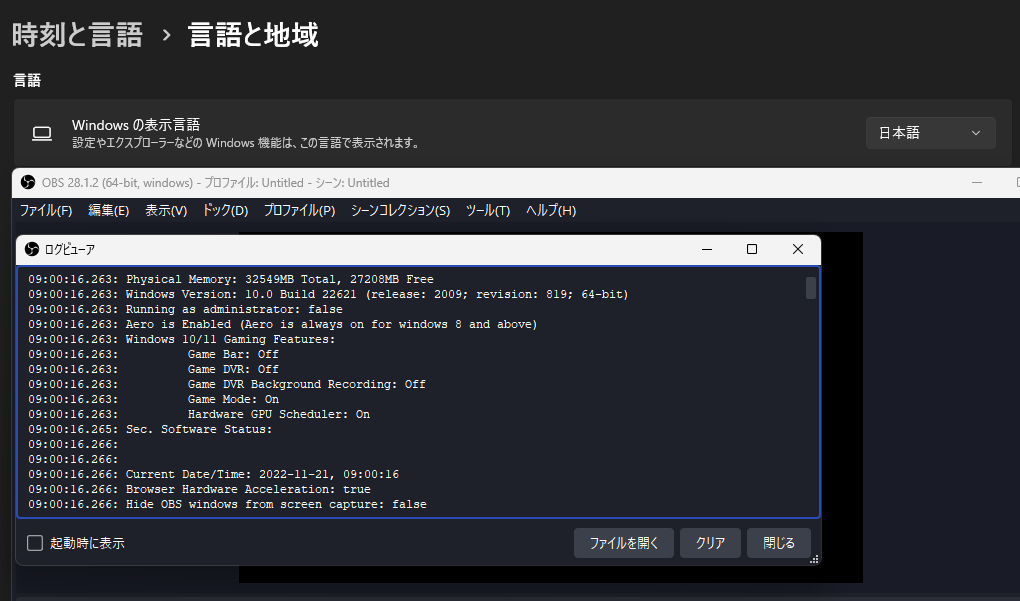
Steps to Reproduce
- Set the Windows display language to "English"
- Start OBS.
- Open the log file.
- The name of the security software is logged in the log file.
- Quit OBS.
- Set the Windows display language to "Japanese"
- Log out of Windows and log in again to apply the settings.
- Start OBS.
- Open the log file
- Security software name is not logged in log file.
Anything else we should know?
I'm using translation. Sorry if the English is not correct.
Results of checking past versions 21.1.2 and later : No logging. (Same behavior as now)
21.0.1 : Security software names are only partially logged.
09:31:56.479: Sec. Software Status:
09:31:56.480: 	Microsoft Defender
09:31:56.480: 	Windows

