

 obsproject
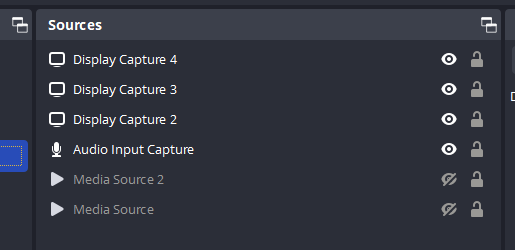
Sources icons cut off (visual bug)
Operating System Info
Windows 10
Other OS
No response
OBS Studio Version
28.0.3
OBS Studio Version (Other)
No response
OBS Studio Log URL
https://obsproject.com/logs/NItne8VYKEHQfDrp
OBS Studio Crash Log URL
No response
Expected Behavior
Sources icons should be full visible and in line with text.
Current Behavior
Icons are offset from text and partially cut-off.

Steps to Reproduce
- Open OBS
- View Sources panel
Anything else we should know?
Before the latest update, all icons were visible. This may be a scaling issue.

Since the latest update, this continues to be an issue. Any idea why the icons are cut-off visually?
This issue doesn't have enough information to be actionable currently, so nobody has really looked at it. We cannot replicate this behavior with the given reproduction steps.
Everything appears just fine for me. You have several third party plugins installed in the provided log. Are you using DPI scaling? Have you made any adjustments to the themes at all?
Please test again with no third-party plugins installed, to see if the same thing occurs.


I have most commonly seen this issue arise with the StreamElements plugin installed. Please uninstall it and see if the issue persists.
If it does, please submit a new log file.
