

 obsproject
obs-output: Add presets to dynamic bitrate (rtmp)
Description
Also modifies UI. We add three presets:
- dynamic bitrate disabled (default);
- a recommended preset where bitrate recovery is much faster (bitrate increase tested every 2 seconds).
- a preset which corresponds to earlier settings (but with a faster 15 sec recovery).
The recommended preset targets good internet connections with occasional hiccups. The slower recovery preset is more adapted to challenging internet connections with instabilities.
Furthermore, the minimum bitrate (floor) is set to :
- 30% of initial bitrate for default preset & drop frames instead of going under the floor.
- 50 kbps for the slower recovery preset.
Note that the basic algorithm for dbr has not been changed. Only some of its hard-coded settings have been changed.
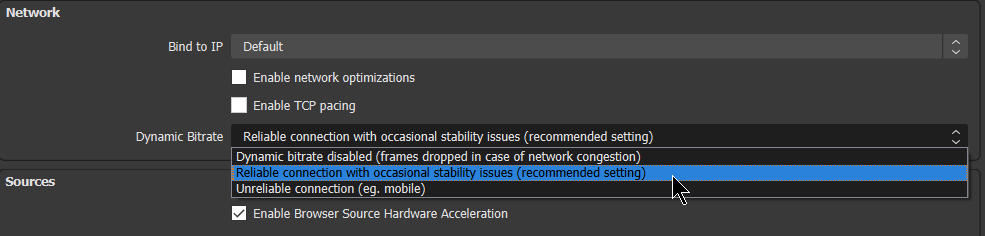
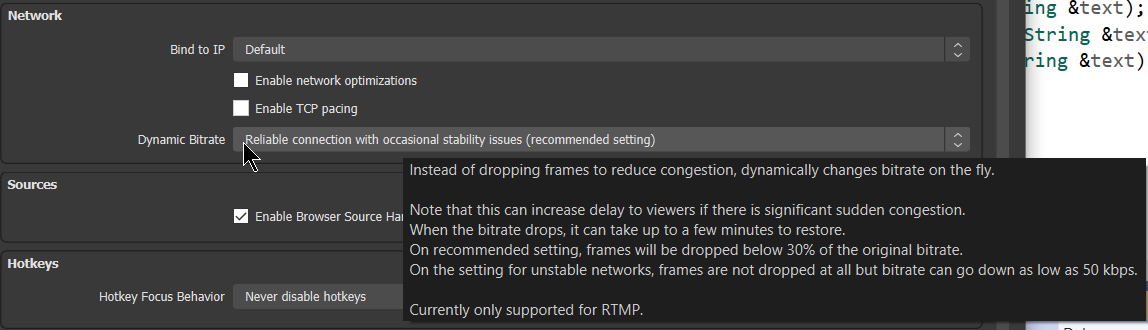
The old dynamic bitrate settings have been ported to the recommended setting (fast recovery).
Motivation and Context
The current dynamic bitrate was written with specifications from a major service, with tests to increase bitrate every 30 seconds. This was unfortunately very slow for the majority of users because it would mean recovery can take several minutes. The service doesn't require from us such long recovery times, which allows us to make some changes. There's broadly two populations we target :
- people who have excellent internet (broadband, fiber), very stable but with very rare occasional network issues. The default preset targets them. The recovery rate is set to 2 seconds so overall recovery from a hiccup will be very fast.
- people with unstable network; the recovery rate needs to be much slower in order to ensure stable transmission.
For the presets we also set different minimum bitrates, below which we drop frames again. For unstable network, the floor is set to 50 kbps (as it was before) because stability is prioritized over frame drops. For stable networks, we picked 30% of the initial bitrate, meaning we can absorb bandwidth contractions down to that value. We don't want to go too low because this would increase the recovery time. And we know that on these networks, the hiccups are really short and occasional.
How Has This Been Tested?
This was tested on windows 10 with a network limiter app (NetLimiter 4). Works as expected.
Types of changes
- Performance enhancement (non-breaking change which improves efficiency)
Checklist:
- [x] My code has been run through clang-format.
- [x] I have read the contributing document.
- [x] My code is not on the master branch.
- [x] The code has been tested.
- [x] All commit messages are properly formatted and commits squashed where appropriate.
- [x] I have included updates to all appropriate documentation.

I think it might be better to change from having a checkbox for On/Off plus this dropdown to a single dropdown with Off / Reliable / Unreliable, and then migrate existing users Off -> Off and On -> Unreliable.
I'll let @Warchamp7 weigh in on this first though.

I think it might be better to change from having a checkbox for On/Off plus this dropdown to a single dropdown with Off / Reliable / Unreliable, and then migrate existing users Off -> Off and On -> Unreliable.
I'll let @Warchamp7 weigh in on this first though.
i have no preference; the latter choice requires some rework since the previous setting was a bool and it's changed into an int.
Updated the PR to follow @WizardCM recommendation, following @Warchamp7 advice. The porting of ancient dbr settings has been done through casting bool to int (the c bool in obs is actually an int anyway). When dbr was enabled on previous settings I've chosen to port to the 'recommended' preset instead of the slower preset since the previous slow recovery of 30 seconds was oftentimes unsuitable. Anyway, changing the preset is one click away so it's a minor matter.
I feel like having this much text in the listbox is bad UX. The tooltip can explain the details, I would much prefer if we could simplify the list to more concrete options instead of terms which could mean different things to different users. I was thinking something like "Disabled, Normal, Aggressive" and leave the explanations to the tooltips (or even a KB link if we think this feature needs significant explanation).

I feel like having this much text in the listbox is bad UX. The tooltip can explain the details, I would much prefer if we could simplify the list to more concrete options instead of terms which could mean different things to different users. I was thinking something like "Disabled, Normal, Aggressive" and leave the explanations to the tooltips (or even a KB link if we think this feature needs significant explanation).
I agree with this. I'd prefer short names for the options, and use explanatory text and/or KB link in a tooltip.

Per discussion w/ @notr1ch & @RytoEX I'm changing to less wordy entries : disabled / normal / weak for the three options.
As a user "Normal / Aggressive" and "Normal / Weak" tell me absolutely nothing about what to expect from each option. I think communicating the behaviour in fewer words is fine, but it needs to still be descriptive & relevant.
Dynamic Bitrate:
- Disabled
- For wired connection
- For wireless connection
or
Unstable Connection:
- Drop frames
- Drop bitrate
- Dramatically drop bitrate

Is it possible for this to get working for SRT streaming as well, or is it too complex to alter?
I'm happy to show my ignorance (if I am), but I do recall hearing that OBS Dynamic bitrate is both slow to recover and may only work for RTMP.
Dynamic bitrate in IRL solutions is a huge game changer, especially with HEVC and SRT (albeit using an obviously forked version - if anyone knows of oneI'd be happy to know :) I am unsure if SRT has technology built into it to allow a high performance dynamic bitrate (sometimes my bitrate will drop to sub 500 if I hit certain spots/blocks with bad coverage).

Srt would require a separate implementation. The two protocols use completely different code.
On Thu, Jul 7, 2022, 12:36 spiderfaced @.***> wrote:
Is it possible for this to get working for SRT streaming as well, or is it too complex to alter?
I'm happy to show my ignorance, but I do recall hearing that OBS Dynamic bitrate is both slow and may only work for RTMP.
Dynamic bitrate in IRL solutions is a huge game changer, especially with HEVC (albeit using an obviously forked version - if anyone knows of onw I'd be happy to know :)
— Reply to this email directly, view it on GitHub https://github.com/obsproject/obs-studio/pull/6173#issuecomment-1177378268, or unsubscribe https://github.com/notifications/unsubscribe-auth/ACG2OTYGGN6SVY5MC3UGQMTVS2XKLANCNFSM5RD5LLCA . You are receiving this because you authored the thread.Message ID: @.***>
Do you know how the built in and advertised Adaptive bitrate works in vanilla SRT? Is it at all comparable to the RTMP dynamic bitrate in performance or does it need to be working closely with the encoder?
Do you know how the built in and advertised Adaptive bitrate works in vanilla SRT? Is it at all comparable to the RTMP dynamic bitrate in performance or does it need to be working closely with the encoder?
Got nothing to do with dynamic bitrate. It's ARQ, automated repeat request, meaning an auto resend of lost packets. It's faster than rtmp which is tcp because it uses udp but improved with some ack exchanges. Dynamic bitrate decreases the video bitrate when bandwidth decreases.
Do you know how the built in and advertised Adaptive bitrate works in vanilla SRT? Is it at all comparable to the RTMP dynamic bitrate in performance or does it need to be working closely with the encoder?
Got nothing to do with dynamic bitrate. It's ARQ, automated repeat request, meaning an auto resend of lost packets. It's faster than rtmp which is tcp because it uses udp but improved with some ack exchanges. Dynamic bitrate decreases the video bitrate when bandwidth decreases.
Gotcha on resending packets, but I am very interested in getting the bitrate lowered without having to resend packets. I use a high SRT latency as it is (located in Cambodia for IRL streaming and 4g is iffy.
Perhaps I will just test SRT without forcing my mind to think that it requires dynamic bitrate ala RTMP or also HEVC level low bitrate qualities, assuming the latency can keep up. Mostly waiting for V28 to see what goodies it brings and potential source mods.
Last two months, I have issues with dynamic bitrate - white screen for a long time, and only sound is heard Without enabled dynamic bitrate, my stream just drops in these moments If possible, can anyone give me latest master build with this patch? I want to test these changes

@pkviet I also interested in testing https://github.com/obsproject/obs-studio/pull/9807 If you can give me one build with both changes, I can test both
@pkviet I also interested in testing https://github.com/obsproject/obs-studio/pull/9807 If you can give me one build with both changes, I can test both
MS might have solved the bug. We're waiting for confirmation but it's on their side. Not ours. So #9807 is not necessary. It solves another minor bug but not the cracks.
@pkviet I also interested in testing #9807 If you can give me one build with both changes, I can test both
MS might have solved the bug. We're waiting for confirmation but it's on their side. Not ours. So #9807 is not necessary. It solves another minor bug but not the cracks.
Ah, ok In any case, this bug appears extremely rarely for me Most annoying thing with sound is https://github.com/obsproject/obs-studio/issues/7588
MS might have solved the bug.
By this do you mean the audio cracks? This have been bothering me for quite some time and I can still (pretty consistently) reproduce the issue on 30.0.2 after ~10h of recording. If MS has done something I'll try updating my OS instead.
