

 nxt-dev
maya installation error
Describe the bug After I drag "drag_into_maya.py" onto Maya app and restarted Maya, when I activate the nxt plugin, these are the errors that I got. // Error: file: C:/Program Files/Autodesk/Maya2020/scripts/others/pluginWin.mel line 317: ImportError: file X:/temp/nxt/nxt_editor-editor_v3.10.0/nxt_editor/integration/maya/plug-ins/nxt_maya.py line 17: No module named Qt //
sys:1: Warning: Failed to run file: X:/temp/nxt/nxt_editor-editor_v3.10.0/nxt_editor/integration/maya/plug-ins/nxt_maya.py
// Error: file: C:/Program Files/Autodesk/Maya2020/scripts/others/pluginWin.mel line 317: ImportError: file X:/temp/nxt/nxt_editor-editor_v3.10.0/nxt_editor/integration/maya/plug-ins/nxt_maya.py line 17: No module named Qt // // Warning: file: C:/Program Files/Autodesk/Maya2020/scripts/others/pluginWin.mel line 317: Failed to run file: X:/temp/nxt/nxt_editor-editor_v3.10.0/nxt_editor/integration/maya/plug-ins/nxt_maya.py // // Error: file: C:/Program Files/Autodesk/Maya2020/scripts/others/pluginWin.mel line 317: (nxt_maya) //
It seems that Maya wasn't able to find dependencies of nxt-editor library. Thanks!
To Reproduce Steps to reproduce the behavior:
- Open Maya
- Drag drag_into_maya.py
- restart maya
- activate nxt plugin
Expected behavior It won't install as demonstrated on youtube. Maybe there must be some path settings that I have to set to match yours.
Screenshots

Desktop (please complete the following information): windows 10 maya2020
Additional context Add any other context about the problem here. Attach traceback here if possible.

Please make sure you're downloading the nxt_maya.zip from our latest release, not the source code zip.

I just downloaded from your latest release and ran the steps. Same errors occurred. myTempEDPF.executeDroppedPythonFile("C:/Program Files/Autodesk/nxt/drag_into_maya.py", "") del myTempEDPF Placed nxt mod file at D:/MayaProject/modules\nxt.mod // Error: file: C:/Program Files/Autodesk/Maya2020/scripts/others/pluginWin.mel line 317: ImportError: file F:/Downloads/nxt_editor-editor_v3.10.0/nxt_editor/integration/maya/plug-ins/nxt_maya.py line 17: No module named Qt //
sys:1: Warning: Failed to run file: F:/Downloads/nxt_editor-editor_v3.10.0/nxt_editor/integration/maya/plug-ins/nxt_maya.py
// Error: file: C:/Program Files/Autodesk/Maya2020/scripts/others/pluginWin.mel line 317: ImportError: file F:/Downloads/nxt_editor-editor_v3.10.0/nxt_editor/integration/maya/plug-ins/nxt_maya.py line 17: No module named Qt // // Warning: file: C:/Program Files/Autodesk/Maya2020/scripts/others/pluginWin.mel line 317: Failed to run file: F:/Downloads/nxt_editor-editor_v3.10.0/nxt_editor/integration/maya/plug-ins/nxt_maya.py // // Error: file: C:/Program Files/Autodesk/Maya2020/scripts/others/pluginWin.mel line 317: (nxt_maya) //
btw, I was able to open nxt editor by adding "sys.path.append" line in the plugin file. I know this isn't a proper way of installing your plugin.
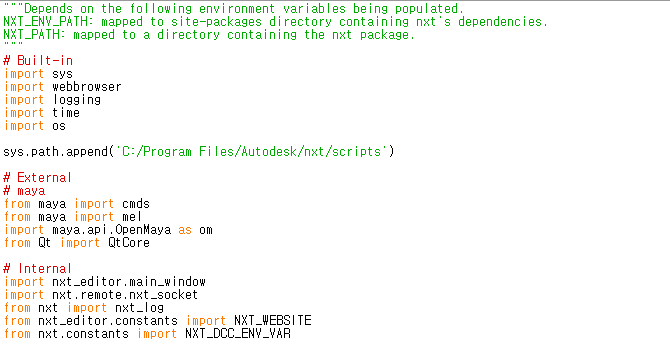
I tested on maya2022 and it works fine. Maybe there was a problem with my maya 2020 configurations. Thanks!