

 nvim-treesitter
Syntax highlight colors are not always respected
When using this plugin, the syntax highlight colors are not always respected (at least within terraform).
Normal highlighting(using treesitter):
 Highlighting with
 nvim-treesitter-context:

It seems to use the basic vim highlights instead of the treesitter ones. Python does seem to work correctly with treesitter hightlights.

It seems to be using the same highlighting as when you visual select something:
- Normal:

- treesitter-context:

- Visual Selection:
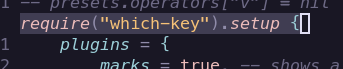


Vim highlights are not used. The treesitter highlights are applied by reading the AST at the position.
Please provide precise instructions on how to reproduce this.

Hi, I'm having a similar issue with a plugin of mine, reported here. Is there any way for other highlights to also get added to the context buffer? I'm using nvim_buf_set_extmark to add my plugin's highlights

Is there any way for other highlights to also get added to the context buffer? I'm using nvim_buf_set_extmark to add my plugin's highlights
Not currently. ts-context has its own mini treesitter highlighter to apply highlights directly from the AST. Other highlights in the buffer aren't looked at.
Interesting. Maybe it would be nice to allow other plugins to register a callback to add highlights on top of that, or something like that. I could maybe try my hand at it this weekend if you think it makes sense
Here's a reproducible example. It seems to occur with some colour schemes, so I've included one that has the issue. @rwblokzijl seems to have one too which looks like some sort of gruvbox variant.
Minimal config
Save this into a file called minimal.lua (or whatever you want to name it) then run nvim -u minimal.lua example.lua where example.lua is the other code block below.
-- minimal.lua
vim.cmd([[packadd packer.nvim]])

local packer = require("packer")
packer.init({
	enable = true,
	threshold = 0,
})

local use = packer.use
packer.reset()

packer.startup({
	function()
		use({
			"rose-pine/neovim",
			as = "rose-pine",
			config = function()
				vim.cmd("colorscheme rose-pine")
                vim.opt.background = 'dark'
			end,
		})
        use { 'nvim-treesitter/nvim-treesitter-context' }
	end,
})

require('treesitter-context').setup{
    enable = true, -- Enable this plugin (Can be enabled/disabled later via commands)
    max_lines = 0, -- How many lines the window should span. Values <= 0 mean no limit.
    trim_scope = 'outer', -- Which context lines to discard if `max_lines` is exceeded. Choices: 'inner', 'outer'
    patterns = { -- Match patterns for TS nodes. These get wrapped to match at word boundaries.
        -- For all filetypes
        -- Note that setting an entry here replaces all other patterns for this entry.
        -- By setting the 'default' entry below, you can control which nodes you want to
        -- appear in the context window.
        default = {
            'class',
            'function',
            'method',
            'for',
            'while',
            'if',
            'switch',
            'case',
        },
        -- Patterns for specific filetypes
        -- If a pattern is missing, *open a PR* so everyone can benefit.
        tex = {
            'chapter',
            'section',
            'subsection',
            'subsubsection',
        },
        rust = {
            'impl_item',
            'struct',
            'enum',
        },
        scala = {
            'object_definition',
        },
        vhdl = {
            'process_statement',
            'architecture_body',
            'entity_declaration',
        },
        markdown = {
            'section',
        },
        lua = {
            'local function',
        }
    },
    exact_patterns = {
        -- Example for a specific filetype with Lua patterns
        -- Treat patterns.rust as a Lua pattern (i.e "^impl_item$" will
        -- exactly match "impl_item" only)
        -- rust = true,
    },

    -- [!] The options below are exposed but shouldn't require your attention,
    --     you can safely ignore them.

    zindex = 20, -- The Z-index of the context window
    mode = 'cursor',  -- Line used to calculate context. Choices: 'cursor', 'topline'
    separator = nil, -- Separator between context and content. Should be a single character string, like '-'.
}
Example file
-- example.lua
require('test').setup({
    function()
        -- this is a test

        -- scroll so require leaves the screen
        -- and shows up in treesitter context

        -- You can use C-e to scroll down
        -- without moving the cursor
    end
})
Yes i use ellisonleao/gruvbox.nvim with a red i liked better: https://github.com/rwblokzijl/neovim/blob/85326669b4db8a5de346a0af8a5b9a69378c0e99/lua/util/colors.lua#L40
Seems fixed! Thanks a lot! (tested with https://github.com/nvim-treesitter/nvim-treesitter-context/pull/210)


It's still there for me. Using the above minimal.lua/example.lua
regular:
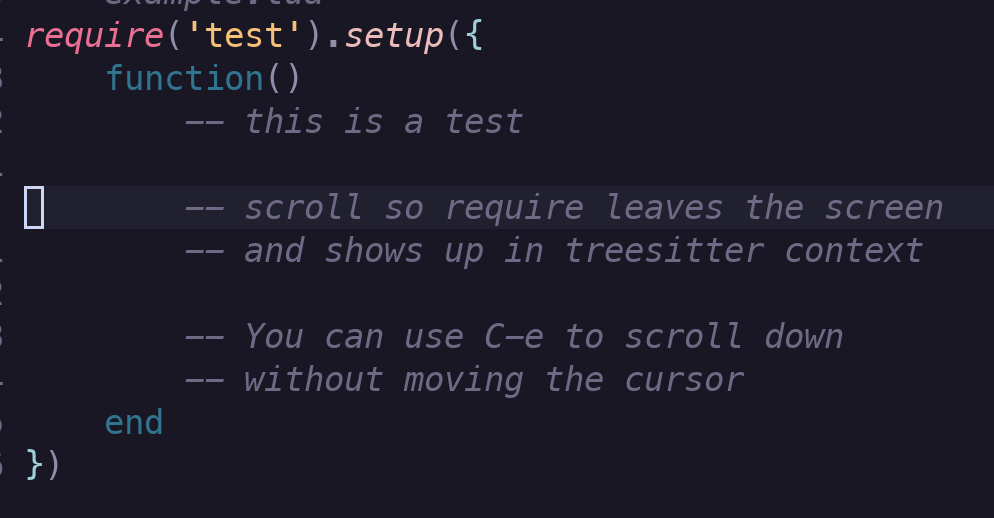
treesitter-context:
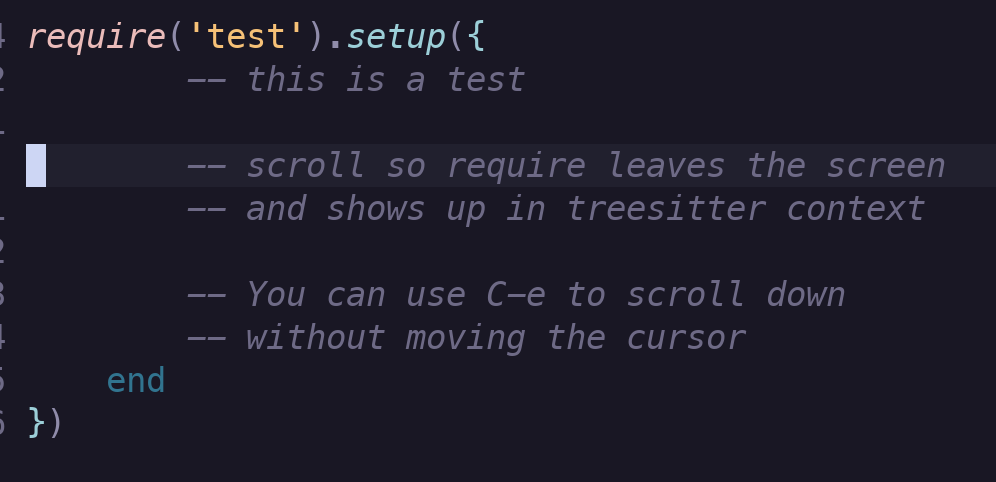
Another theme where this occurs is catppuccin (tested on all flavours)
Hi all!
In the past I've noticed the same issue (I mainly use Sonokai as colorscheme), and it shows up with the example.lua provided by @hisbaan. In mine only the color of the word setup is wrong though.
From what I've seen poking around, the highlights are applied in the correct order using the vim.api.nvim_buf_set_extmark() but when you query the extmark for that specific area the order is not respected:
From row 0 to 0 and from col 0 to 7 with Extmark ID 1 --> Name capture: 'variable' || Node type: 'identifier' || Highlight group: '@variable.lua' From row 0 to 0 and from col 0 to 7 with Extmark ID 2 --> Name capture: 'function.call' || Node type: 'identifier' || Highlight group: '@function.call.lua' From row 0 to 0 and from col 0 to 7 with Extmark ID 3 --> Name capture: 'function.builtin' || Node type: 'identifier' || Highlight group: '@function.builtin.lua' From row 0 to 0 and from col 7 to 8 with Extmark ID 4 --> Name capture: 'punctuation.bracket' || Node type: '(' || Highlight group: '@punctuation.bracket.lua' From row 0 to 0 and from col 8 to 14 with Extmark ID 5 --> Name capture: 'string' || Node type: 'string' || Highlight group: '@string.lua' From row 0 to 0 and from col 8 to 14 with Extmark ID 6 --> Name capture: 'spell' || Node type: 'string' || Highlight group: '@spell.lua' From row 0 to 0 and from col 14 to 15 with Extmark ID 7 --> Name capture: 'punctuation.bracket' || Node type: ')' || Highlight group: '@punctuation.bracket.lua' From row 0 to 0 and from col 15 to 16 with Extmark ID 8 --> Name capture: 'punctuation.delimiter' || Node type: '.' || Highlight group: '@punctuation.delimiter.lua' From row 0 to 0 and from col 16 to 21 with Extmark ID 9 --> Name capture: 'variable' || Node type: 'identifier' || Highlight group: '@variable.lua' From row 0 to 0 and from col 16 to 21 with Extmark ID 10 --> Name capture: 'field' || Node type: 'identifier' || Highlight group: '@field.lua' From row 0 to 0 and from col 16 to 21 with Extmark ID 11 --> Name capture: 'function.call' || Node type: 'identifier' || Highlight group: '@function.call.lua' From row 0 to 0 and from col 21 to 22 with Extmark ID 12 --> Name capture: 'punctuation.bracket' || Node type: '(' || Highlight group: '@punctuation.bracket.lua' From row 0 to 0 and from col 22 to 23 with Extmark ID 13 --> Name capture: 'punctuation.bracket' || Node type: '{' || Highlight group: '@punctuation.bracket.lua' From row 0 to 0 and from col 22 to 23 with Extmark ID 14 --> Name capture: 'constructor' || Node type: '{' || Highlight group: '@constructor.lua' From row 1 to 1 and from col 4 to 12 with Extmark ID 15 --> Name capture: 'keyword.function' || Node type: 'function' || Highlight group: '@keyword.function.lua' From row 1 to 1 and from col 12 to 13 with Extmark ID 16 --> Name capture: 'punctuation.bracket' || Node type: '(' || Highlight group: '@punctuation.bracket.lua' From row 1 to 1 and from col 13 to 14 with Extmark ID 17 --> Name capture: 'punctuation.bracket' || Node type: ')' || Highlight group: '@punctuation.bracket.lua' { { 9, 0, 16 }, { 11, 0, 16 }, { 10, 0, 16 } }
The last line is obtained with vim.api.nvim_buf_get_extmarks() specifying the row and columns where setup is in example.lua. I think that the correct order should be: { { 9, 0, 16 }, { 10, 0, 16 }, { 11, 0, 16 } }
Now, even if this assumption is correct, I don't know how I would fix it.
