

 nvim-tree
Menu for file management
Hi there,
I love this plugin, but the only thing holding me back from switching from NERDTree is that AFAIK there's no menu for file management. I really would rather not learn a lot of bindings for just a file manager (mainly because I only use them occasionally), and NERDTree makes this easy with its menu, activated by pressing m:
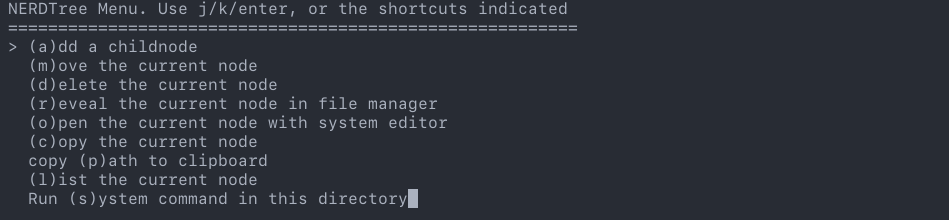
I haven't found any issues or discussion about this, does nvim-tree plan on implementing something like this?

Hi, I don't think it would be hard to implement, if someone wants too, i'd accept a PR :)


As #362 as pointed out it can be cool to have a floating menu to select actions instead of using key map. This feature is currently under development but I've think that can help let people try it out and express their desired feature or suggestions.
I think that is better to leave this feature on this branch until give the code a refactoring for better implementation. As for now there is 3 actions avaible: copy path, copy name, edit no picker.
Run the plugin from this branch then press 'm' inside NvimTreeExplorer to open the menu and select the desired action.
From packer this can be done via the branch options
use { 'kyazdani42/nvim-tree.lua', branch = 'file-management-menu-#362', config = function()
    require("nvim-tree").setup {} end
}
once @kyazdani42 as accepted the pull request without merging into master or via lrnzlo/nvim-tree.lua if for technical/development reason that's not possible.
Please @kyazdani42 and @marioortizmanero let me know if something idea :) As for now, I don't have update any documentation as I don't consider this a official version of the feature and I don't think is stable/mature enough to be merged into the main repo.
I keep working on this to get to a better result. This as to be intended as an EXPERIMENTAL feature.
I think a long running branch is a good idea. The first PR looks good, but it is a work in progress. Feedback/testing/additions from users would be valuable.

I've keep working on the feature this morning.
I've implemented the setup function and the logic behind the action exec.
At this point only the actions present in nvim-tree.actions.mappings can be executed, custom function will be avaible soon.
Now the user can add or remove options via
setup {
    menu = {
        actions = {
            ['title_of_options'] = 'action_from_nvim-tree.actions.mappings',
            ['Copy File Name'] = 'copy_name'
        }
    }
}
I think it's ok to keep a default set of options. Which options should be? 4-5? Example: copy_paste, open_file etc.... @marioortizmanero which options has you in mind when open this issue? :smiley:
I had in mind the same ones configured for NERDTree, basically. But it can be tweaked if you consider it better in another way, of course.
If someone was interested, I implemented something similar using Telescope as a custom dropdown (cursor) picker. You can see it here

If someone was interested, I implemented something similar using Telescope as a custom dropdown (cursor) picker. You can see it here
That's amazing!
I'd be grateful if you could add that Recipe to the wiki
See https://github.com/Tolomeo/nvim-tree.lua/wiki/Recipes#creating-an-actions-menu-using-telescope for a full solution.