

 nvim-lua
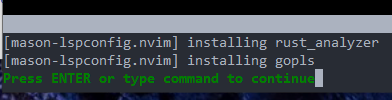
"[mason-lspconfig.nvim] installing rust_analyzer" on every startup
Describe the bug
I see this on every startup:

To Reproduce Steps to reproduce the behavior:
- Start fresh
- Get latest init.lua (https://github.com/nvim-lua/kickstart.nvim/blob/d37a3a946288c97e52e3d82e8a710c099eb6bd90/init.lua at time of writing)
- Start Neovim
- Let it install the plugins
- Restart Neovim when complete
- Let it finish the install
- Restart Neovim when complete
Desktop (please complete the following information):
- OS: Windows 10
- Terminal: N/A (Neovim GUI)
Neovim Version
- Output of running
:versionfrom inside of neovim: Neovim 0.8.1
I have the same issue on an Ubuntu computer, except there the output is slightly different:
[mason-lspconfig.nvim] installing pyright
[mason-lspconfig.nvim] installing tsserver
[mason-lspconfig.nvim] installing gopls

Given that it's happening on two different systems (and assuming you didn't add/remove anything from that init.lua file you linked), likely cause seems to be something about your environment setup. Do you alter $XDG_CONFIG_ vars or do some symlink trickery in any way?

Ahh, interesting. I do have a dotfiles repo and had a symlink from C:\Users\MyUser\AppData\Local\nvim\init.lua to the file in my dotfiles repo. I should have thought of that when I was writing this post, sorry. But even when getting rid of the symlink and starting from scratch I still observe this behavior:

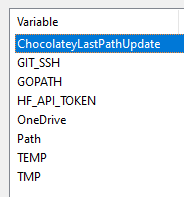
As far as I can tell, I have no environment variables like XDG_CONFIG_* or MYVIMRC set on my computer:
If there are any other settings I should inspect to rule out stupidity on my own end, let me know. As a sanity check, I renamed init.lua to __init.lua. As expected, Neovim started with vanilla settings.
Could also be that these servers require some dependencies and mason lspconfig is just failing silently, and then retries on restart. I believe you need cargo binary reachable on your $PATH from inside Neovim for it to work, so check from Neovim: echo executable('cargo') and if it's 0, then there's your issue. It is installing the others successfully it seems, and nearly duplicated across systems. I suspect pyright fails on Ubuntu because the dependency there is pip and Ubuntu packages that separately (or used to do something like that) and you have to do apt install python-pip, from what I remember.
Please remove any servers you don't want to actually run -- I'm assuming you don't want to run rust analyzer cause you don't have cargo.

Check if u have C:\Program Files\7-Zip in ur PATH.
https://github.com/williamboman/mason.nvim/issues/282?ysclid=lbwjlb0juz999449161#issuecomment-1213297775

@craigmac On my Windows machine, both echo executable('cargo') and echo executable('pip') were returning 1. On my Ubuntu machine pip wasn't detected. But after fixing it, repeating the install procedure from scratch and verifying that both commands were returning 1 now, I still got the same issues.
@tjdevries I'd like to keep rust-analyzer if possible.
@sekmentina While I have a lot of paths in my Path variable, 7-Zip does not appear to be on it. I've confirmed this by trying to invoke 7z.exe, which is not recognized as an internal or external command.
A Reddit thread told me to check :MasonLog. It looks like my Go setup is acting strange (will try to update) and rust-analyzer somehow cannot execute.
[ERROR Tue Dec 20 20:29:41 2022] ...acker\start\mason.nvim/lua/mason-core/installer/init.lua:155: Installation failed for Package(name=gopls) error=spawn: C:\Program Files\Go\bin\go.EXE failed with exit code 1 and signal 0.
[ERROR Tue Dec 20 20:29:45 2022] ...acker\start\mason.nvim/lua/mason-core/installer/init.lua:155: Installation failed for Package(name=rust-analyzer) error="...acker\\start\\mason.nvim/lua/mason-core/installer/init.lua:122: ...er\\start\\mason.nvim/lua/mason-core/managers/std/init.lua:96: Unable to unpack rust-analyzer.exe.gz."
I'll do some more Googling in the meantime.
On Windows, I updated go and ran go install -v golang.org/x/tools/gopls@latest on Windows. Not sure how this helped solve the rust-analyzer error but everything seems to be running smoothly there now.
On Ubuntu, all messages went away when I installed npm and go. It was a fairly fresh install so I didn't have everything set up there yet.
Long story short for people finding this thread in the future: check :MasonLog for further debug info and make sure you have cargo/pip/go/npm available if you want the default settings to work. Or disable language support for what you don't need as TJ suggests.
Thanks to everyone who participated in the thread!