

 nvim-lua
Spawning language server with cmd: `lua-language-server` failed. The language server is either not installed, missing from PATH, or not executable.
Hey @tjdevries, Thank for the Video: https://www.youtube.com/watch?v=stqUbv-5u2s
I get this error after removing my current ~/.config/nvim and replacing with the one in this repo!



I'm also getting lua errors. I've tried deleting all the directories and starting over. Also upgraded all packages with brew
   90 ## The following errors have been detected:
   91   - ERROR: vim(highlights): ...im/0.8.1/share/nvim/runtime/lua/vim/treesitter/query.lua:219: query: invalid node type at position 2765 for language vim
   92     vim(highlights) is concatenated from the following files:
   93     | [ERROR]:"/Users/martinphee/.local/share/nvim/site/pack/packer/start/nvim-treesitter/queries/vim/highlights.scm", failed to load: ...im/0.8.1/share/nvim/runtime/lua/vim/treesitter/query.lua:219: query: invalid node type at               position 2765 for language vim

No I moved the whole /nvim dir to somewhere else before starting this. @tjdevries
This issue was happening in v8.1.0 and v8.0.0, I fixed it by installing v0.9.0-dev.
Can you try with latest version of how we're initializing and running the servers? should be better now.
Yes, thanks @tjdevries, the language server is fixed. But I still get this error in 0.8.1 version:
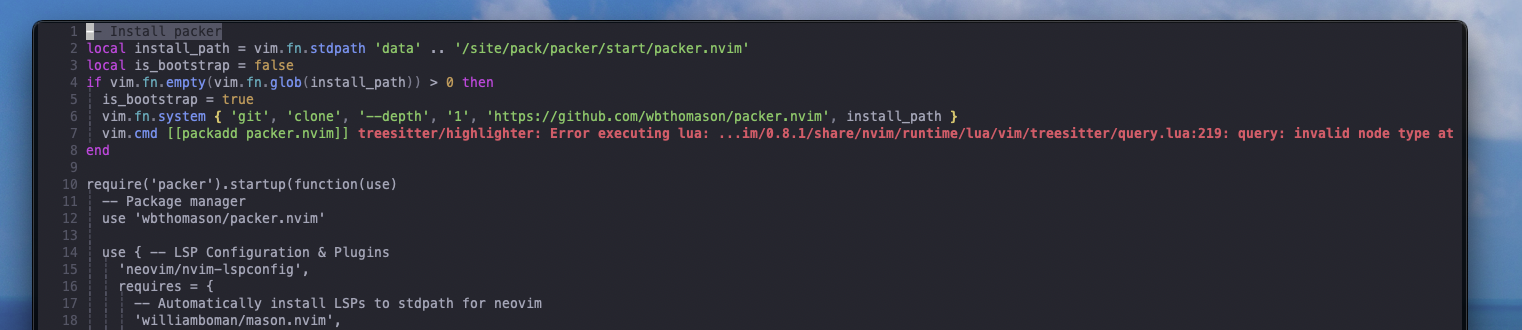
I think "yes". I can't be sure thought, hard to remember as I tried everything!
The neovim is not finding the LSP in the neovim PATH because it has not yet been added to the neovim PATH. This task is handled by Mason. But if nvim-lspconfig tries to access the LSP server before the appropriate PATH gets added by Mason then we encounter the error:
Spawning language server with cmd: `lua-language-server` failed. The language server is either not installed, missing from PATH, or not executable.
The solution is given here: https://github.com/williamboman/nvim-lsp-installer/discussions/509#discussioncomment-3337756
So you need to make sure that Mason gets loaded before nvim-lspconfig does, i.e. require("mason").setup() runs before require("nvim-lspconfig").setup()
If you are using Lazy.nvim then this solves the problem, adding mason as a dependency of nvim-lspconfig.
{
    "neovim/nvim-lspconfig",
    dependencies = {
        "williamboman/mason.nvim",
    },
}
