
nativescript-videoplayer

nativescript-videoplayer copied to clipboard
 nstudio
Video controls float in scrollview (Android)
Hey,
Issue
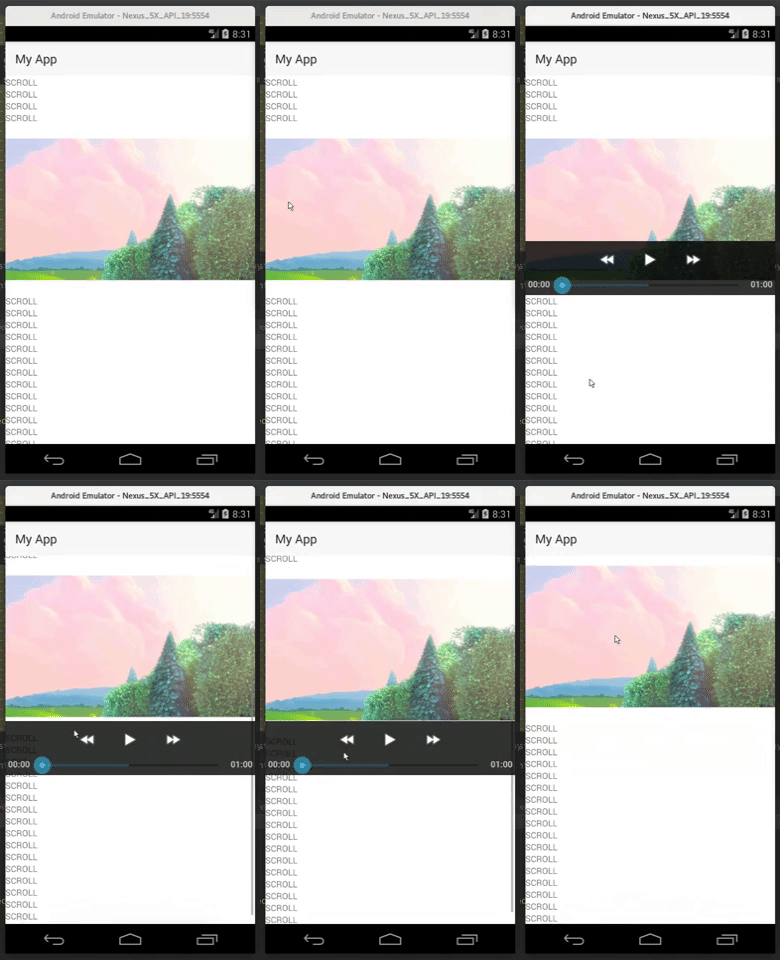 Occurs in all android versions and devices we've checked.
Reproduce
 <StackLayout>
        <ScrollView>
            <StackLayout>
                <Label text="SCROLL"></Label>
                <Label text="SCROLL"></Label>
                <Label text="SCROLL"></Label>
                <Label text="SCROLL"></Label>
                <Label text="SCROLL"></Label>
                <Label text="SCROLL"></Label>
                <Label text="SCROLL"></Label>
                <Label text="SCROLL"></Label>
                <Label text="SCROLL"></Label>
                <Label text="SCROLL"></Label>
                <VideoPlayer:Video id="nativeVideoPlayer"
                                   controls="true"
                                   loop="true" autoplay="true" height="280"
                                   src="https://clips.vorwaerts-gmbh.de/big_buck_bunny.mp4" />
                <Label text="SCROLL"></Label>
                <Label text="SCROLL"></Label>
                <Label text="SCROLL"></Label>
                <Label text="SCROLL"></Label>
                <Label text="SCROLL"></Label>
                <Label text="SCROLL"></Label>
                <Label text="SCROLL"></Label>
                <Label text="SCROLL"></Label>
                <Label text="SCROLL"></Label>
                <Label text="SCROLL"></Label>
                <Label text="SCROLL"></Label>
                <Label text="SCROLL"></Label>
                <Label text="SCROLL"></Label>
                <Label text="SCROLL"></Label>
                <Label text="SCROLL"></Label>
                <Label text="SCROLL"></Label>
                <Label text="SCROLL"></Label>
            </StackLayout>
        </ScrollView>
</StackLayout>
We use this video plugin in production, so we forked this repo and hacked our way around it. We accomplished it by exposing "hideMediaControls" and calling it on scroll, gross.
Would be nice if the controls stick to the video :)
Alternatives
Exoplayer
We've tried this and we faced some issues:
- 1.5mb extra on Android (not really an issue but we rather avoid the additional mb's)
- Suspend/Resume breaks the video on lower Android API's. We're not sure if this is an Exoplayer issue or NativeScript-Exoplayer issue. We see a "less than API 23" check in the Exoplayer sdk that might be the culprit as it might conflict with the NativeScript implementation.
Logged issue:

