

 nrwl
nrwl
How to prevent reload of dependencies?
Hello! Running the application with nx serve host and I see that some of the dependencies are loading on each pageload:
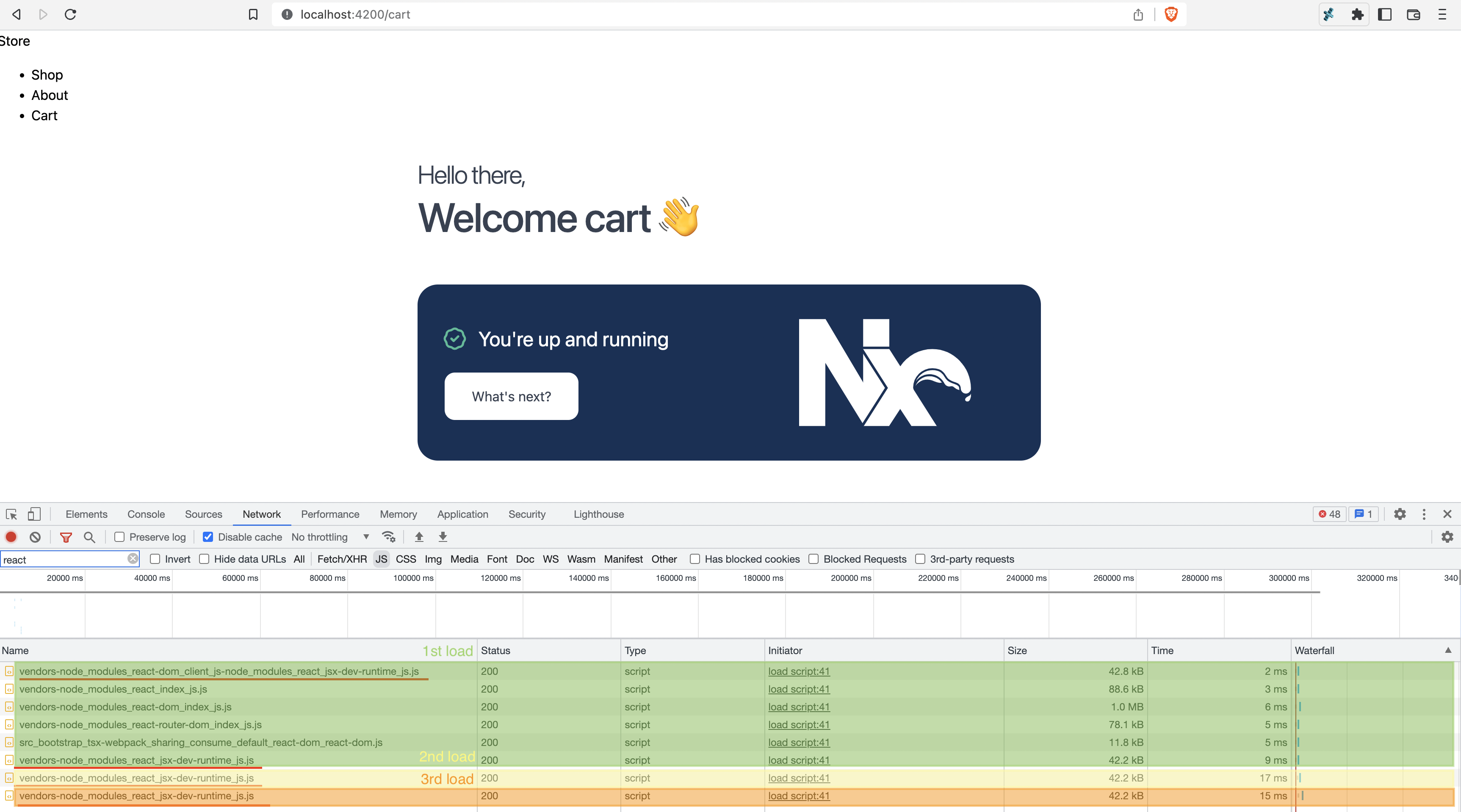
- The 1st load (green) included the initial request to
http://localhost:4200, which looks like it loads the "Shop" page by default - The 2nd load (yellow) happened after clicking "About"
- The 2rd load (orange) happened after clicking "Cart"
I'm not exactly sure what's happening here, but on the first pageload there's two separate requests that have node_modules_react_jsx-dev-runtime_js.js in their name that are around 42kB in size. The first one is made to localhost:4200 and then the second is to localhost:4203.
And then with the 2nd and 3rd pageload, it looks like identical 42.2kB vendors-node_modules_react_jsx-dev-runtime_js.js, to localhost:4201 and then localhost:4202 respectively.
It seems like there's an opportunity here for identical dependencies between apps to be cached in the browser and only requested once. In this case it could be loaded in the localhost:4200 application.
Can this be accomplished with a withModuleFederation compatible configuration file?

I'm interested in knowing this as well, shared dependencies are part of the reason for using module federation?
