

 nordtheme
Having kind of "tints" inside the code editor
Description
Only with Nord theme, my editor displays kind of 'tints', shapes with different colors, on the right side, see prtscn
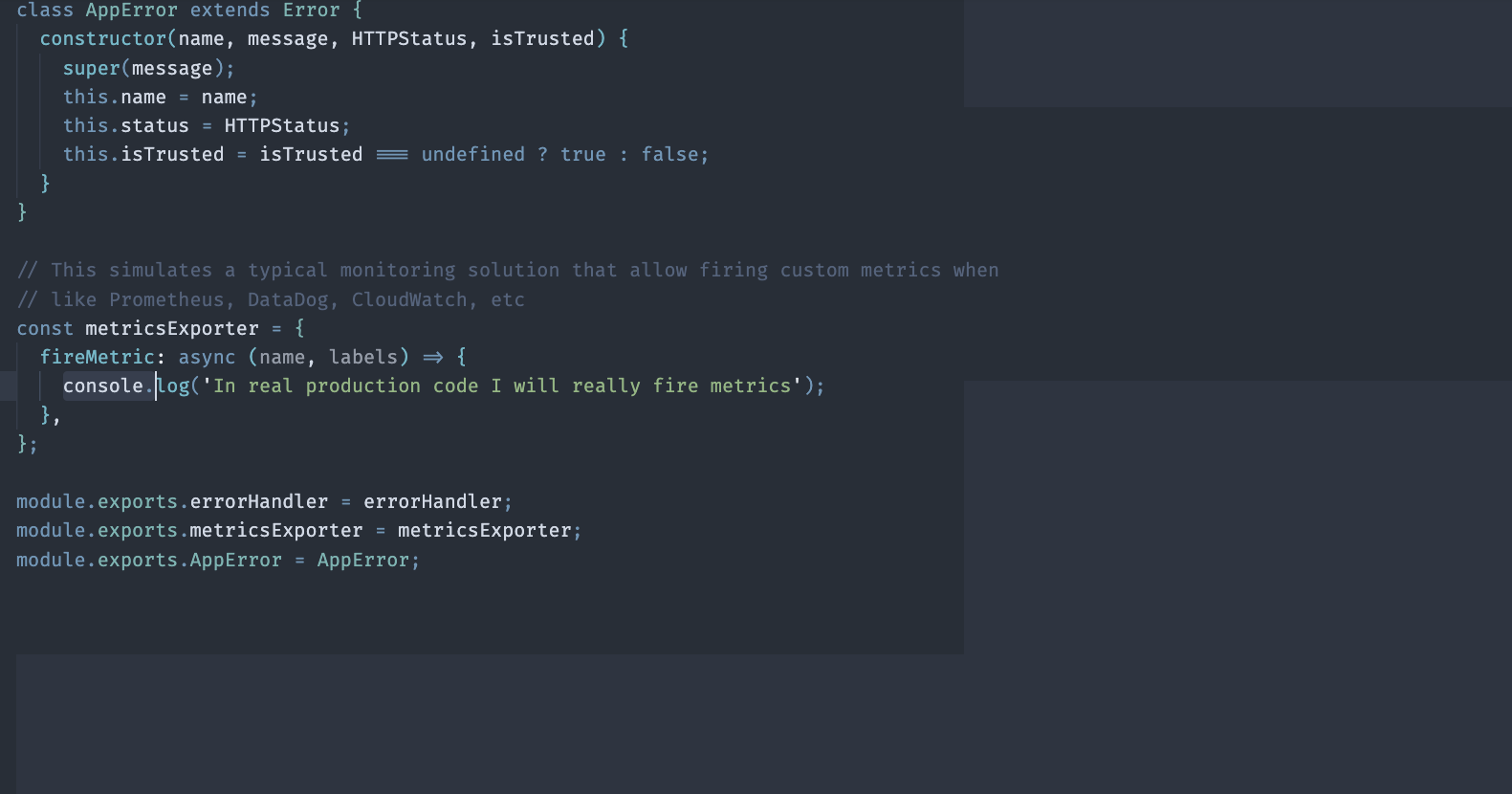
Steps to Reproduce
In my environment, it will happen in every code file. Just installed 'Nord' and opened a code files
Expected Behavior
The background to be consistent
Example
See prtscn
Environment and Versions
- What is the version of Nord Visual Studio Code you are running? - 0.19
- What is the name and the version of your OS? - MacOS Monterey 12.4
- Have you tried to reproduce it on different OS environments and if yes is the behavior the same for all? No, don't have one
- Are you using any additional CLI arguments to run the project? No
- What is the version of the build tool (e.g. npm, dep or Gradle) you are running? 8.12.1
- Are you using any additional CLI arguments to start the build tool task/script other than defined by the project? No

Hi @goldbergyoni :wave:
This is a known Visual Studio Code problem reported in microsoft/vscode#152816 which is also a pinned issue so I guess a patch version will be released as soon as possible. I also noticed changes after updating to the latest VS Code version, but while most users are facing these rendering issues, I noticed that the theme colors (and the IDE in general) looked "washed out" which was already a problem some months ago. At that time I found out that this was a problem of Electron so I set the runtime argument variable disable-color-correct-rendering to true which helped to restore the previous color rendering. With the latest version there seem to be changes to rendering again and I set it to true again while also setting the force-color-profile variable to srgb to enforce the usage of my monitors color profile as well as macOS SRGB rendering features. This helped to get back Nord's color appearance for my (hardware) setup.
My main system is a MacBook Pro 2021 M1 Pro with the currently latest Monterey version 12.4, but I haven't had any issue with the mysterious background color "blocks". Anyway, many users have posted in the mentioned issue that they were also able to fix the problem by either changing their monitor profile to the one that makes use of macOS rendering features or by also forcing a specific color profile for Electron through the force-color-profile runtime variable.
Can you try the same by setting the variables in your argv.json file. You can opened (or automatically create if it does not exist yet) through the "Preferences: Configure Runtime Arguments" command via the command palette or open it directly from within your VS Code configuration directory.
