

 nodejs
Error: ENXIO: no such device or address, open '/dev/stdin'
Details
When executing a code even though it is simple like this, the following error appears.
Node.js version
nodejs-1:16.14.0-2
Example code
const input = require('fs').readFileSync('/dev/stdin', 'utf8');

const [tempoGasto, velocidadeMedia] = input.split("\n");

const totalPercorrido =tempoGasto * velocidadeMedia;
const qtdCombustivelGasto = totalPercorrido / 12

console.log(qtdCombustivelGasto.toFixed)
Operating system
Fedora Linux 36
Scope
node:internal/fs/utils:344
    throw err;
    ^

Error: ENXIO: no such device or address, open '/dev/stdin'
    at Object.openSync (node:fs:585:3)
    at Object.readFileSync (node:fs:453:35)
    at Object.<anonymous> (/home/Golpe_Baixo/Downloads/beecrowd/javascript/1001 - Extremely Basic.js:6:29)
    at Module._compile (node:internal/modules/cjs/loader:1103:14)
    at Object.Module._extensions..js (node:internal/modules/cjs/loader:1155:10)
    at Module.load (node:internal/modules/cjs/loader:981:32)
    at Function.Module._load (node:internal/modules/cjs/loader:822:12)
    at Function.executeUserEntryPoint [as runMain] (node:internal/modules/run_main:77:12)
    at node:internal/main/run_main_module:17:47 {
  errno: -6,
  syscall: 'open',
  code: 'ENXIO',
  path: '/dev/stdin'
}
Module and version
Not applicable.


@NicolasSSantos @Jaseel56789 - are you running the code in a container? if so, how are you starting the container? if not, can you paste here the output of ls -lrt /dev/stdin ?


Hey, did anyone get round to a possible resolution? I'm still puling my hair out. I've got exactly the same issue, I am stuck.

Hey, I've the same problem. What do I have to do?
did you find out the fix???? i am using linux-mint and i'm stuck on it for weeks

can anyone with this issue confirm if you are running in a container that is started without -it (in case of docker) flag?
Was not able to reproduce on kali linux 2022.1 and slackware 15 on virtualbox
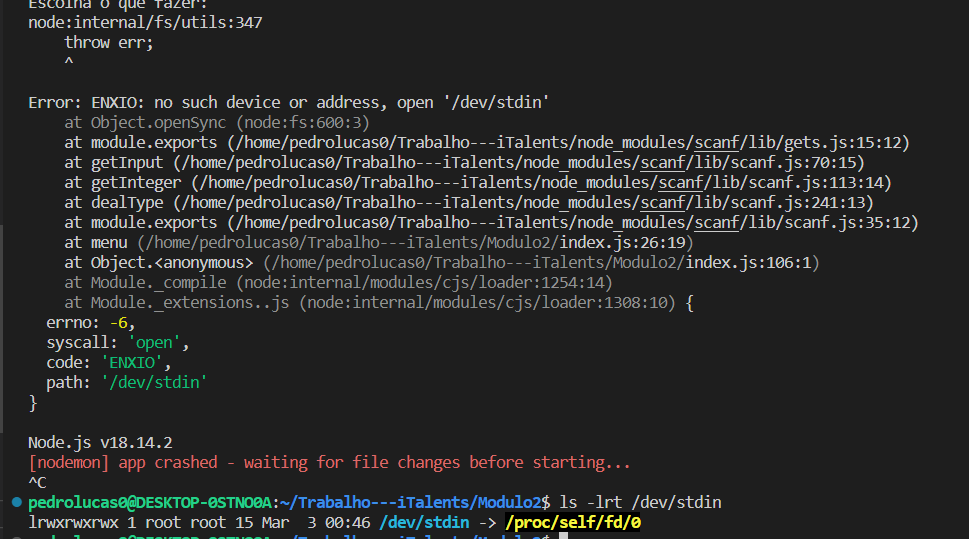
@NicolasSSantos @PedroLSF @marhtt can you share the output of ls -lrt /dev/stdin as suggested by @gireeshpunathil

I am Facing the same issue but, when I tried to run the JS Code directly in the terminal or command prompt using the code:- node file_location_of_your_js_file (example:- node index.js) it works but if you are asking for the VS code then I don't know. But try the terminal trick it will work for sure.

I am Facing the same issue but, when I tried to run the JS Code directly in the terminal or command prompt using the code:- node file_location_of_your_js_file (example:- node index.js) it works but if you are asking for the VS code then I don't know. But try the terminal trick it will work for sure.

ls -lrt /dev/stdin outputs /dev/stdin -> /proc/self/fd/0
Also, can confirm, running in Kubernetes with stdin: true and tty: true
