

 nodejs
macOS only uses half of its logical CPU cores by using Worker Threads
- Node.js Version: 12.13.0
- OS: macOS 10.15.1
- Scope (install, code, runtime, meta, other?): runtime
- Module (and version) (if relevant):
Hi,
I'm playing around with Worker Threads (my first time) to speed up a CPU heavy function.
On Windows every logical CPU core (hyper threading) is used. (Tested on one machine) But on Mac only the half of them are used. In "activity monitor" it shows, all odd cores are under work, while the others are sleeping. (Testet on two machines)
Is this behaviour a bug?
This is a part of the code, I've used to create workers:
const cc = require("os").cpus().length;

const wrkr = [];
if (isMainThread) {
	for (let i = 0; i < cc; i++) {
		wrkr[i] = new Worker(__filename);
	}
}
And in an other function I use this:
	//Give data to worker and send results back
	const st = (x) => {
		return new Promise((resolve, reject) => {
			wrkr[x].postMessage({
				//... some data
			});
			wrkr[x].on("message", msg => resolve(msg));
		});
	}

	//Start all Threads
	const wrkrObj = {};
	for (let i = 0; i < cc; i++) {
		wrkrObj[i] = st(i);
	}

	//Wait for results and join them together
	let delList = [];
	for (let i = 0; i < cc; i++) {
		delList = delList.concat(await wrkrObj[i]);
	}

I'm experiencing the same issue:

I spawned 8 threads (os.cpus().length) and I'm using Node.js 13.11.0 on a MacBook Pro Quad-Core. Maybe that's because 4 are virtualised...? 🤔


Same issue with macOS 10.15.4 and Node 13.12.0. Only two threads are used on a macbook pro dual core (4 threads).

That’s interesting – I don’t think Node.js does anything specifically that would lead to this behavior, and it leaves the scheduling fully to the OS. I’d be curious whether other software also has this problem.


I know some ago, my mac was using all of the cpu cores, just like on my Linux build. What is happening?

Yes, it's just half. Tried in on a 6 cores/12 threads Macbook Pro - only 6 threads run hot with 12 workers started. v14.15.4
Better, run number of cores times echo "for(;;);" | node & ... always shows just half of them busy.
Filed separate issue for this here: https://github.com/nodejs/node/issues/38629
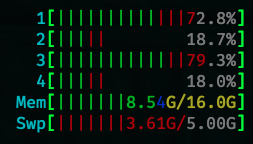

Can confirm this on
10.15.7, any update?
Both the Node.js and the Deno team think this is as expected for hyper-threading CPUs running V8. Which is weird because running the same code in a Docker container on the same MacOS machine maxes out all logical processors. So ... shrug.
Thanks for the quick response, docker it is then 😉
May (all of) the cores be with you.
Quick update, this issue no longer exists on M1 MBP with MacOS 12.3.1 (Monterey), could happily report now it's working correctly out of the box! 🙌

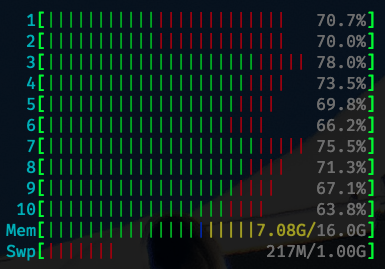
Quick update, this issue no longer exists on M1 MBP with MacOS 12.3.1 (Monterey), could happily report now it's working correctly out of the box! 🙌
Which node version are you using here? I just ran into the same issue, while running Node v16.16.0 on MacOS 12.3.1 (Monterey).

I have just tried on MacBook Pro 2019 with six core i7 + macOS Ventura 13.1
v16.19.0, v18.14.0, v19.6.0 - all versions loads only 6 cores.

Experiencing the same behaviour of only half of the logical cores getting busy on Macbook Air 2017, Intel Core i5, macOS Monterey v12.6.7, Node v14.21.3.

The issue is related to MacOS M1, M2, M3 efficient codes. I just ran into this myself. Basically we need to tell node.js to schedule background work on the efficiency codes. Using the latest Node.js 21.
Here is a full reproduction script:
import fs from 'fs';
import os from 'os';
import pLimit from 'p-limit';
import path from 'path';
import { pipeline } from 'stream';
import zlib from 'zlib';

const sourceDir = './db/source/20240325';
const limit = pLimit(os.cpus().length);

let totalFiles = 0;
let startedFiles = 0;
let processedFiles = 0;

function compressFile(file) {
  const srcPath = path.join(sourceDir, file);
  const destPath = srcPath.replace('.gz', '.br');

  return limit(
    () =>
      new Promise((resolve, reject) => {
        if (fs.existsSync(destPath)) {
          console.log(`${destPath} already exists, skipping...`);
          resolve();
          return;
        }
        const tempDestPath = `${destPath}.tmp`;
        if (fs.existsSync(tempDestPath)) {
          console.log(`${tempDestPath} already exists, skipping...`);
          resolve();
          return;
        }
        const srcStream = fs.createReadStream(srcPath);
        const gzipDecompressStream = zlib.createGunzip();
        const brotliCompressStream = zlib.createBrotliCompress();
        const destStream = fs.createWriteStream(tempDestPath);

        startedFiles++;
        const now = Date.now();

        console.log(
          `Compressing ${path.basename(
            destPath
          )} (${startedFiles}/${totalFiles})...`
        );
        pipeline(
          srcStream,
          gzipDecompressStream,
          brotliCompressStream,
          destStream,
          (err) => {
            if (err) {
              reject(err);
              return;
            }
            try {
              fs.renameSync(tempDestPath, destPath);
            } catch (err) {
              reject(err);
              return;
            }
            processedFiles++;
            console.log(
              `Compressed ${path.basename(
                destPath
              )} (${processedFiles}/${totalFiles}) in ${Math.round(
                Date.now() - now
              )}s.`
            );
            resolve();
          }
        );
      })
  );
}

async function processFiles() {
  try {
    const files = await fs.promises.readdir(sourceDir);
    totalFiles = files.length;
    const gzFiles = files
      .filter((file) => file.endsWith('.gz'))
      .map((file) => {
        return compressFile(file);
      });

    await Promise.all(gzFiles);
    console.log('Compression completed.');
  } catch (error) {
    console.error(`Failed to compress files: ${error.message}`);
  }
}

processFiles();
