

 node-red
Twitter authorization does not work using Internet Explorer.
HI! I see an issue with Twitter authorization when using Internet Explorer (IE). I do not see it if I use FireFox. Since I do not know if my users will use IE or FireFox, and since IE is still relevant, I’d like to see this issue fixed. To reproduce the issue, do as follows:
- Open Node-RED (NR) in IE.
- Drag and drop the twitter node onto the canvas.
- Double click it.
- Select ‘Add new twitter-credentials…’ from the Twitter ID drop down.
- Click the pencil icon.
- Click the ‘Click here to authenticate with Twitter’ button.
- A new browser tab should be opened.
- Enter your twitter credentials and click the Authorize App button.
- Upon successful authorization you’ll see the message “Authorised - you can close this window and return to Node-RED”.
- Once you return to the browser tab containing NR, you will not see your twitter handle as expected. You’ll only continue to see the ‘Click here to authenticate with Twitter’ button.
Sincerely,
Heath Thomann

Hi @hthomann
I don't have a copy of IE to hand to look, but if you could provide some more information that would help.
- What version of IE are you using?
- Are there any errors in the browser's F12 DevTools console? https://docs.microsoft.com/en-us/microsoft-edge/f12-devtools-guide/console

HI! I’m on version 11 of IE. In short, I think the issue might be related to, or due to, this:
http://go.microsoft.com/fwlink/?LinkID=291337
As the developer maybe this page will make a bit more sense to you. Notice this bit in that doc: “In order to be cached, webpages must meet these conditions: …… The F12 Developer tools window isn't open”
I will use this info below to show that I can get my scenario to actually work in IE……which I think is proof that this ‘back navigation caching’ thing might be affecting us. If you are aware of a way to disable this please let me know. Here is my analysis:
When I open NR in IE (i.e. http://localhost:1880, forget about twitter node for now) I see this:
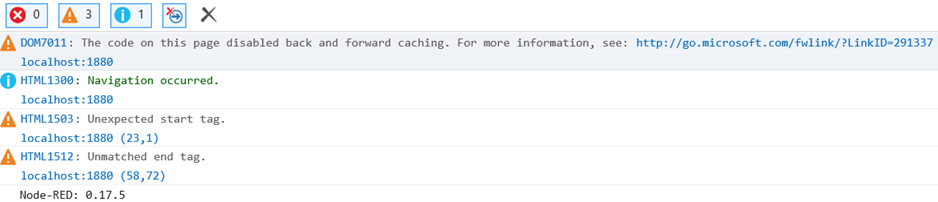
Notice the “DOM7011: The code on this page disabled back and forward caching. For more information, see: http://go.microsoft.com/fwlink/?LinkID=291337”
This seems very peculiar, especially when you read the details. I have to wonder if some type of caching is not allowing the necessary handshake/callback??
I do not see this message in Edge. When I start NR in Edge I see this:
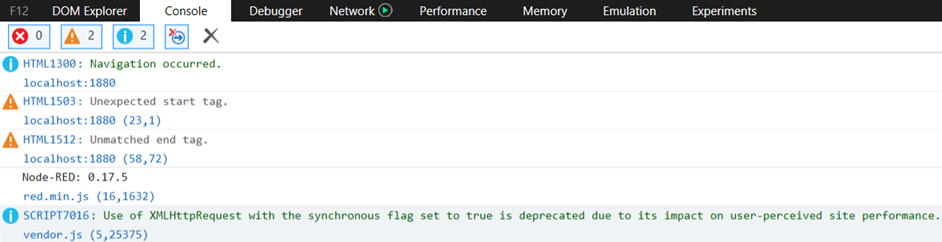
According to the above Microsoft doc, if the F12 Developer tools window is open, back caching is disabled. With that in mind, I went through the steps to authenticate with Twitter. If I hit F12 at the right spots, I am able to authenticate with twitter and have the twitter handle/id presented back to the original NR window (i.e. the window with the ‘Click here to authenticate with Twitter’ button). In other words, everything works as expected when I hit F12 at the right spots. That is, after you hit the ‘Click here to authenticate with Twitter’ you need to hit F12 in the resultant web page. When you select the “Authorize App” button a different URL location is entered and as such the F12 screen disappears. When it disappears you need to immediately hit F12 again. Doing this, I assume the F12 console is open in just the right spots to allow IE to disable the caching.
Finally, note that the Microsoft doc states that caching is disabled with HTTPS is used. Given this, I enabled admin security on NR and tried my original scenario (the one described in the opening text to this) and it didn’t resolve things. I suspect NR isn’t actually using HTTPS calls for the twitter auth??
Let me know if I can provide any more details. Is it possible for you to provide to me some test/debug code which might invalidate the caching conditions? I.e. the conditions the above Microsoft doc lists which makes caching possible (e.g. make use of beforeunload handlers).
Sincerely,
Heath Thomann
Hi @knolleary! I forgot to add @knolleary to my last post so I just wanted to make sure you saw it. I know the Holidays are coming up so you are likely on vacation or have far, far better things to do than handle this odd edge case. ;-) No rush at all.
Thanks,
Heath Thomann