

 nod5
nod5
[Sugestion] increase stored pre-set pages as scroll to
I am certain some users will need dozens of quick jump sets however as there are 9 keys plus 0 I suggest you can easily expand feature to 9 locations as a minimum (10 if you assign a different key to show list such as # )
A really nice enhancement would be to get the position under cursor (say a paragraph or link of interest) and store that as the scrollto x,y (default=0,0 this would promote it above the current "favorites" feature)
Icing on the cake, is if a short heading or word (say max 30 chars) is currently highlighted it could be added as optional label (then user does not need to key in the reminder like "Favorites")

expand feature to 9 locations as a minimum
I have thought about various enhanced versions but will stick to the bare minimum 1 2 3 4 for the time being. I need to use the feature more to get a better feel for what would make sense to add. I haven't yet found a use case for myself that four quickjumps and highlight jumps and favorites in combination couldn't handle easily. There is risk for feature creep here too: going from 4 to 9, to 99, to text labels, to saving jumps to a file, ... , to a whole new favorites system! I don't want to go there.
get the position under cursor (say a paragraph or link of interest) and store that as the scrollto
I know of no way to scroll to a specific x y canvas position without more edits to the SumatraPDF c++ source.
if a short heading or word (say max 30 chars) is currently highlighted it could be added as optional label
Easier (to code and also to use perhaps) would be to use the selection text when the quick jump is created. For example select the word Index on the first page of the index near the end of a book.

scrollto is inherent in both -command-line and [dde] calling
Yes selecting a word such as index was what I was referring to but it has a scrollable value as can be used by -named-dest(inations)
scrollto is inherent in both -command-line and [dde] calling
Ok, I had overlooked that. But I see it here now https://www.sumatrapdfreader.org/docs/DDE-Commands.html I will think some more on if and how to implement that to Quick Jump. I can see the usefulness of that if a users often reads documents zoomed in to less than full page views.
Option to use selection as text label in quick jump list added in release 2020-02-18 , bb9ea5e
Option to use selection as text label in quick jump list added in release 2020-02-18
[NICE] but took me a while to get working I suggest this could be high in NOOB instructions that default is off and if changed either way whilst running then need to reload the script.
Updated Readme with instruction to reload HighlightJump after edits to INI file
I like this feature but a minor niggle the label is all lower case rather than Mixed
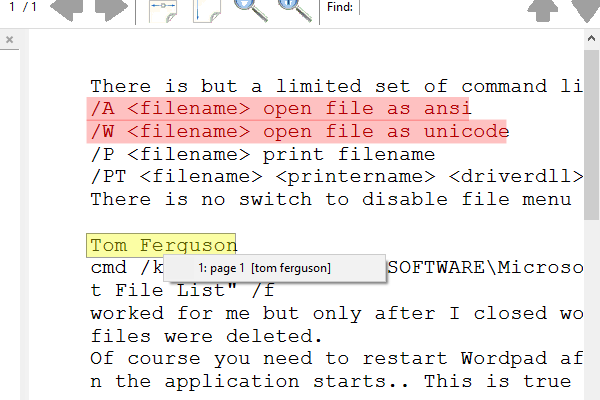
I intentionally put in a step to lowercase the string. To avoid ALL-CAPS labels in the use case where a document uses all-caps for headers (not so uncommon) and the user wants to use headers as labels. Seemed less visually intrusive that way.
But on second thought I see problems with that. Especially if the user wants to use something case-sensitive as label e.g. a function names like ThisFunc in a coding textbook.