

 nmwsharp
Transparency of two same overlapping regions
Hi,
First of all, let me show my thanks for the newly added features, e.g., orthogonal view, the user-defined color of the slice plane, and tet mesh. Polyscope is so powerful that I have recommended it to my classmates.😀
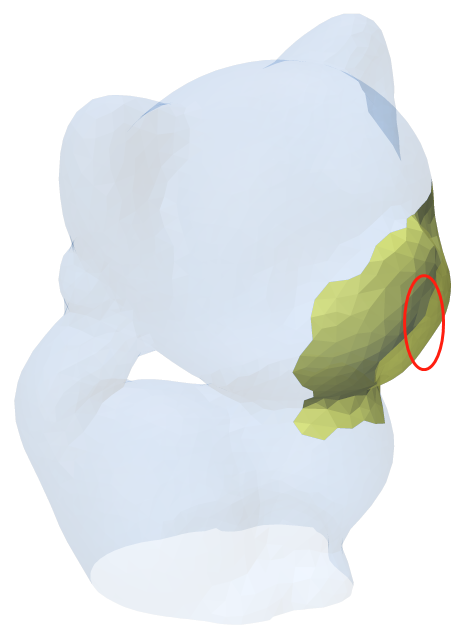
I have a question about transparency for discussion. A yellow patch (Fig. 1) is exact a part of the original mesh (kitten), i.e., the faces list of the patch is a subset of the faces of kitten. If we increase the transparency of the whole kitten model, the yellow patch should emerge, but it is still occluded by the big mesh if using pretty transparency mode (Fig. 2). If we switch to the simple transparency mode, the yellow patch can emerge but this time it has a transparency that is not set by us (the red circle in Fig. 3).
I am not sure whether it is a bug, or there is some mechanism for transparency? Many Thanks!
Fig. 1
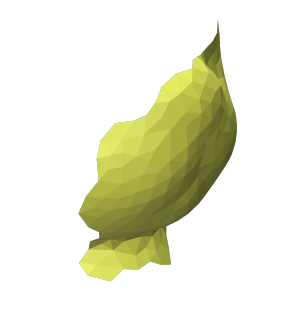
Fig. 2 : Pretty transparency mode
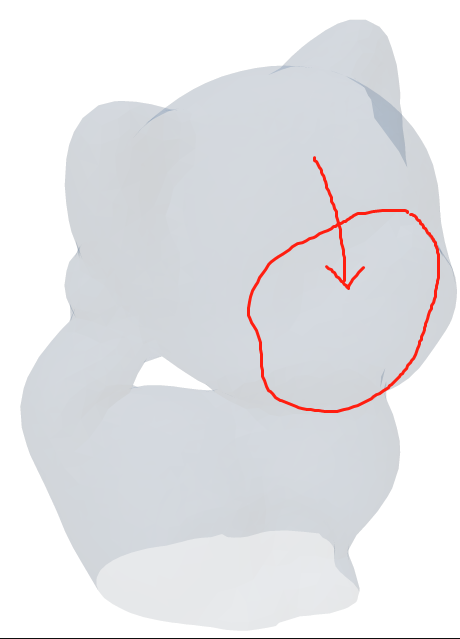
Fig. 3 : Simple transparency mode

Hi! Glad to Polyscope is useful to you!
Unfortunately, what you've encountered here is a pretty fundamental challenge of rendering in openGL (and elsewhere). Basically, whenever two surfaces are exactly on top of each other, then cannot be distinguished by depth during the rendering process, which can cause all kinds of errors and artifacts, etc. (See z-fighting for one such artifact, though that is not what we are seeing here). In your case, Polyscope's "pretty" depth-peeling renderer cannot tell that there is another piece of the surface to peel off when they sit exactly on top of each other in space.
To my knowledge, we can't really fix this in general in the depth-peeling renderer without a significantly more complicated implementation. There are a whole bunch of tricks and heuristics used to mitigate this problem in rendering, most of which amount to perturbing one of the surfaces so that they no longer sit exactly on top of each other. However, I am reluctant to enable any such heuristics by default, because even if they help in this case, they could hurt in other cases, be confusing to users.
So in summary I'd say:
- This is a legitimate and common issue with rendering algorithms
- We probably cannot fix the problem in general
- I'm mostly inclined to just mark this as "won't fix". Perhaps we could document it as a known limitation
For your particular situation, I would probably suggest just manually perturbing the data slightly inward or outward, so the surfaces are no longer precisely on top of each other.

Hi! Glad to Polyscope is useful to you!
Unfortunately, what you've encountered here is a pretty fundamental challenge of rendering in openGL (and elsewhere). Basically, whenever two surfaces are exactly on top of each other, then cannot be distinguished by depth during the rendering process, which can cause all kinds of errors and artifacts, etc. (See z-fighting for one such artifact, though that is not what we are seeing here). In your case, Polyscope's "pretty" depth-peeling renderer cannot tell that there is another piece of the surface to peel off when they sit exactly on top of each other in space.
To my knowledge, we can't really fix this in general in the depth-peeling renderer without a significantly more complicated implementation. There are a whole bunch of tricks and heuristics used to mitigate this problem in rendering, most of which amount to perturbing one of the surfaces so that they no longer sit exactly on top of each other. However, I am reluctant to enable any such heuristics by default, because even if they help in this case, they could hurt in other cases, be confusing to users.
So in summary I'd say:
- This is a legitimate and common issue with rendering algorithms
- We probably cannot fix the problem in general
- I'm mostly inclined to just mark this as "won't fix". Perhaps we could document it as a known limitation
For your particular situation, I would probably suggest just manually perturbing the data slightly inward or outward, so the surfaces are no longer precisely on top of each other.
Hi,
Thanks very much for your information, which makes me know more about CG and more interested in it. In my implementation, offsetting a little bit works very well. Thanks again and have a nice day. 😀